
Why dependencies matter
Prevent conflicts
Avoid situations where workflows might perform conflicting or redundant actions if run simultaneously or out of order.
Ensure data availability
Guarantee that data generated or processed by one workflow is available and finalized before a subsequent workflow that needs this data begins.
Enable complex automations
Build sophisticated, multi-step automation processes by chaining workflows together based on specific completion criteria.
How dependencies work
When a Neo Agent workflow is triggered, it can be configured to wait for other specified workflows to complete before it starts its own execution. This is particularly useful for “Triggered” workflows.- If a workflow has dependencies, it will pause and wait until all its prerequisite workflows have finished successfully.
- If a prerequisite workflow fails, the dependent workflow might not run, or its behavior could be affected, depending on your overall setup and error handling.
Configuring execution order
You can manage the execution order of your workflows directly from the Workflows page in Neo Agent. Ordering takes two settings, and both must be right:- The position itself — set by dragging a workflow in the list, or with the Reorder button. Lower runs first.
- The Obey Order toggle — a switch in the Obey Order column of the Workflows list. This decides whether the position is used at all.
Obey Order and ticket filters
Obey Order does more than delay the start. When it is on and an earlier workflow has already matched the same event, Neo Agent defers the workflow’s ticket filter check — it starts the workflow, waits for the earlier workflows to finish, and only then evaluates the filter conditions, against the ticket as it stands at that moment. This matters whenever a workflow filters on a field that an earlier workflow fills in. A common example: a triage workflow classifies a new ticket and sets its issue type and sub-issue type; a specialist agent — say a password-reset agent — then filters on sub-issue type. When the ticket is first created that field is still empty, because triage has not run yet. With Obey Order off, the specialist agent checks the filter immediately, finds no match, and never runs — a technician has to trigger it by hand. With Obey Order on, it waits for triage, re-checks the filter, and matches.The trigger event itself is always checked up front, and is never deferred. Obey Order only defers the ticket filter conditions. A workflow that triggers on “Ticket Created” still needs a ticket-created event; Obey Order just gives earlier workflows a chance to shape the ticket before the filter is applied.
Sequential execution
To make one workflow run only after another one finishes, you can establish a dependency. This is achieved by reordering workflows. The workflow that needs to run first should be placed higher in the execution order. For example, you might have a “Triage” workflow that first categorizes a ticket. An “L1 Engineer” workflow could then depend on the “Triage” workflow to ensure the ticket has the correct type, subtype, contact, and company information before it attempts to perform its tasks.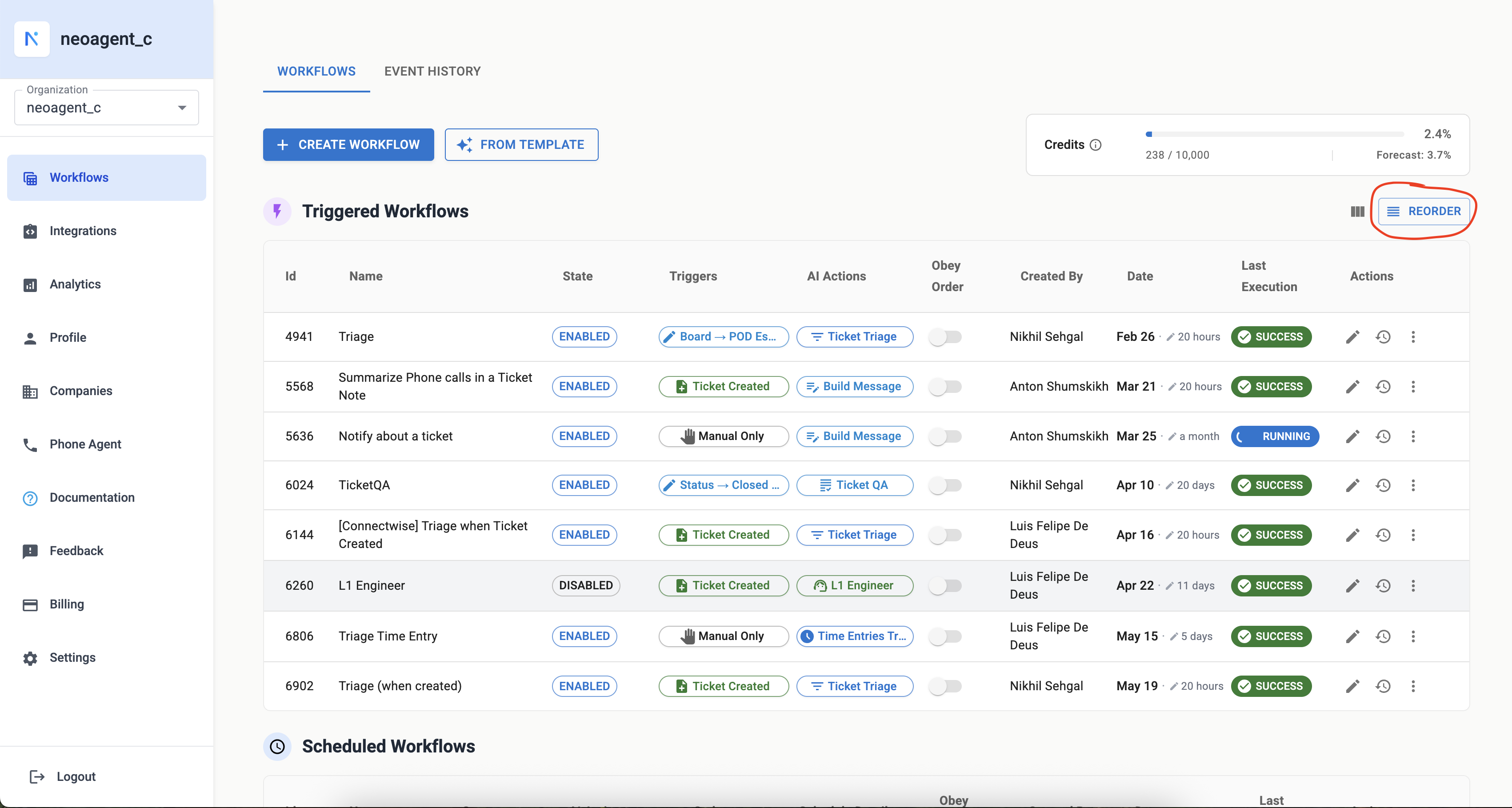
The 'Reorder' button allows you to change the execution sequence of your triggered workflows
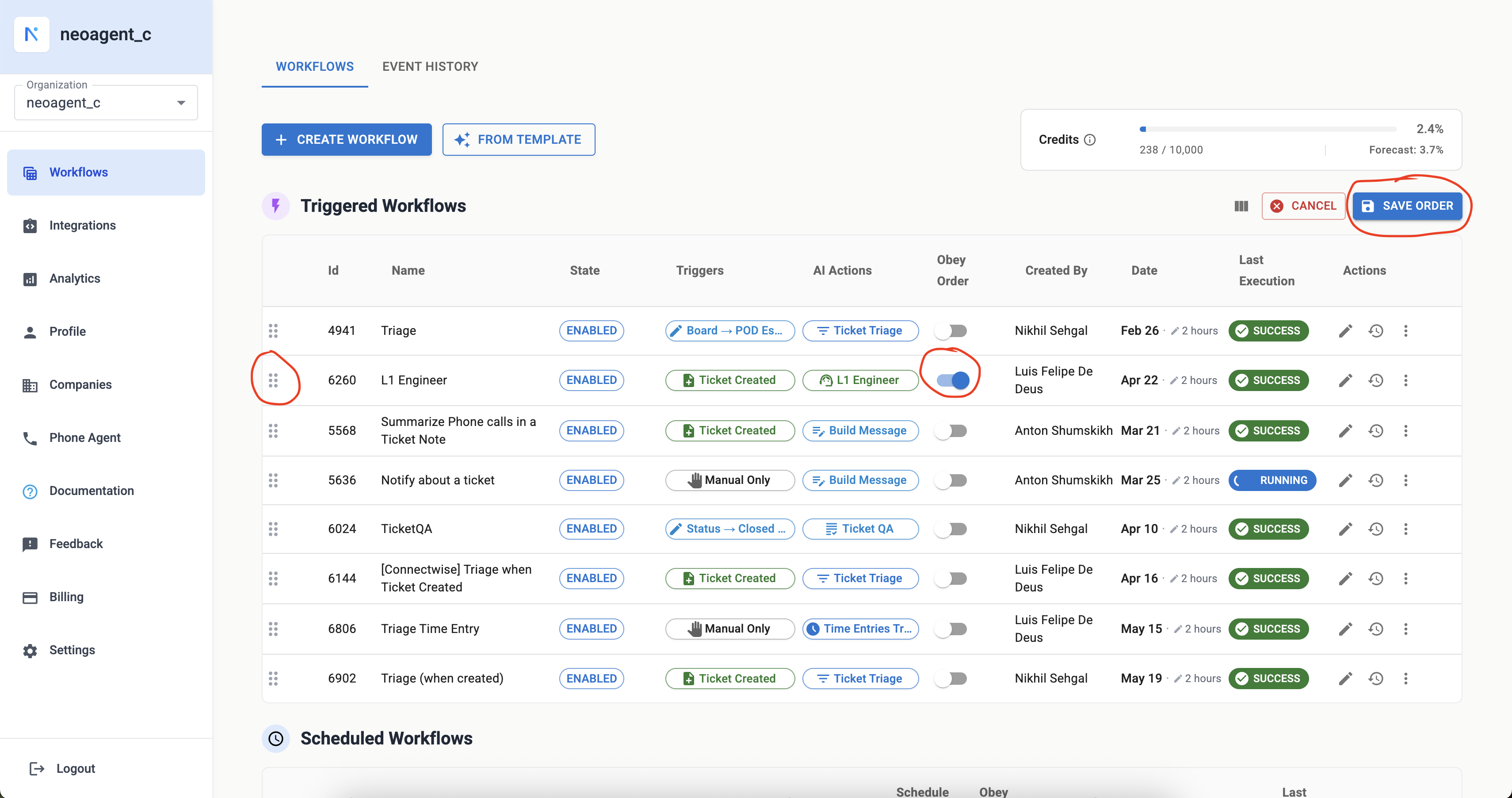
In this setup, 'L1 Engineer' waits for 'Triage' to complete. Other workflows can run in parallel
Workflow Finished trigger
Another powerful way to create workflow dependencies is by using the “Workflow Finished” trigger. This trigger allows you to start a workflow automatically when another specific workflow completes its execution.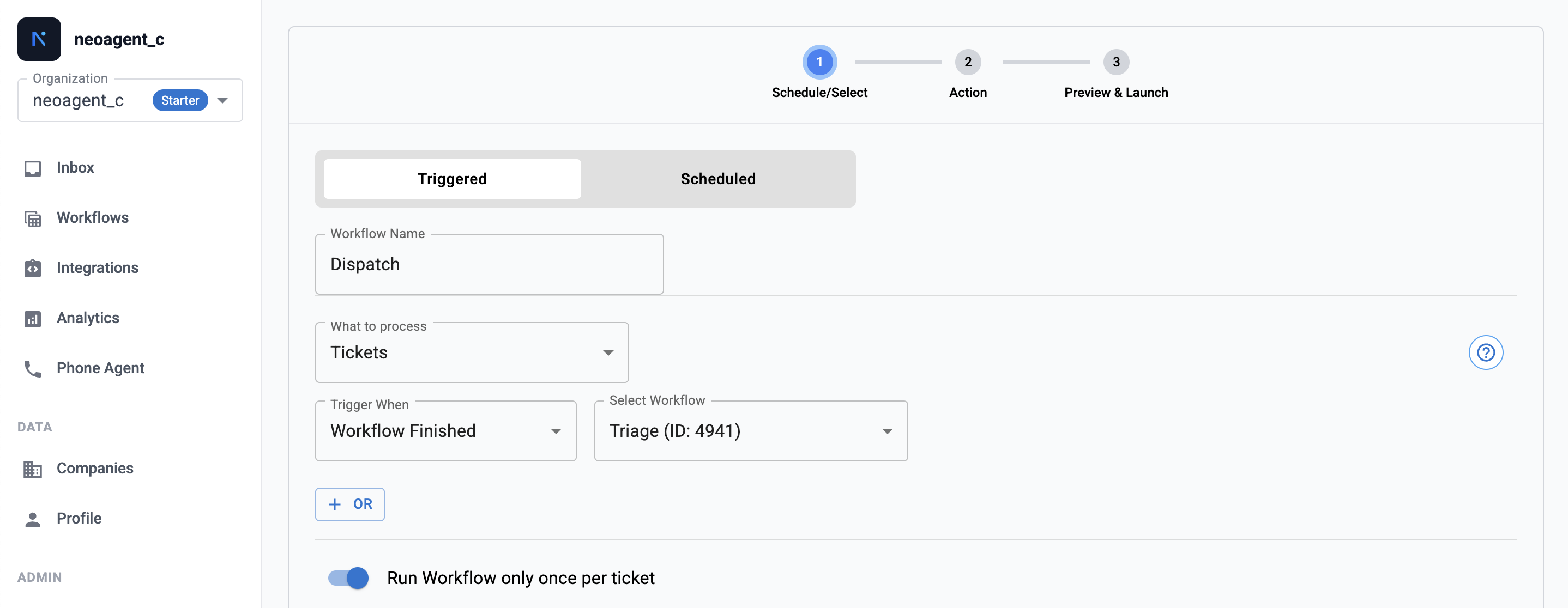
Configure a workflow to trigger when another workflow finishes
- Select the prerequisite workflow: Choose which workflow must complete before this workflow starts
- You want to create a clear chain of workflows that process the same ticket sequentially
- Each workflow in the chain performs a distinct function (e.g., Triage → Analysis → Dispatch)
- You need to ensure that one workflow’s output is available before the next workflow begins
The next workflow does not start the instant the first one finishes. Neo Agent waits a moment for your PSA to reflect the first workflow’s changes, then queues the handoff. It usually starts within seconds, but on a busy account it can take a few minutes. If a chained workflow has not started yet, give it a short while and check again before treating it as a fault.
A workflow that other workflows depend on can’t be deleted. If you try to delete a workflow while another workflow is set to trigger when it finishes, Neo Agent blocks the deletion and lists the dependent workflows. Remove the “Workflow Finished” trigger from those dependents (or delete them first), then delete the workflow.
Parallel execution
Workflows that do not have defined dependencies on each other can run in parallel. This means they can be triggered and execute concurrently, based on their individual trigger conditions (e.g., “Ticket Created”, “Status - Closed”). Parallel execution is the default: a workflow with Obey Order off ignores its position in the list and starts as soon as its own trigger and filter match. Leave it off when the workflow is genuinely independent — it starts sooner and is not held up by an unrelated workflow that happens to sit above it.Best practices
Start simple
Start simple
Begin with basic dependencies and gradually introduce more complex ordering as your automation needs evolve.
Avoid circular dependencies
Avoid circular dependencies
Ensure you don’t create a loop where Workflow A depends on Workflow B, and Workflow B (directly or indirectly) depends back on Workflow A. This will prevent your workflows from running.
Review regularly
Review regularly
Periodically review your workflow dependencies, especially as you add or modify workflows, to ensure the logic remains sound and efficient.
Use Executions
Use Executions
Check Executions to monitor workflow executions and confirm that dependencies are behaving as expected.
A workflow only runs when triggered manually
A workflow only runs when triggered manually
This is almost always Obey Order. If a workflow works when you run it by hand but never fires on its own, look at what its ticket filter needs. If any of those fields are set by an earlier workflow — issue type, sub-issue type, contact, company, priority — the filter is being checked before that workflow has run. Turn Obey Order on so it waits and re-checks.To confirm it, switch on PSA events in Executions, open the event and look at Workflow Matching Results. Its Field Comparisons table lists each condition with the value it wanted and the value the ticket actually had. A row showing
(empty) under Actual for a field an earlier workflow is supposed to set is the signature.