
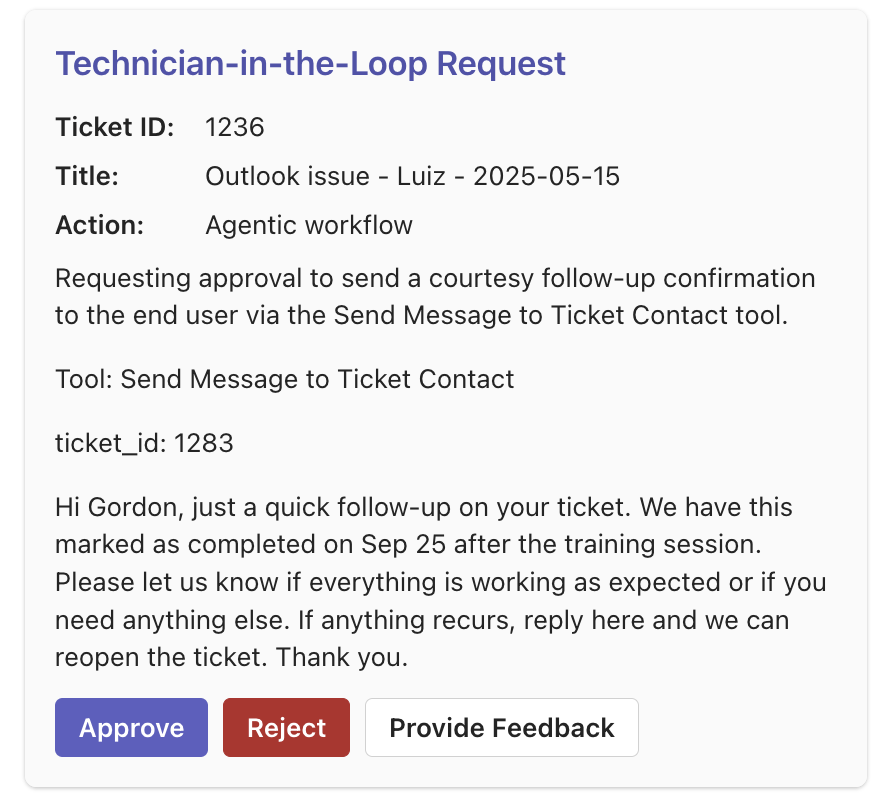
Approval card in Teams / Neo Inbox
Quick setup
- Add approvers – Enable the Request Technician-in-the-Loop tool and pick who receives cards: technicians, Teams channels and group chats, or both. A technician shows up in the picker once they add the Neo Agent app in Microsoft Teams, or a Teams admin installs it for everyone (Install the app). If someone who installed the app still does not appear, they send it one message. A channel or group chat shows up once the app is added to it (Approvals in a Teams channel or chat). With the Neo AI Agent in Slack connected, the pickers also list Slack users and channels (Approvals in Slack).
- Flag tools – Toggle Require technician approval on sensitive tools (Send Message, Execute RMM Script, etc.).
Approvers from another workspace
For the agent’s approval tool, you can select a technician from another Microsoft directory once they have accepted an invitation to the workspace and registered the Neo Agent app in their own Microsoft Teams account. They do not need a second Microsoft account in your directory. Approval cards arrive in their own Teams chat, and their decisions apply to the workspace that raised the request. Removing their workspace access stops further delivery and approval of its cards. Ordinary Teams notification recipients and legacy action pickers still use your connected directory. The approver pickers on the Ticket Dispatch, Find RMM Script and L1 Engineer actions list only the people in that directory who use the Neo Agent app in Teams, because only that app delivers approval cards. To add someone who is missing, ask them to open the Neo Agent app in Teams and send it one message.When an approver gets no card
Every person who receives approval cards needs the Neo Agent app in Microsoft Teams, whether they are in your own directory or another one. Someone who has only chatted with another Neo bot in Teams, such as your internal or white-label bot, gets no card. Dashboard access alone does not change this. To fix it, they open the Neo Agent app in Teams and send it one message. If an admin removed them from Neo in Teams, a message does not bring them back: ask the Neo Support Agent to restore them (see Remove someone from Neo in Teams). Later approvals then reach them. The fix does not resend a card that already failed, so approve that request on the Approvals page. When no approver gets a card, Neo alerts your admins and names each person who can’t receive cards.Approvals in a Teams channel or chat
When several people share one approval queue, such as a team of dispatchers, send the card to a Teams channel or group chat instead of to each person. Pick it in Teams channels & chats that can approve on the approval tool, or in Teams channels & chats on the Ticket Dispatch action.- Neo posts one card in each channel or chat you pick. Anyone who can see it can answer it, and the first answer wins. Neo records the person who answered.
- When the request is answered, the card changes to show the outcome for everyone in the channel.
- The Neo app must be in the channel or chat first. See Post to a Teams channel or chat.
- If you remove a channel from the picker in the dashboard, Neo stops sending cards to it, and its pending cards can no longer be answered there. The dashboard Approvals page still works.
- A supervised run started with Run Now asks only the approvers you pick for that run, never the tool’s channels.
Approvals in Slack
Once you connect the Neo AI Agent in Slack, the approver pickers on the approval tool and the Ticket Dispatch action also list the people of your Slack workspace and the Slack channels the app is in. Slack entries end in (Slack), for exampleAda Lovelace (Slack) or #dispatch (Slack). Slack and Teams approvers can sit side by side on the same tool.
- A Slack user gets the card as a direct message from the Neo AI Agent app. A Slack channel gets one card that any full member of your Slack workspace in the channel can answer. Only full members can be approvers or answer a card.
- Each approver gets the card where their entry points: a Slack entry in Slack, a Teams entry in Teams. A Chat Agent shows the card in the conversation instead.
- To add a channel, first add the Neo AI Agent app to it in Slack. Until then the channel is not in the picker, and Neo does not save a channel the app is not in.
- Every approver gets the same request. The first answer wins, Neo records who answered, and the other cards change to show the outcome.
- The request is also on the dashboard Approvals page, where you can answer it as from any card.
Where approval can be required
There are four separate places approval gets switched on, and they differ in how wide they reach:
If an agent quietly stops doing its final step some days after you changed a setting, check the
agent’s version history for a permission change around that date.
What happens next
- Approve – Neo immediately executes the action. Before each approved call runs, Neo checks it against what the card describes. The check also reads the calls the agent made since the run last started or resumed (in a chat, since the last message), so a value one of those calls looked up for the approved target can count as the one you approved: the status you named, sent as its id, or the user a search returned. A lookup made before the agent asked for your approval is not part of the check, and neither are the instructions the agent gives a run it starts or schedules. These calls never add to what you approved.
- Reject – The workflow stops and logs the rejection.
-
Add a note – Opens a comment box with two options:
- Ask for changes – Neo does not execute the action. It reads your comment and either sends you a new approval request that reflects the change, or — when your comment rules the action out, or the ticket has moved on while Neo was reading it — writes what it concluded in the run and sends no further request. Nothing runs until you approve a new request. Use this when the plan is close but wrong in a way you can name. A card identical to the one you commented on is not an expected answer — report it if you see one.
- Approve with note – Neo incorporates your comment and executes the action now, without showing you the revised version first. This authorizes the action.
- Open run – When you can open the run this request belongs to, the card links to it in the dashboard, so you can see what the agent read and did before it asked. On an agent’s approval card the link stays after you answer, because that is when you most want it; a dispatch or script card keeps it only while it waits. On the run page, Run now starts the agent again, on the same ticket and already filled in when the run had one — use it when Neo stood down and you want it to look again. When the ticket is done, click Train on the run’s row in Executions and say what should change. Neo Support proposes an edit to the agent, and applies it when you confirm.
If the run stops after you answer
Your answer resumes the run, which then carries out what you decided. If the run stops on an error before it finishes, Neo tells you in your chat with the Neo app in Teams that the run stopped. Some of the approved actions may have run before it stopped, so check what changed before you do the rest by hand. When Neo can’t reach you there, for example because the request reached you only on a channel card or in Slack, or you answered in the dashboard without a card of your own, the message goes to Neo Inbox in the dashboard and names you. A run that finishes and reports a failure sends no such message; its page in the dashboard shows the failure. The message is best effort. It goes to each person whose answer the run was carrying when it stopped. An answer that arrives while Neo is sending these messages gets none.If nobody answers
A request waits until someone answers it. Neo has no approval timeout, and the run does nothing while it waits: an instruction such as “if nobody approves in 30 minutes, ask Sam; use Delay to wait” never reaches its second step. To bring in a second approver after a set time, have the agent schedule a check-back on the same ticket. The agent needs the Trigger or Schedule Workflow tool with self-scheduling allowed (the default), and the Send Teams Message tool with Sam allowed under Users. That list holds people in your own workspace who use the Neo app in Teams, so the recipe does not reach an approver from another workspace. Add to its instructions:Before you send the approval request, use Trigger or Schedule Workflow to schedule this agent on the same ticket for 30 minutes later, with the instructions “Escalation check only for this ticket’s approval request. Use Get Technician-in-the-Loop Approval Status. If it is still pending, use Send Teams Message to Internal Team to ask Sam to approve or reject it on the Approvals page. Do nothing else.”Schedule the check-back before the request: once the request is pending, the agent finishes its turn. The check-back does not work for an agent with supervised runs on: each of its runs reads only the approval requests it raised itself. The check-back is a full run of the agent, so keep “Do nothing else” in its instructions. It runs, and uses credits like any other run of the agent, for every request, also one answered in time. When Sam answers the first request, the original run continues with its plan. Sam can answer it on the Approvals page when Sam is one of its approvers or a dashboard admin. Approval cards show the ticket number you recognise (e.g.
T20260319.0091), not an internal id.
When an agent asks you to approve a change that sends or writes a password, API key, token or one-time code, the agent is instructed to show a placeholder in place of the value, such as <initial password set on jane@contoso.com in the approved user creation>. The change still uses the real value. This is an instruction, not a filter: reject a request that shows a secret.
Requests with a list of calls
When an agent must make the same kind of change many times, such as deleting 77 memories that a search returned, it can put the exact list of calls in the request. Each call has a short label, such as the name of the memory it deletes. You approve the list, not only a sentence that describes it. If Neo cannot put a call on the list, such as a script, it leaves that call off and still sends the request; the request text describes it.- On the Teams card – the card shows the number of planned calls and the first 10 labels. Show all opens the rest on the card when the list fits. Open the full plan opens the request on the dashboard Approvals page. A very long list, or a long request text, can leave room on the card for fewer labels; the count and the link always stay.
- In a Teams or Slack chat with the agent – the card shows the count, the first 10 labels and the Open the full plan link. In Teams, a long request text can leave room for fewer labels; the count and the link always stay.
- On the dashboard – the Approvals page lists every call: its label, the exact method and path for an API call or the tool name for a dedicated tool, and any other input that decides the call, such as the customer. After you approve without a note, each call shows how many times it passed the approval check (Used 2×) or Not used yet, when you can view the agent that asked. The run shows each call’s result. Filter the list to see only the calls that are used, or only those that are not. The run page and the chat card show the first 10 labels, with a link to the full list.
Supervised runs
A supervised run is a live run of an agent in which every change waits for a technician’s approval, one change at a time. The agent works on real tickets and reads real data, and nothing changes until you approve it, so it sits between test mode and letting an agent run on its own. Supervise a single run from Run now, or every run from the agent’s Overview tab. Supervised mode has the whole picture: how it differs from test mode, what each approval covers, and what supervision does not reach.Approvals in the dashboard
Beyond the Teams and Slack cards and Neo Inbox, the dashboard has a dedicated Approvals page that lists every request waiting on a decision, so you can act on them in one place instead of hunting through chats.- Queue at a glance – header cards show how many requests are waiting on a decision, how many were resolved in the last 7 days, and the median time a request waits for its decision.
- Pending / Resolved / All tabs, with the agent, ticket, and request detail for each.
- Approve or Reject inline, with an optional note (a note on an approval is recorded as a comment, the same as the card’s Approve with note).
- Open run – A request links to its run when you can open it, the same as the card’s Open run button.
- Planned calls – A request that lists its calls shows every call and, when you can view the agent that asked, how many times it passed the approval check. See Requests with a list of calls.
- Bulk decisions – Select individual pending requests, or tick the header box to select every loaded pending request (press Load more first to reach older ones), then approve or reject them together. Review the confirmation summary and optionally apply the same note to every selected request. A request with a list of calls cannot be selected: open it and decide on it alone, where its list is shown.
- Dismiss – Closes pending requests without a decision. Nothing is approved, the agent does not run again, and nothing is written to the ticket; the request shows as Dismissed under Resolved. Use it to clear old requests nobody needs any more: a reject runs the agent once more for each request. Dismiss the selected requests from the selection bar, or press Dismiss old requests on the Pending tab and pick a day to close every pending request created on or before it (the agent and approver filters narrow it). The dialog shows how many requests match before you confirm. Dispatch and script requests take approve or reject only. Teams and Slack cards for a dismissed request stay as they are; a tap on one says the request was already resolved.
- Who sees what – Technicians see and decide the requests they’re an eligible approver on; admins see and decide every request for the team, including who is eligible to approve each one. If you are not an admin, a link to a request that went to someone else opens as “not found”. The same rule applies when you ask the Neo Support agent to approve or reject a request, and to the public API. A request raised in your own chat stays yours to answer there.