
Use it for an agent you have just built, or one whose instructions you have just rewritten. You see what it decided and why, one change at a time, before anything reaches your PSA.
Neo holds each change until you approve it, with the exceptions listed under What supervision does not cover. That makes it the first step of the loop from a new agent to a trusted one. Run the agent in Supervised mode on a real ticket, and approve, reject or comment on each card as it works. When the ticket is done, click Train on the run in Executions, say what should change, and send. Neo Support reviews the run and your decisions, and updates the agent when you confirm the edit it proposes. Repeat until the runs need no corrections, then let the agent run alone.
Supervised mode is not test mode
The two answer different questions.
You can turn both on. The agent then shows its plan and asks before its changes, as on any supervised run, but every change is simulated, whether you approve it or not. The plan card starts with Test run to say so, and the test report arrives once, when the run ends.
Supervised mode alone is the better choice. It already changes nothing until you approve, and an approved change then really happens, so you see the true result of each step.
Supervise one run, or every run
One run. Open the agent in Executions, choose Run now, and turn on Supervised run. Pick who approves that run. Those technicians receive the cards for this run in place of the agent’s own approvers, and your choice is remembered in your browser for the next one. The agent’s saved settings do not change, so its scheduled and triggered runs are unaffected. A disabled agent can run supervised too, so you can test a new agent before you enable it. The Neo Support agent can start the same run for you: say which ticket and who approves. The agent stays disabled, so it does not pick up new tickets on its own.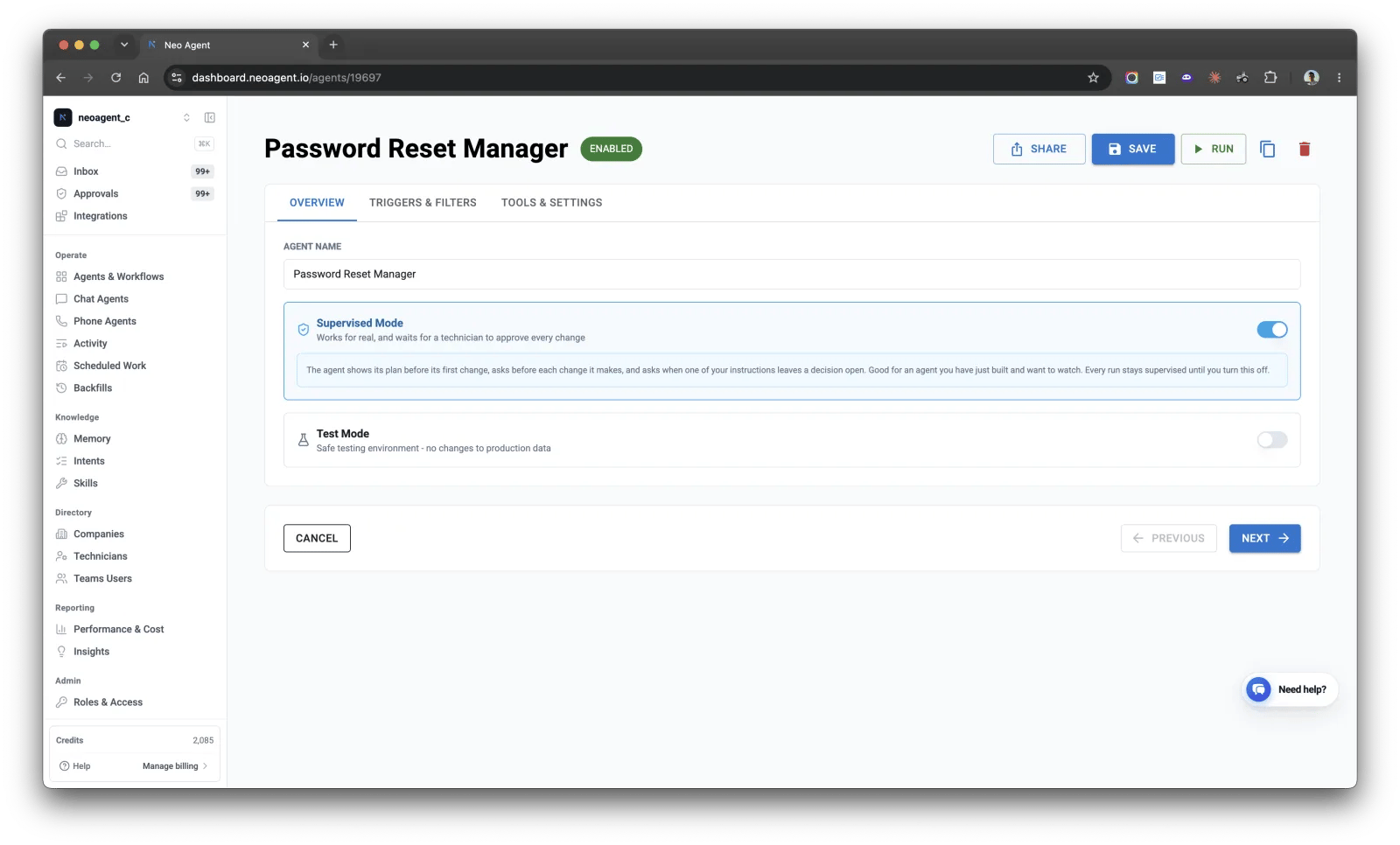
Supervised Mode on an agent's Overview tab
agent_settings.supervised through the public API, or ask the Neo Support agent, for example “turn on supervised runs for my onboarding agent”.
What the agent does on a supervised run
- It shows its plan first. Before its first change, it sends a card with how it reads the ticket and its instructions, and every change it intends to make. Approve it, or ask for changes and it sends a revised plan.
- Every change asks on its own, whatever the agent’s permission groups and tool settings say, with a card in three parts: the Action, the instruction it follows (Because), and what it read to decide (Evidence). One card covers one record: the ticket, one user, one mailbox, one contact. So the ticket’s own notes, time entries and field or status changes arrive on one card, and so do blocking a user’s sign-in and revoking their sessions. A second record, a second system, an SMS or email the agent sends, and starting another agent each get a card of their own. One card does cover the same change repeated over several records when it names each one, such as a password reset for five named users. A card that reports on another change comes after that change has run. An Exchange or Active Directory PowerShell script asks even when it only reads, because Neo cannot tell from the script that it changes nothing.
- It works through the whole plan in one run. After an approved change, it goes straight on to the next planned change and asks for it. The run ends when every planned change is made, rejected, blocked or no longer needed, and the run summary names each planned change it did not make, with the reason.
- It asks when your instructions leave a decision open: when two instructions conflict, when one can be read two ways, or when none covers a choice on which MSPs differ. The card shows each choice, the one it will follow if you approve, and suggested wording for your instructions.
Watch the run
After you start a supervised run from Run now, Neo confirms that the run has started, and that it asks you before every change it makes on this run (what that does not cover). Open the run takes you to the run’s page in Executions, where you watch the agent work. Each card appears on that page at the point in the run where the agent raised it. The same card also goes to Teams and to the Approvals page. Answer it in whichever place you like: the first answer counts, and the other places show it.- A change offers Approve, Ask for changes and Reject.
- The plan offers Approve plan, Ask for changes and Reject and stop. Approving the plan lets the run start. It approves no change. Reject and stop asks why: Wrong steps, Not needed on this ticket or Just a test, with optional details. The run stops whatever you pick. Train reads the reason to decide what to fix: the agent’s instructions, the tickets it runs on, or nothing.
- A question about your instructions offers Use Neo’s reading, Give another reading and Reject and stop.
After the run: train the agent
Your answers on a supervised run tell Neo what to change in the agent. When the ticket is done, open the run in Executions and click Train, then send, with or without a note. The Neo Support agent reads the run and every decision on it: each change you rejected, each plan you rejected and why, each note you left, and each choice you picked for an unclear instruction. Each of your approvals split the work into a new run, and it reads all of them, so the reasoning behind the plan is in front of it alongside the last step rather than left behind in an earlier run. It proposes the exact edit to the agent’s instructions, so the next run acts on its own where this one asked, and it changes nothing until you click Apply it.What supervision does not cover
- Another agent or workflow. You approve the start, and what it runs then follows its own settings. Supervision covers the agent you switched it on for.
- The sandbox. You approve the command before it runs, not each change inside it, so one approval can cover several changes.
- Chat agents. The person in the conversation already approves each change, so the setting does not apply.
Before you turn it on
Somebody has to be able to approve. Supervision works through the Request Technician Approval tool. A one-off supervised run adds that tool for the run and uses the approvers you pick at Run now, so there is nothing to set up first. The saved Supervised Mode setting does need the tool on the agent with at least one approver. You can save such an agent as disabled without one, but not as enabled. It cannot run alongside sequential processing. Both hold the same lock. Turning Supervised Mode on turns sequential processing off and tells you it did. Going the other way, the sequential setting stays unavailable while the Request Technician Approval tool is enabled, so turn Supervised Mode off first. A run already under way cannot be supervised. An agent has one run at a time on a ticket, and supervision has to be set before that run starts. If the agent is still working, wait for it to finish or stop it, then start the supervised run.Supervised run checkpoints
What the plan card and the instruction question show
Technician-in-the-Loop
The approval system supervision runs on