
Why custom skills make outputs reliable
When an agent takes on a complex, multi-step task, it normally works out the approach each time it runs — which data to pull, how to crunch it, how to format the result. That flexibility is exactly what you want for one-off problems. But for a job you run every week, you want the opposite: the same proven steps, every time, no surprises. A custom skill gives the agent a fixed recipe to follow instead of reinventing it. The result:- Consistent — the Monday report looks the same every Monday, in the same shape and format.
- Reliable — the tricky parts (a fiddly query, a specific calculation) were worked out and tested once, then reused. The agent doesn’t re-derive them and occasionally get them wrong.
- Faster — the agent follows the recipe rather than reasoning the whole job out from first principles.
What’s inside a skill
A skill is a small bundle of files. There are two kinds:
Not every skill has scripts. A skill can be just a
SKILL.md — a written procedure the agent reads and follows. Skills that do real data work usually include one or more scripts that the agent runs in its secure code sandbox.
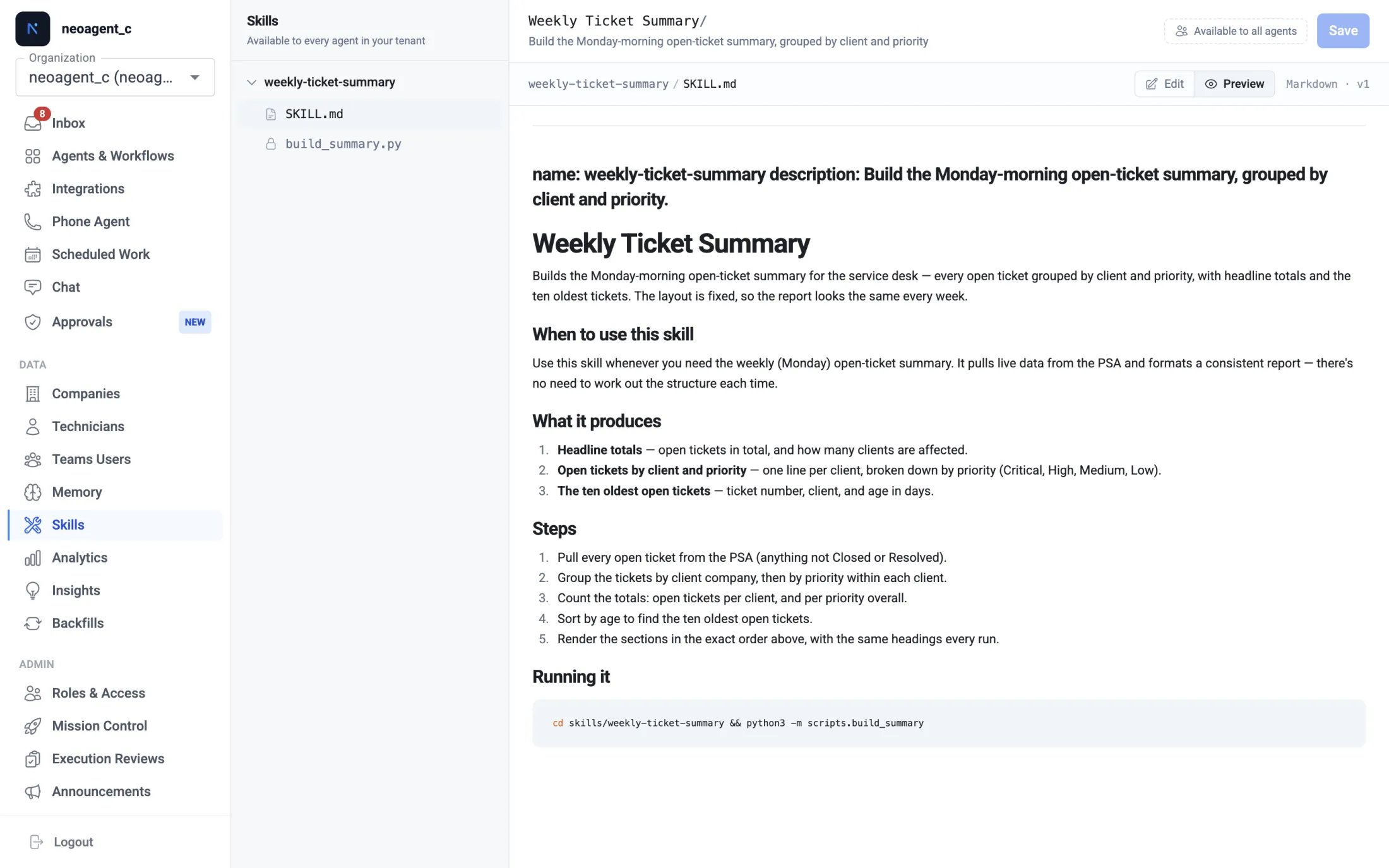
Every file in a skill is editable in the Skills tab — the plain-English procedure (
SKILL.md) and the scripts alike. Every save keeps the previous version, so a change is one Restore away, and you can Run a script to check it before it goes live. When you would rather Neo make the change, ask Neo Support — and if a run fails, one button hands the failed run straight to Neo Support to fix.Skills that read an outside website
Most skills only talk to the systems Neo already connects to — your PSA, Microsoft 365, your RMM, your documentation. Some need a public web page as well: a vendor status page, a utility’s outage map, a supplier price list. Two separate things control this, and it helps to know which is which:- The skill records the sites it needs. Neo Support fills this in when the skill is created. It is a statement of what the scripts fetch — nothing more.
- Each agent is allowed to open sites in its own settings. Open the agent, find the Web Fetch tool, and add the site there. This is the permission, and it is per agent, so you stay in control of what each agent can reach.
- Give the address when you ask for the skill, so it is recorded.
- Add that site to the Web Fetch settings of the agent that will run the skill. Until you do, the agent reports the missing site rather than fetching it.
- A saved skill may come back marked “unverified”. Neo Support’s own agent is limited to Neo’s documentation sites and cannot open your vendor’s page, so it saves the skill and tells you which site to allow. That is expected, and the skill is not faulty.
How your agents use a skill
- Available everywhere. Every skill you create is automatically available to every agent in your tenant — there’s no per-agent setup or toggle.
- Loaded when relevant. When an agent takes on a task that matches a skill, it loads that skill, reads the procedure, and runs any scripts — instead of working the task out from scratch.
- Guaranteed for a scheduled job. For a scheduled agent whose entire job is one procedure (say, a weekly report), name the skill in the agent’s instructions — for example, “Load and run the
weekly-ticket-summaryskill” — so it’s used on every run.
Loading a skill is free. The tools the skill uses are not — on a scheduled or chat agent each call bills at its per-call price. External API Request is 3 credits per call; the API skills under Built-in Capabilities do not change that. Build and edit skills with Neo Support: that work is free, and only its calls into your own systems bill. Iterating by running the scheduled agent spends credits. See Tool credit costs.
A typical example
Say every Monday a scheduled agent builds an open-ticket summary for your team — grouped by client and priority, with totals and a short list of the oldest tickets. It works, but you notice small differences week to week: the grouping order shifts, the wording changes, occasionally a count looks off. Turn that job into a skill, and it stops drifting. The procedure and the code are fixed, so the report comes out in the same shape — same sections, same calculations, same format — every single Monday. New technicians reading the report always see the layout they’re used to, and you can trust the numbers because the same tested logic runs each time.Skills vs. instructions & memory
A skill, custom instructions, and memory all shape how an agent behaves, but they do different jobs:
The full decision guide — including intents, the fourth piece — is on Teaching Neo.
Create & manage your skills
Ask Neo Support to build a skill, then view and fine-tune it in the Skills tab