
Creating a skill
Open Neo Support — the Need help? button in the bottom-right corner of any dashboard page, or the first card on the Chat page — and ask it to build a skill. There are two ways to do it.From a past run (recommended)
The best skills come from a job an agent has already done well. If a run produced exactly the output you want, ask Neo Support to turn that exact run into a reusable skill. It combines what the run actually did — the steps it took and the code it ran — with the relevant rules from the source agent, including rules for branches that this run did not need to exercise. Neo Support shows you the proposed skill before saving it. The fastest way: find the run in your agent’s execution history and click Skillify on it. That opens Neo Support with a pre-filled request pointing at that exact run — review the message and send it. Or do the same by hand:1
Find the run
Open Executions and find the run that did the job well. Click Skillify on it — or copy its link or run ID.
2
Ask Neo Support to compile it
If you didn’t use the Skillify button, paste the run into a Neo Support chat and ask for a skill. For example:
Turn this run into a reusable skill so my weekly ticket summary comes out the same way every time: https://dashboard.neoagent.io/execution-reviews/…
3
Review what it built
Neo Support explains which parts came from the run and which came from the source agent’s instructions. Check the proposal and confirm it before Neo Support writes the procedure and code, tests the new skill, and saves it. It’ll tell you the skill’s name when it’s done — you’ll find it in the Skills tab.
From a chat conversation
Chat agents get the same treatment. When a conversation with one of your chat agents went the way you wanted, click Skillify under the message box to turn it into a skill — no need to copy the conversation or look up any IDs.1
Open the conversation
Go to Chat, open the agent, and select the conversation that went well. Skillify sits under the message box. It’s greyed out while the agent is still replying, and until the agent has answered at least once — there’s nothing to compile before that. It doesn’t appear on Neo Support itself (that’s the agent doing the compiling), on end-user agents (skills are shared across your whole organisation, so they’re built from your technicians’ agents, not your clients’), on a conversation someone shared with you read-only, or if your organisation doesn’t have Neo Support.
Conversations from Teams. A conversation held with an internal agent in Microsoft Teams is not one you started from the dashboard, so the message-box button above does not show it. Open the History tab on the Chat page instead (visible to workspace owners), select the conversation, and click Skillify at the top of the transcript. The rest of the flow is the same. End-user agents still show no Skillify action.
2
Review and send
Neo Support opens on a new conversation with the source agent and conversation already attached, and the message box empty. Nothing is sent until you send it. Add a line if you want the skill focused on something specific, then send.
3
Review what it built
Same as above — Neo Support reads the conversation together with that agent’s own instructions, then shows you the proposed skill and waits for your confirmation before saving.
From a description
If you don’t have a run to point at, describe the procedure in plain English and let Neo Support build it from scratch:Build a skill that, every Monday, lists our open tickets grouped by client and priority, with totals and the ten oldest tickets, and formats it as a short summary.
Viewing and editing your skills
Open the Skills tab to see every skill in your tenant. The left side lists your skills; click one to expand it and see its files — theSKILL.md procedure and any scripts. Click a file to open it on the right.
Display name and slug
Each skill has a display name and a slug. The display name is the human-friendly label and can be updated by asking Neo Support. The slug is the permanent identifier agents use to load the skill and is shown with a lock in the Skills tab; it cannot be changed after the skill is created. If you need a different slug, ask Neo Support to create and verify a replacement first. Any agent instructions that name the old slug must be updated before the old skill is deleted. Neo Support will explain the tenant-wide impact and wait for your confirmation before replacing it.Editing the procedure
SKILL.md — the plain-English procedure — is fully editable. Tweak the wording, add a step, or adjust how the output should be formatted, then click Save.
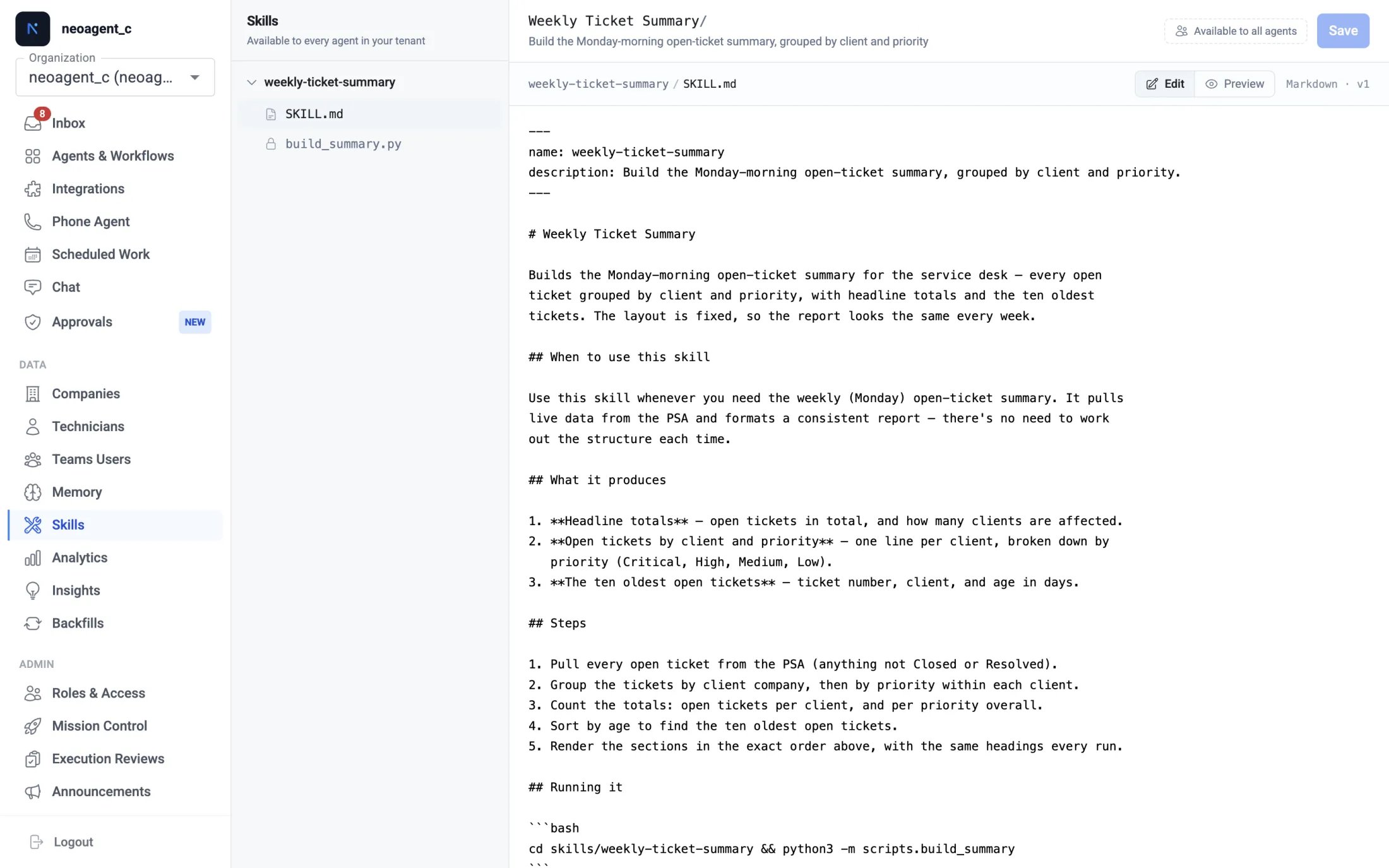
Editing a script
The scripts inside a skill are editable too. Open a script and it appears in a code editor with line numbers and syntax highlighting. Change what you need and click Save, or press ⌘/Ctrl + S. Like the procedure, each save creates a new version, so a tested script is never more than one Restore away. An edited file shows an Unsaved marker until you save it, both in the top bar and next to the file in the tree. Editing several files? Save all writes them together.Asking Neo to make the change
Prefer to have Neo do it? Click Adjust with Neo in the top bar of any skill. Neo Support opens with that skill attached — say what you want changed, and it reads the whole skill, proposes the edit, and saves it once you confirm. When the change touches a script, it runs the script in the sandbox first. One button covers the whole skill, whichever file you have open, because the procedure and the scripts that carry it out have to agree. Save your work first. The button is switched off while a file has unsaved changes, since Neo reads the saved skill: it would work from one text while your screen shows another, and your next save would overwrite what it wrote.Going back to an earlier version
Click History on any file to see every saved version, newest first, with when it was saved. Pick Restore on an older version to load it back into the editor; save it to make it the current version again. Nothing is lost — restoring simply brings an earlier version forward as a new one.Running a script to check it
Before you rely on an edit, run it. Open a script and click Run (or press ⌘/Ctrl + Enter). Neo runs the script in the same secure sandbox your agents use, so it reaches your real systems, and streams the output as it goes.- Choose which agent to run as. A script reads from your PSA, Microsoft 365, RMM and the rest through the permissions of one of your agents. Pick that agent in the Run as box — Neo defaults to your internal chat agent and remembers your last choice. The run is always read-only: it can look at your systems but never change anything, so testing a script is safe.
- It runs what’s in the editor. You don’t have to save first — Run uses your current edits, so you can try a change, see the result, and only save once it works.
- When a run fails, Neo tells you why — a syntax error with the line, a permission the agent is missing, a timeout — in plain language above the output.
Available to all agents
Every skill shows an Available to all agents label. That’s the rule for custom skills: once a skill exists, every agent in your tenant can load and use it, automatically. There’s no per-agent toggle to manage.Deleting a skill
Open the skill and select Delete in the top bar — you’ll be asked to confirm, since the skill disappears for every agent in your tenant at once. If an agent tries to remove a skill on your behalf (through Neo’s API), a technician has to approve it first.Keeping your skills healthy
Check the first real run
Check the first real run
Neo Support tests a skill before saving it, but it’s always worth watching the first real run after you create or edit one — open it in Executions and confirm the output is what you expect.
Keep each skill focused on one job
Keep each skill focused on one job
A skill works best when it does one well-defined thing (one report, one reconciliation). If a procedure is really two jobs, ask Neo Support to split it into two skills.
Edit the procedure, ask for code changes
Edit the procedure, ask for code changes
Small wording and formatting tweaks: edit
SKILL.md yourself and save. Anything that changes what the code does: ask Neo Support, so the change is tested before it goes live.Point an agent at the skill for guaranteed use
Point an agent at the skill for guaranteed use
For a scheduled agent whose whole job is one procedure, name the skill in its custom instructions (e.g. “Load and run the
weekly-ticket-summary skill”) so it’s used on every run. Loading the skill is free; each tool the skill calls still bills at the rates on Tool credit costs. Build the skill here with Neo Support rather than by re-running the scheduled agent — those runs spend credits, including in test mode.What custom skills are & why they matter
New to custom skills? Start with the concept page.