
Prerequisites
Before starting the integration setup, you need:- Admin Access: Administrator access to your Datto RMM portal
- API Access Enabled: Ability to enable API access in Global Settings
- User Management: Permissions to create or modify users and generate API keys
Setup Guide
1
Enable API access
Navigate to Setup → Global Settings → Access Control and enable API access for your account.
API access must be enabled at the account level before individual users can generate API keys.
2
Generate API keys
Go to Setup → Users, select a user (or create a dedicated API user), and generate API keys for authentication.When applying Security levels, configure the following: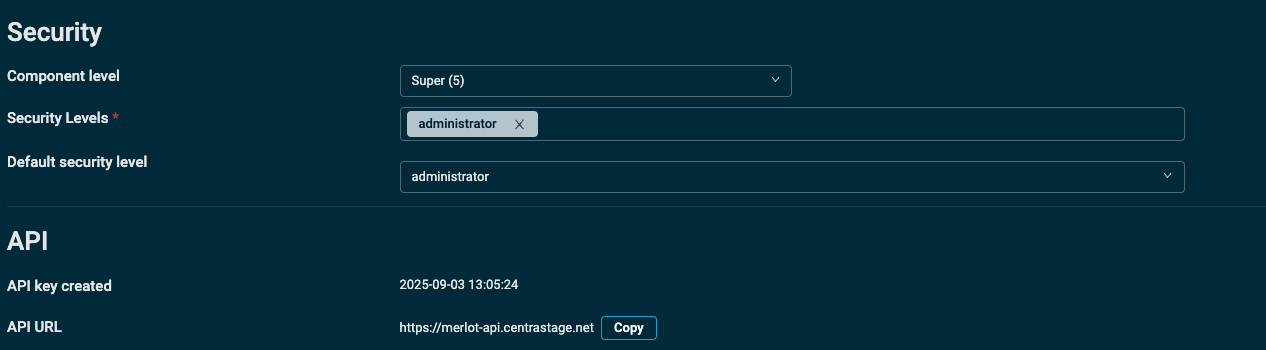
Make note of both the API Key and Secret Key as you’ll need these to configure the integration in Neo Agent.
3
Configure in Neo Agent
Navigate to the Neo Agent Dashboard and select Datto RMM from the RMM integrations.Enter your credentials:
- API Key: The API key generated from your Datto RMM user
- Secret Key: The secret key associated with your API key
- API URL: Your Datto RMM API endpoint (based on your region)
4
Test and save
Neo Agent will validate your credentials and establish the connection. Once successful, save the configuration.
A successful connection allows Neo to access your scripts, devices, and alerts.
API Regions
Datto RMM uses different API endpoints based on your region. Select the appropriate URL when configuring:Known Limitations
Troubleshooting
”Datto RMM refused Neo access” in your Inbox
Datto accepted your API key and secret, then refused the user they belong to access to the data Neo asked for. Neo posts this to your Inbox as an action-required message and stops the sync for that data; it does not retry until the next sync. The API key and secret are correct, so re-entering them does not help. Open Setup → Users in Datto RMM, find the user whose API key Neo signs in with, and check its security level. Neo reads the account’s devices, sites and components, so the security level must allow all three — the setup guide above uses the administrator security level. Neo picks the sync up on its own once the permission is in place.”No devices found” after a sync
The sync finished, but Neo received no devices from Datto. Open Setup → Users in Datto RMM, find the user whose API key Neo signs in with, and check that its security level can see your sites. Then select Trigger sync on the Datto RMM integration in Neo.What Neo Can Do
With Datto RMM connected, Neo Agent can:Script Execution
Script Execution
- Browse and search your script library
- Execute scripts on specific devices
- Monitor job status and results
- Take automated actions based on script outcomes
Device Management
Device Management
- Look up devices by name, serial number, or other identifiers
- Access device details and specifications
- View installed software and services
- Check device status and alerts
Alert Handling
Alert Handling
- Receive and process RMM alerts
- Clear alerts after successful remediation
- Correlate alerts with PSA tickets
Patch Review and Updates
Patch Review and Updates
- Find the devices that need updates, by patch status (approved and pending, install error, reboot required, no policy)
- List the pending, unapproved or installed patches on a device, or across a site, with severity and KB number
- Install updates now by running an update component on a device (for example Install Updates with SUPER [MAC] on a Mac), with technician approval when your agent requires it
Neo Agent does not run a Patch Management policy, press Patch Now or approve a patch. When no update component fits, Neo gives your technician the devices and their pending patches to install from the Datto RMM console.
External Resources
Datto RMM API Documentation
Official Datto documentation for detailed API setup and reference.