
How it works
Neo manages on-premises Active Directory and Exchange Server by executing PowerShell scripts through your RMM platform. This enables the same operations available in cloud environments — password resets, user provisioning, group management, mailbox delegation, and more. Neo uses two execution patterns depending on your environment:- Direct execution — The RMM agent is installed on the target server (e.g., the Domain Controller or Exchange server). Neo runs scripts directly on it.
- Remote execution — The target server doesn’t have an RMM agent. Neo runs scripts on a “runner” VM that does have RMM, and uses PowerShell Remoting to reach the target server.
Setup
1. Configure Company Settings
For each client with on-prem infrastructure, configure their identity provider and mailbox provider settings in the Companies tab.Identity Provider Settings
Which hybrid type? Choose “Hybrid” when Azure AD Connect syncs your on-prem AD to Entra ID — Neo makes identity changes in AD and triggers a sync so they propagate to the cloud. Choose “Hybrid (no AD Connect sync)” when both directories exist but nothing syncs between them (e.g., AD Connect was decommissioned) — Neo then performs every identity operation in both on-prem AD and Entra ID directly: user creation, password resets, sign-in blocking, deletion, and profile updates are applied to each side with the same values. Picking “Hybrid” without a working AD Connect leaves new users stranded in AD, never reaching the cloud.
Mailbox Provider Settings
Service Account Password
How Neo matches a runner hostname
Enter the runner as your RMM displays it, or as the machine’s fully-qualified domain name. This applies to every hostname Neo runs scripts on — the AD Runner, the Exchange Runner, and the Exchange Server when no Exchange Runner is set. Neo matches the name against all of the following:- The device name shown in your RMM. This always works.
- The machine’s real host name, when your RMM displays an editable label instead. ConnectWise ASIO, for example, shows the friendly name a technician typed —
DC - Head Office - ADSync— while the machine itself is namedHO-DC01. Either one resolves. - The machine’s fully-qualified domain name, for RMM platforms that report one. NinjaOne reports both
HO-DC01andHO-DC01.contoso.local.
DC01.contoso.local resolves a device named DC01.
Neo learns a device’s real host name and its full FQDN during the RMM device sync. If you enter one of these and your RMM does not already display it, allow one device sync to finish before the runner resolves. An FQDN whose short name your RMM already shows is the exception —
DC01.contoso.local resolves a device displayed as DC01 right away, with no sync.Sharing one runner across companies. When several companies share a single domain controller or runner (e.g. a multi-academy trust or a healthcare group), set that same hostname as each company’s AD/Exchange Runner Hostname. The device only needs to exist in RMM under one of those companies — Neo will use it for the others too.Neo resolves the shared runner in this order:
- A device with that hostname mapped to the company on the ticket.
- A device with that hostname owned by a company in the same PSA parent group — the shared company’s parent, plus every company under that parent. This lets a generic hostname such as
dc2be reused across a group even when the same name also exists at unrelated customers, as long as only one machine of that name sits inside the group. - A device with that hostname anywhere in your RMM, if it resolves to a single company.
dc2 inside the same parent group, or the same name at unrelated companies with no parent link. Then it asks you to give one of them a unique hostname (or, for unrelated companies, to assign the correct device under Integrations → RMM → Device Mapping). You do not need to reassign a device that is shared by design across a parent group.2. Upload the Neo Script to Your RMM
Neo needs a wrapper script installed in your RMM to execute PowerShell commands.- ConnectWise Asio
- Datto RMM
- ConnectWise Automate
- NinjaOne
- Kaseya VSA X
No upload required. ConnectWise Asio ships a built-in
PowerShell script automation template that Neo uses to execute PowerShell on managed endpoints. Neo dispatches the wrapper code inline as the body parameter of that template on every run, so you don’t need to create or maintain any Neo-specific script in your Asio library.Asio’s user-created PowerShell scripts (Add → PowerShell script in the Tasks page) don’t expose a “Parameters” tab, so Neo can’t use one as the wrapper. Don’t create a
[Neo Script] Run Powershell task in Asio — it won’t be used.- Confirm an Asio agent is installed on the target server (DC, Exchange server, runner VM, etc.) and reporting
osType=windows. - Trigger an RMM sync in Neo at Integrations → RMM so Neo discovers the endpoint and the built-in
PowerShell scripttemplate.
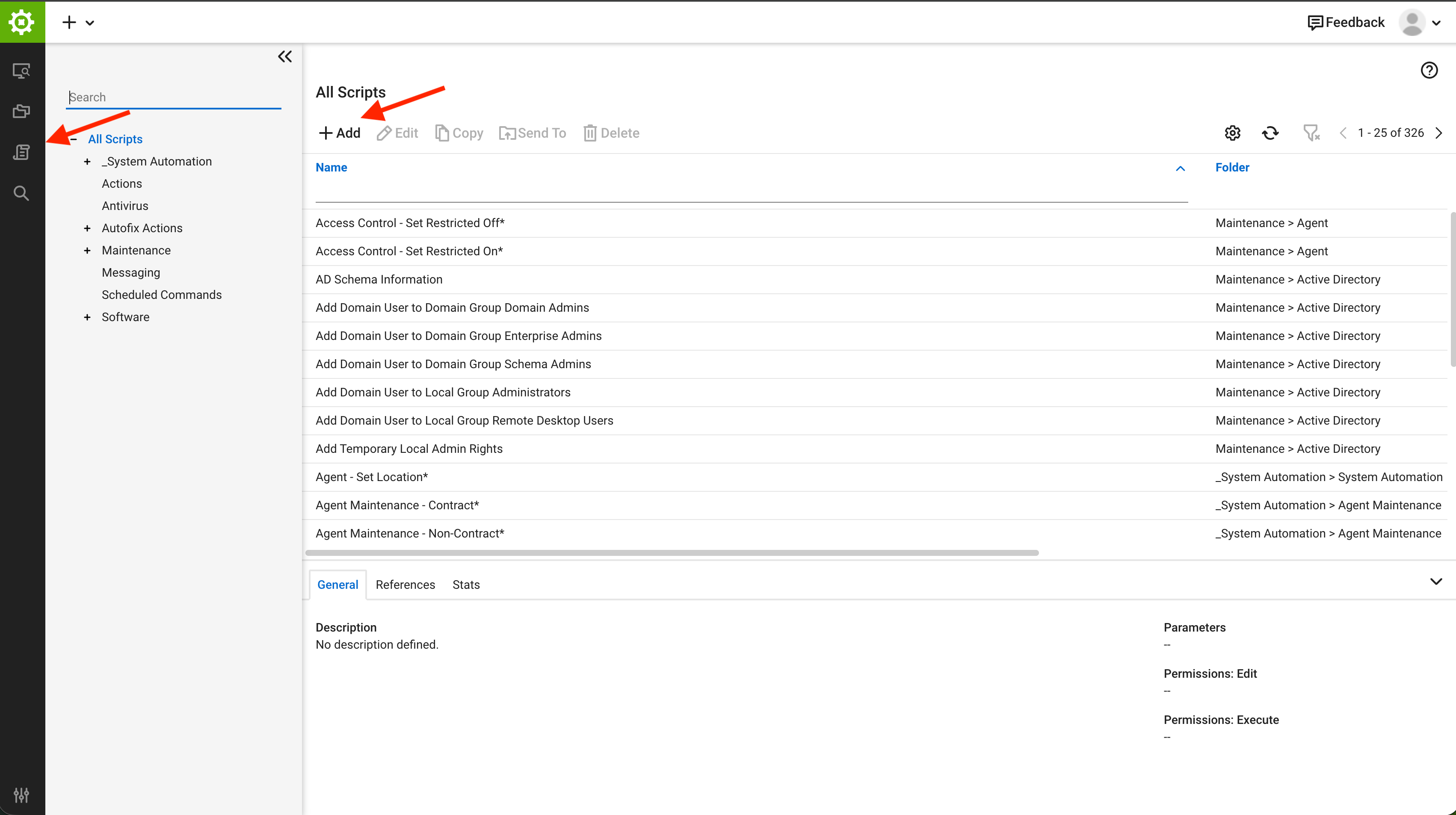
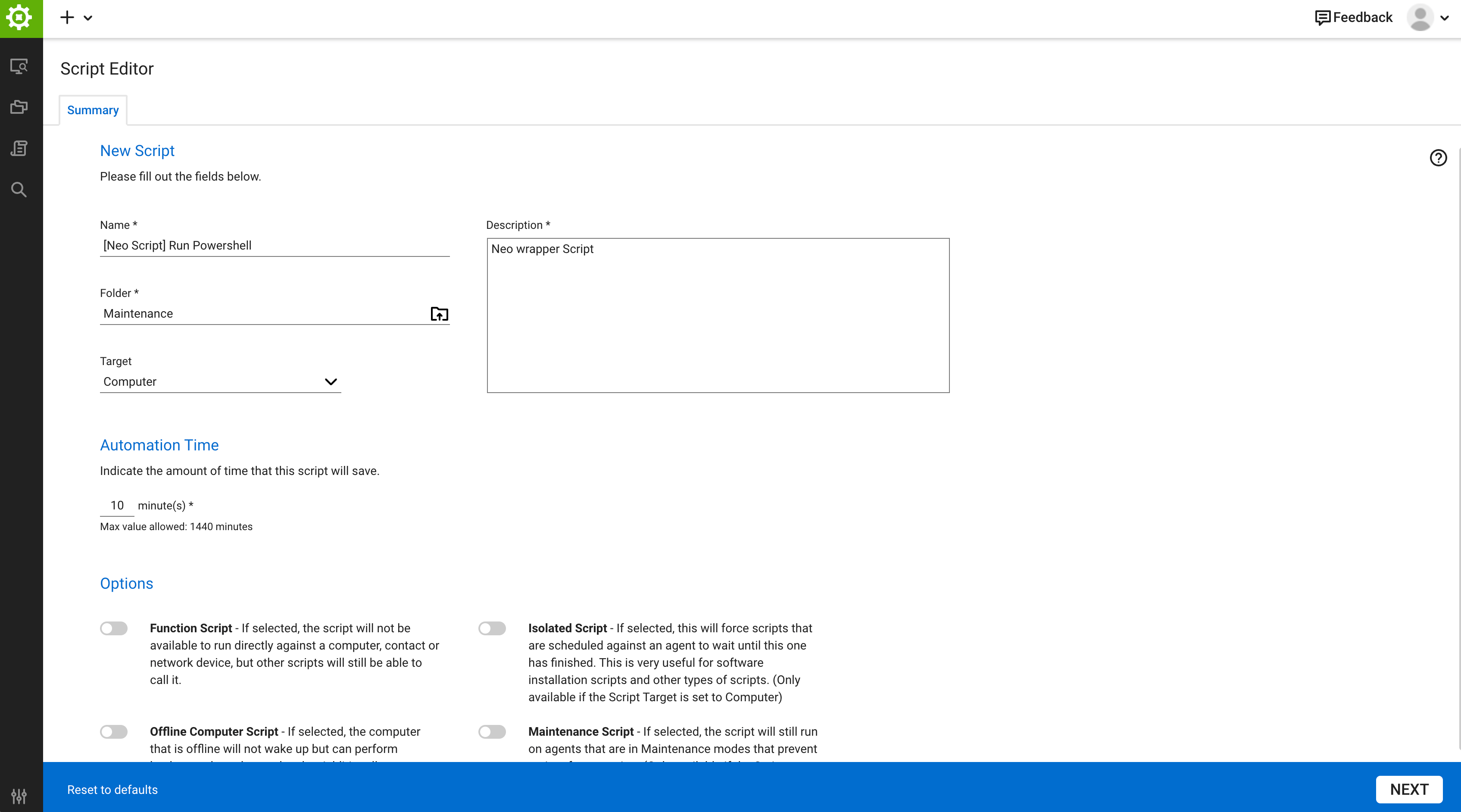
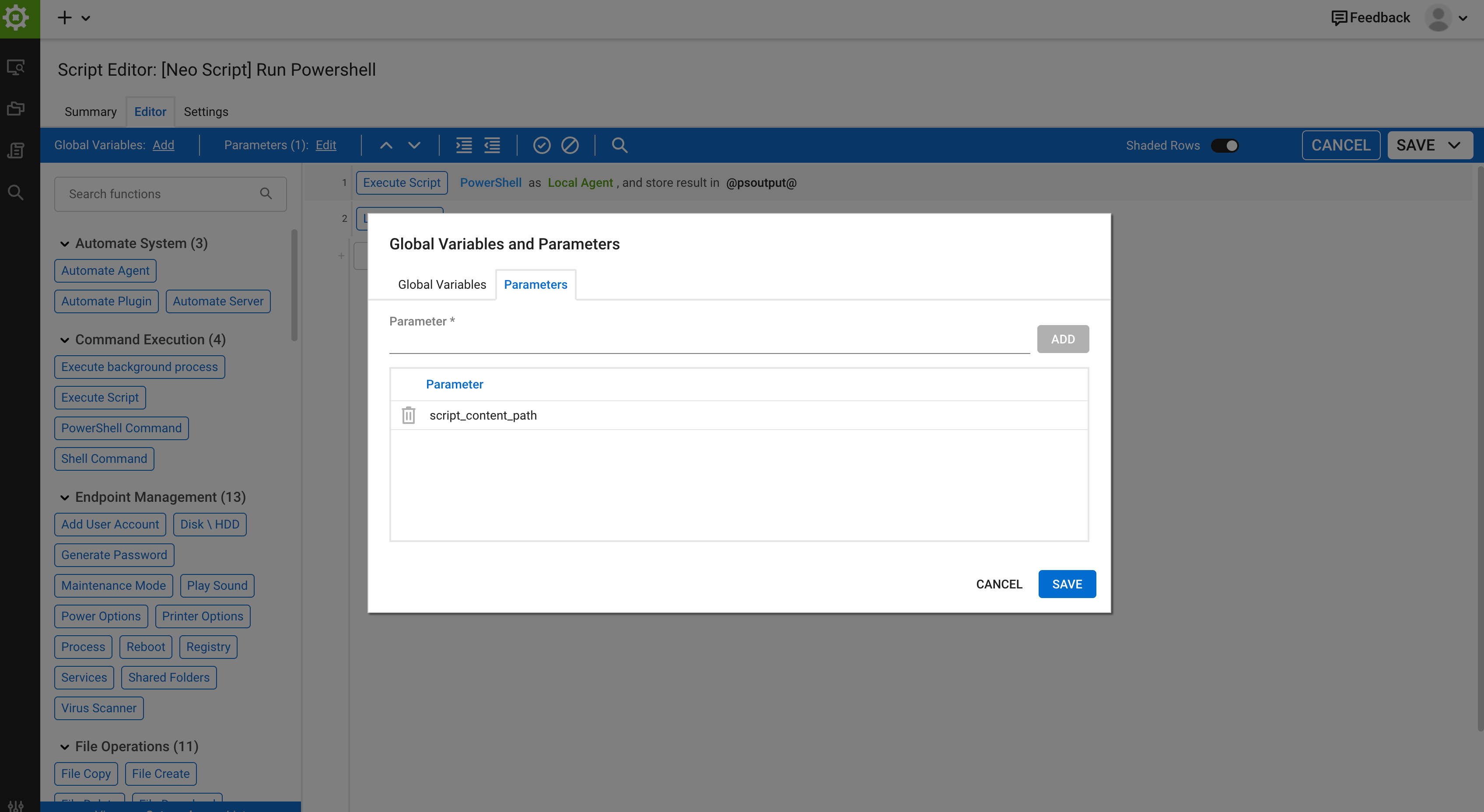
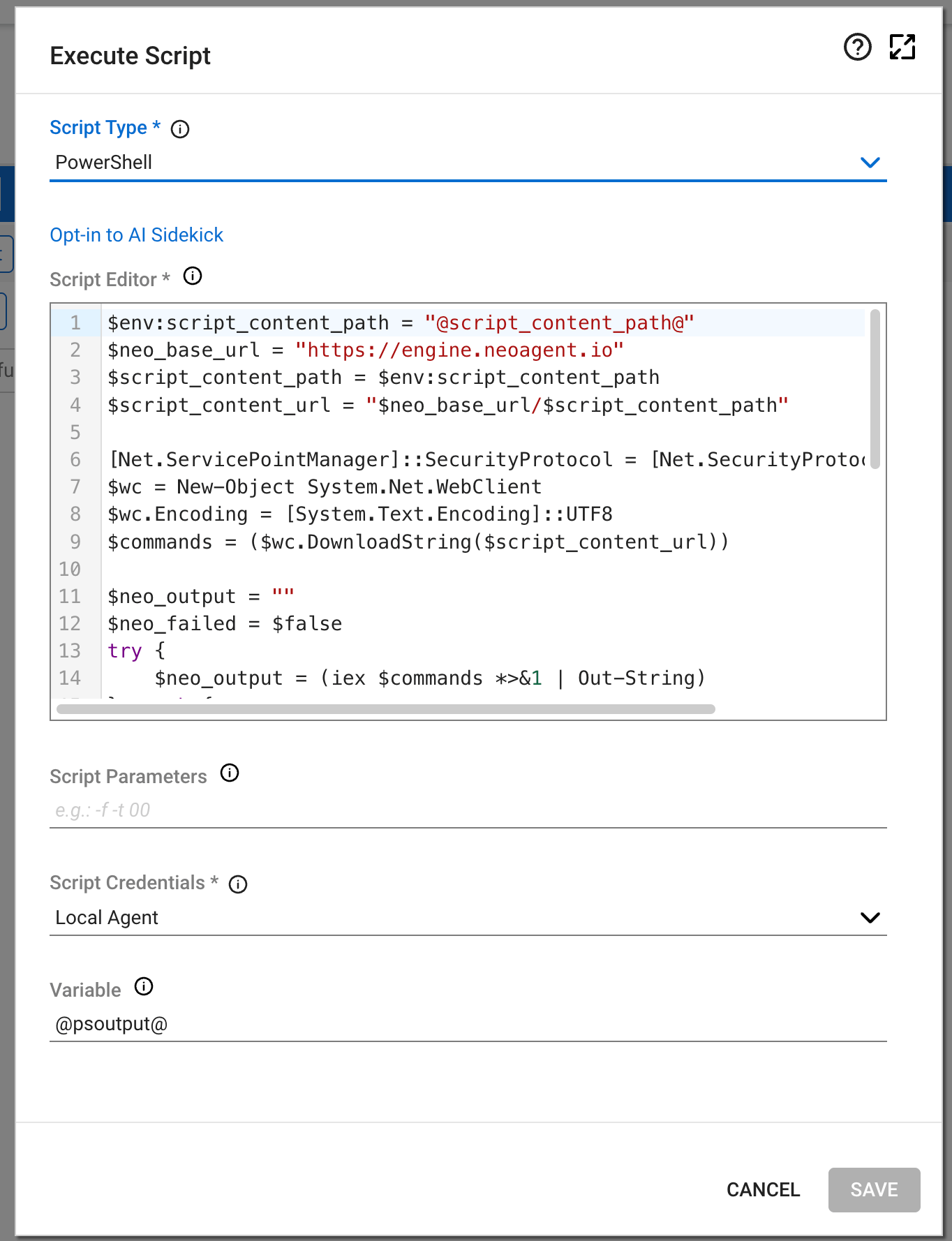
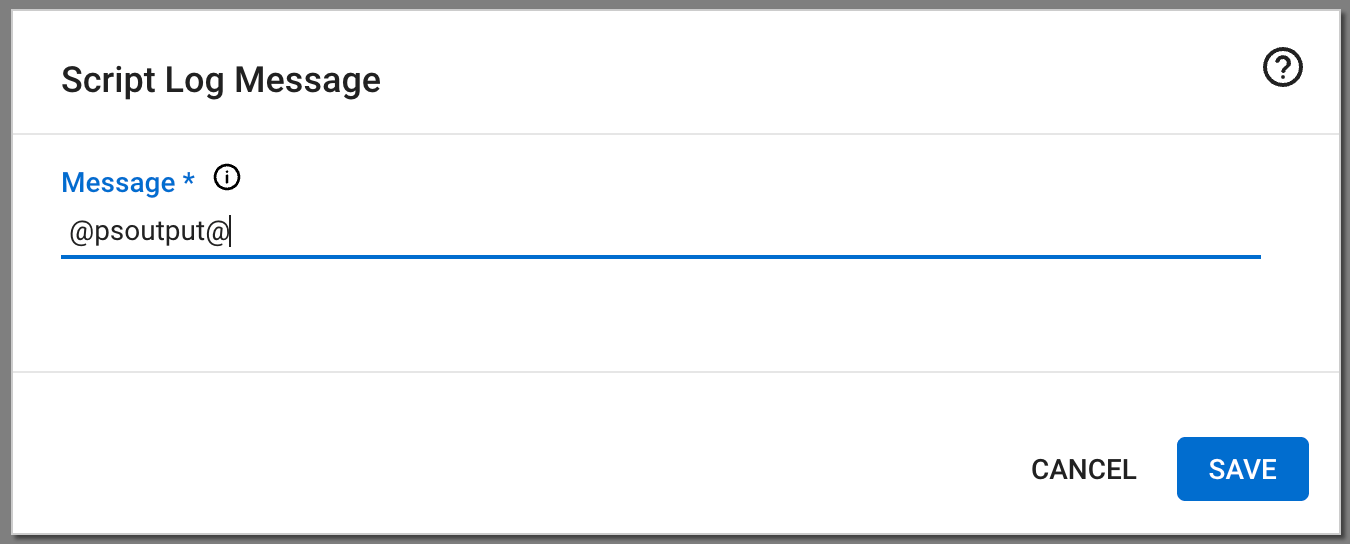
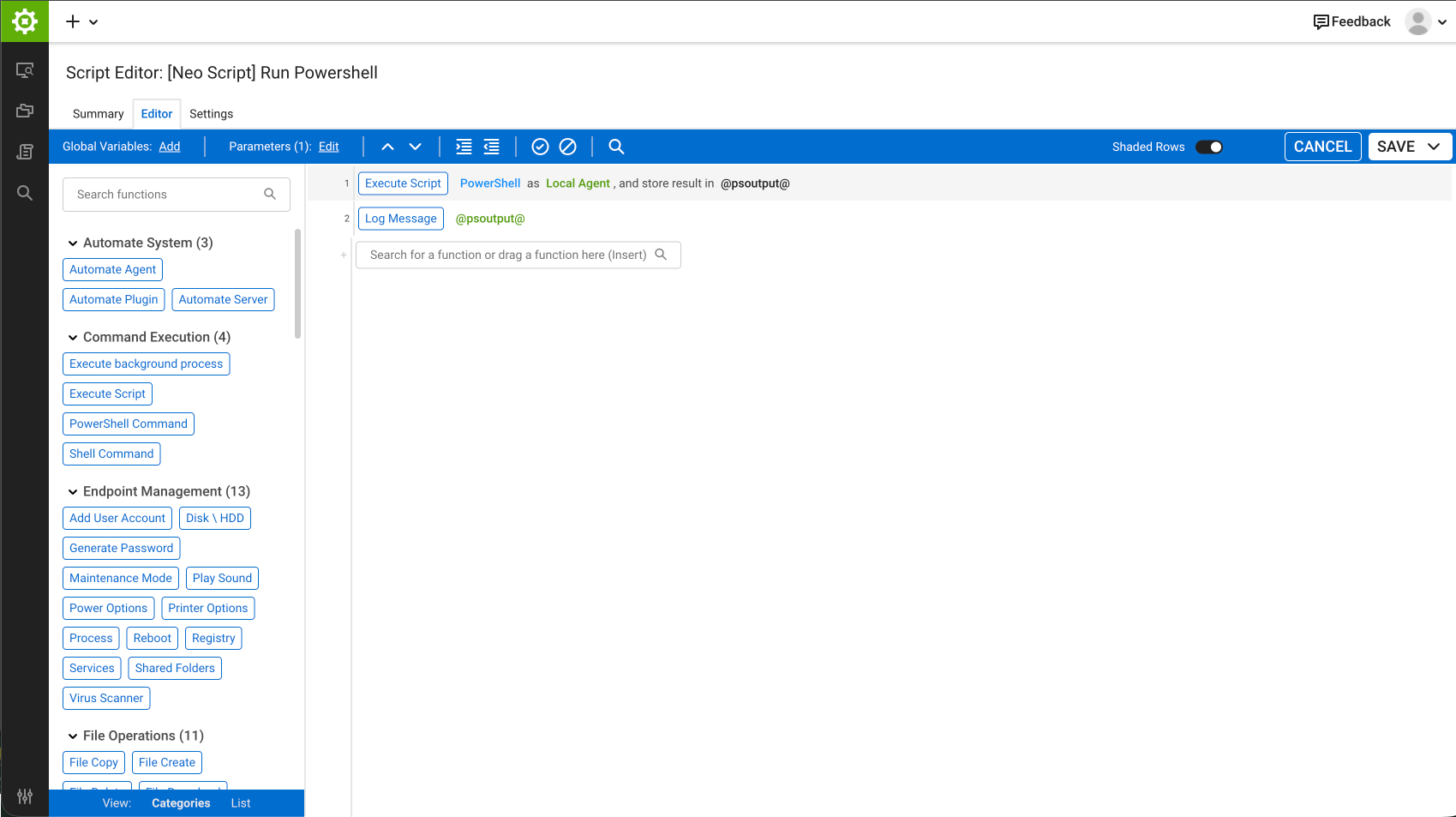
3. Set Up a Runner Machine
Required if: any server Neo manages (DC, Exchange server, AD Connect server) does not have an RMM agent installed. Common scenarios:
- You don’t want to install RMM on the Domain Controller
- The Exchange server doesn’t have an RMM agent
- The AD Connect server doesn’t have an RMM agent
Which account runs Neo’s scripts
Neo passes no credential to Active Directory scripts or to the AD Connect sync. They run on the AD Runner as the account your RMM runs the[Neo Script] Run Powershell wrapper as. When the AD Connect server is not the AD Runner, the sync reaches it with Invoke-Command as that same account.
To confirm the account, run
whoami on the runner through the wrapper.
The company’s AD Service Account Username is not used by these scripts. The Exchange service account and the password are used only for CredSSP, when an Exchange Runner reaches a separate Exchange server.
Grant the AD Connect rights below to the account in the table. For a runner that runs as SYSTEM with a separate AD Connect server, add the runner’s computer account (DOMAIN\RUNNER$) to the ADSyncOperators and Remote Management Users groups on the AD Connect server. Without them the sync fails with Access denied, and a new user reaches Entra ID only on AD Connect’s own schedule, every 30 minutes by default.
3a. Install RSAT AD Tools
Required if: the DC doesn’t have an RMM agent (i.e., the runner performs AD operations on its behalf).
- Windows Server
- Windows 10/11
Open PowerShell as Administrator and run:Or via Server Manager: Add Roles and Features → Features → Remote Server Administration Tools → AD DS Tools → AD DS Snap-Ins and Command-Line Tools
Import-Module ActiveDirectory in PowerShell — it should complete without errors.
3b. Create a Dedicated Service Account
Create a service account in Active Directory (e.g.,DOMAIN\neo_automation) and grant it the permissions needed for the operations you want Neo to perform.
Active Directory permissions
Active Directory permissions
Exchange Server permissions (if using on-prem Exchange)
Exchange Server permissions (if using on-prem Exchange)
Assign the Recipient Management role to the service account, or delegate equivalent permissions:
If the Exchange server is not in RMM (i.e., Neo uses remote execution from a runner), the service account also needs WinRM remoting access to the Exchange server.
Azure AD Connect permissions (if using Hybrid identity)
Azure AD Connect permissions (if using Hybrid identity)
To trigger AD Connect syncs, the account the Neo wrapper runs as must be a member of the ADSyncOperators group on the AD Connect server. See Which account runs Neo’s scripts: on ConnectWise Automate and NinjaOne it is the runner’s computer account,
DOMAIN\RUNNER$.If the AD Connect server is not the same machine as the AD Runner, that account also needs WinRM remoting access to the AD Connect server (the Remote Management Users group). Neo uses Invoke-Command from the runner to trigger the sync remotely.Extended AD capabilities (optional)
Extended AD capabilities (optional)
Neo can also perform these Active Directory operations if you grant the necessary permissions:
3c. Configure RMM Component Credentials
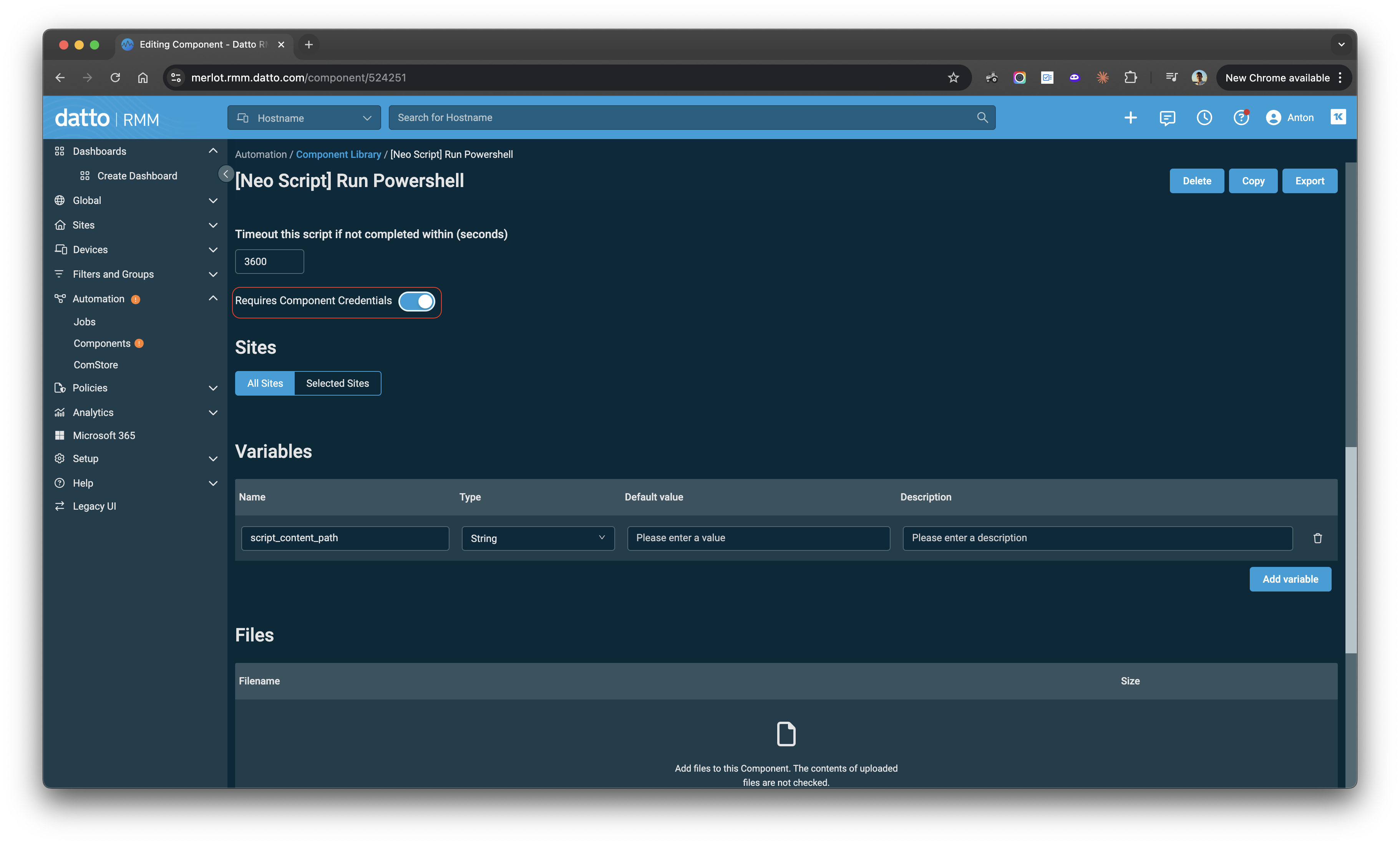
By default, Datto RMM scripts run under LocalSystem, which has no AD or Exchange permissions on non-DC machines. To run scripts under your service account, configure Component Credentials for each site that uses a runner machine.Component Credentials are configured per site (end-client). For sites without credentials configured, scripts run under LocalSystem — which only works if the RMM agent is installed directly on the DC or Exchange server.
- Go to Automation → Components and open the [Neo Script] Run Powershell component
- Toggle Requires Component Credentials to ON
- Click Save to apply the change
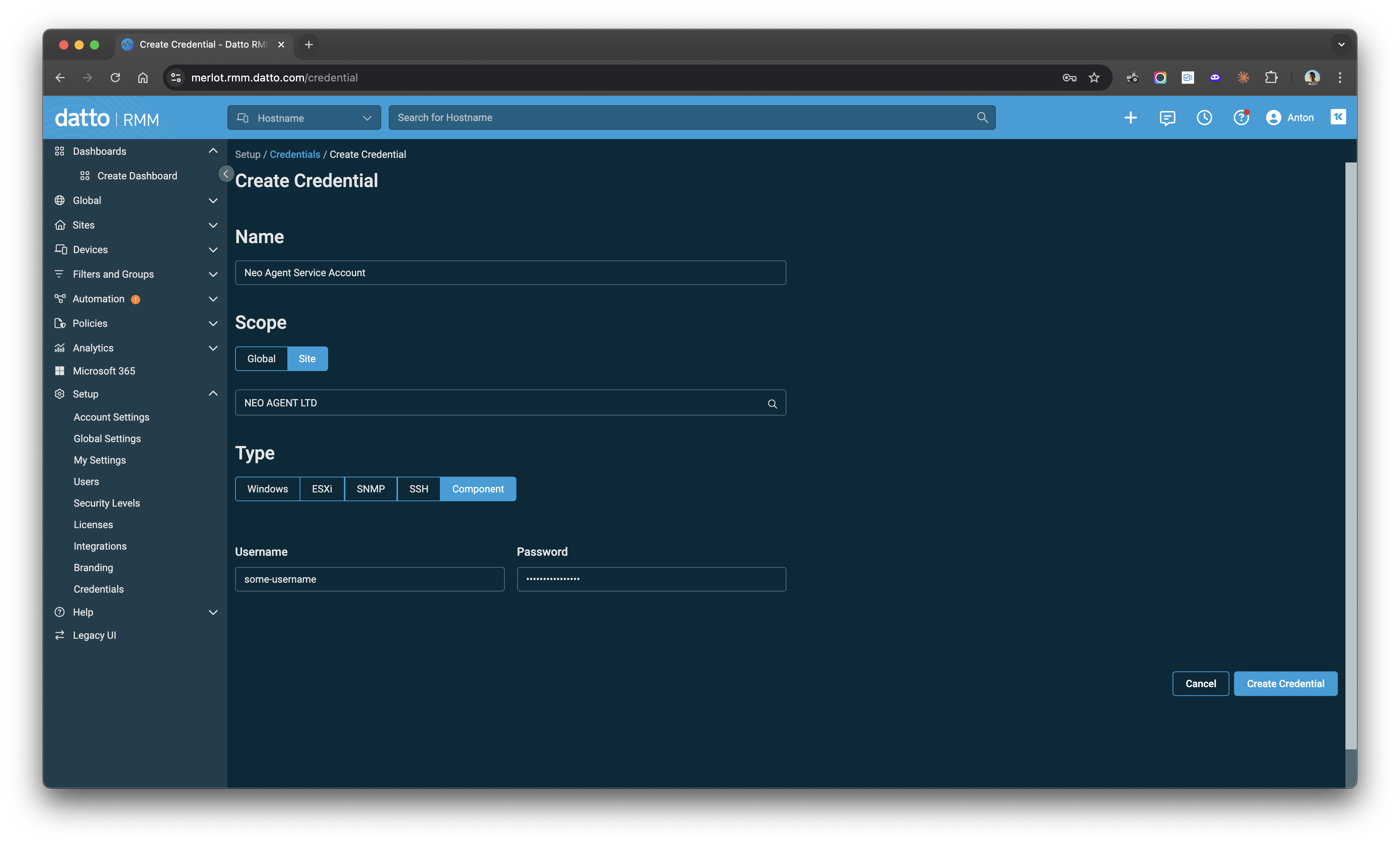
- In Datto RMM, go to Setup → Credentials → Create Credential
- Enter a Name (e.g., “Neo Agent Service Account”)
- Set Scope to Site and select the client’s site
- Set Type to Component
- Enter the service account credentials:
- Username:
DOMAIN\neo_ad_automation - Password: (the service account password)
- Username:
- Click Create Credential
4. Enable Remote Execution
Required if: a target server doesn’t have an RMM agent and Neo reaches it remotely from the runner. This applies when:
- The AD Connect server doesn’t have an RMM agent (AD Connect Server Hostname differs from AD Runner Hostname)
- The Exchange server doesn’t have an RMM agent (an Exchange Runner Hostname is configured)
-
Enable PowerShell Remoting:
This configures WinRM and opens the necessary firewall rules. See Microsoft’s documentation for details and troubleshooting.
-
Grant remoting access to the account that connects. For the AD Connect server, that is the account the Neo wrapper runs as (see Which account runs Neo’s scripts): the Datto Component Credential, or the runner’s computer account
DOMAIN\RUNNER$when the wrapper runs as SYSTEM. For the Exchange server, it is the Exchange service account that CredSSP forwards. If the account is not a Domain Admin, add it to the Remote Management Users group on the target server, or grant it WinRM access via Group Policy. - Verify network connectivity from the runner to the target server on port 5985 (HTTP) or 5986 (HTTPS).
5. Configure CredSSP for Exchange Runners
Required if: the Exchange server doesn’t have an RMM agent and Neo reaches it remotely from the runner. This means:
- You configured an Exchange Runner Hostname in Mailbox Provider Settings
- The runner and Exchange server are different machines
- Exchange Service Account Username — e.g.,
CONTOSO\SVC_NEO_AUTOMATION - Service Account Password
EXCHANGE-SHORT with the Exchange server’s short hostname, EXCHANGE-FQDN with its FQDN, and *.yourdomain.com with your domain’s wildcard. Including all three forms prevents hostname resolution mismatches.
Step 3: Enable CredSSP on the Exchange server (server role).
On the Exchange server, open PowerShell as Administrator:
Get-ExchangeServer requires Exchange to query AD, so if it returns the server name, CredSSP is working end-to-end.
- If it succeeds — CredSSP is configured correctly.
- If it fails with “A computer policy does not allow the delegation of the user credentials” — re-run Step 2 with the correct hostname forms, including the wildcard.
- If it fails with a permissions error — CredSSP is working, but the service account may lack Exchange permissions.
6. Verify Connectivity
After completing setup, run these checks from the runner machine (or the DC if using direct execution) to confirm everything is working.Neo API connectivity
The machine running scripts must be able to reach the Neo API. Run:401 Unauthorized — this confirms the server can reach Neo over HTTPS. If you see an SSL error or timeout, see Troubleshooting.
AD tools (if using on-prem AD)
Verify the runner has the AD PowerShell module and can query the domain:Remote execution (if applicable)
If the AD Connect server or Exchange server is reached via remote execution, verify connectivity from the runner as the account that connects. For AD Connect, run the test through the Neo wrapper, so it runs as the same account as the sync. For Exchange, use the service account; the CredSSP test covers the full path.- PowerShell Remoting is enabled on the target (
Enable-PSRemoting -Force) - The account that connects is in the Remote Management Users group on the target
- Port 5985 or 5986 is open between the runner and the target
Exchange Hybrid
Use Exchange Hybrid when a client has both on-prem Exchange and Exchange Online — typically during a migration or in long-term coexistence. How Neo routes operations:- Standard mailbox operations (forwarding, delegation, shared mailbox conversion, permissions, etc.) route to Exchange Online via Microsoft Graph — the same as pure Exchange Online clients.
- On-prem Exchange cmdlets (e.g.,
Enable-RemoteMailboxfor hybrid mailbox provisioning) are executed on the on-prem Exchange server when Neo’s agent determines they’re needed.
- Set Mailbox Provider Type to “Exchange Hybrid” in Company Settings
- Set the Exchange Server Hostname to the on-prem Exchange server
- (Optional) Set the Exchange Runner Hostname if the Exchange server doesn’t have an RMM agent — then complete Step 3, Step 4, and Step 5
Troubleshooting
”The supplied credential is invalid” on Exchange Runner
Symptom: Exchange operations (e.g.,Enable-RemoteMailbox) fail with:
- CredSSP client not configured: Run
Get-WSManCredSSPon the runner — it should show CredSSP is enabled as a client with the Exchange server in the delegate list. - CredSSP server not configured: Run
Get-WSManCredSSPon the Exchange server — it should show CredSSP is enabled as a server. - GPO blocking delegation: If you see “A computer policy does not allow the delegation of the user credentials”, re-run
Enable-WSManCredSSP -Role Clienton the runner with the FQDN, short hostname, AND domain wildcard forms. - Wrong password in Neo: Verify the service account password in the Companies tab is correct.
SSL/TLS Certificate Trust Error
Symptom: RMM scripts fail with an error like:engine.neoagent.io. There are two common causes:
- A DNS or web filter is intercepting the request. Filtering products (Cisco Umbrella/OpenDNS, and similar DNS-layer or TLS-inspecting appliances) answer the lookup with their own block page instead of the real address. Because that block page cannot present a valid certificate for
engine.neoagent.io, the connection surfaces as a trust failure rather than as a “blocked” message. Intermittent failures on a machine that usually works point here. - Outdated root certificates, typically on older Windows servers.
- Expected result: 401 Unauthorized (confirms SSL/TLS is working)
- If you see an SSL error: continue below to tell the two causes apart
146.112.61.0/24. You can confirm which product is responsible with:
originid, the machine’s DNS is being handled by an Umbrella/OpenDNS account, and its policy is what to check.
Fix:
-
Allow
neoagent.ioin your DNS/web filter — if the checks above showed a filter answering the lookup, addneoagent.ioincluding its subdomains to the filter’s allow list. In Cisco Umbrella this is Policies → Destination Lists; Reporting → Activity Search forengine.neoagent.ioshows which policy and category triggered the block. Allow the whole domain rather than a single host, so the dashboard, docs and API stay reachable too. -
Update Windows root certificates — Install the latest Windows updates, or manually update certificates:
-
Check TLS 1.2 is enabled — Verify in registry:
- Check server clock — Certificate validation fails if the system time is significantly off
- Check for TLS-inspecting proxies — Some security appliances re-sign HTTPS traffic; the appliance’s root CA must be trusted by the machine, or the chain breaks
Neo’s wrapper retries a failed download three times before giving up, so a brief blip recovers on its own. A failure that reaches Neo reports as
NEO_SCRIPT_DOWNLOAD_FAILED, which means all three attempts failed and the cause is persistent.No Internet Access / Firewall Blocking
Symptom: RMM scripts fail with connection errors, timeouts, or “Unable to connect to the remote server.” Cause: The server running Neo scripts cannot reach the Neo API endpoint due to no internet access or firewall restrictions. Fix: Ensure the server can reachhttps://engine.neoagent.io. Add a firewall rule to allow outbound HTTPS (port 443) to this endpoint.
Diagnose: Run this on the affected server:
- Expected result: 401 Unauthorized (confirms connectivity is working)
- If you see a connection/timeout error: The server cannot reach the endpoint — check firewall rules and proxy settings
Other RMM Platforms
Neo supports on-prem execution through any RMM platform that can run PowerShell scripts, including:- N-Able N-Sight RMM
- N-Able N-Central
- ConnectWise RMM (Asio)