Overview
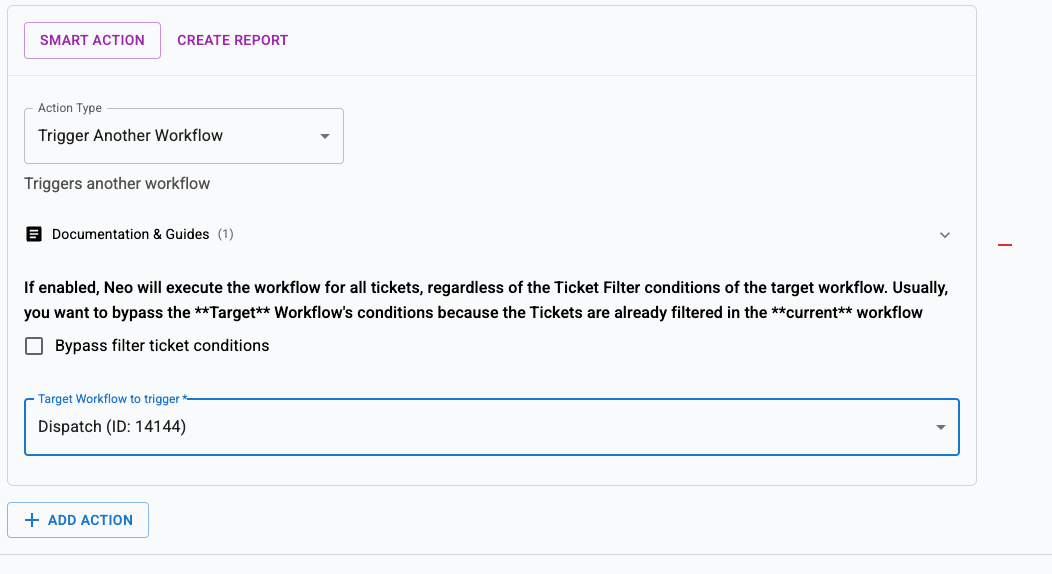
Automatically reassign tickets that have past scheduled entries that were never completed. This ensures work doesn’t fall through the cracks when technicians miss their scheduled appointments.This is a Scheduled workflow that runs daily (e.g., at 7 AM) to catch incomplete work from the previous day and reassign tickets to available technicians.
How it works
- Runs daily at 7 AM (or your preferred time)
- Finds tickets with past scheduled entries that were not completed
- Excludes tickets that already have upcoming scheduled work
- Sends them to a Dispatch workflow for reassignment
Setup
Create the scheduled workflow
Name it “Reassign Incomplete Scheduled Work” and set the type to Scheduled. Configure it to run daily at 7:00 AM (or your preferred morning time).
Configure filters
Add the following filters to find tickets with incomplete scheduled work:
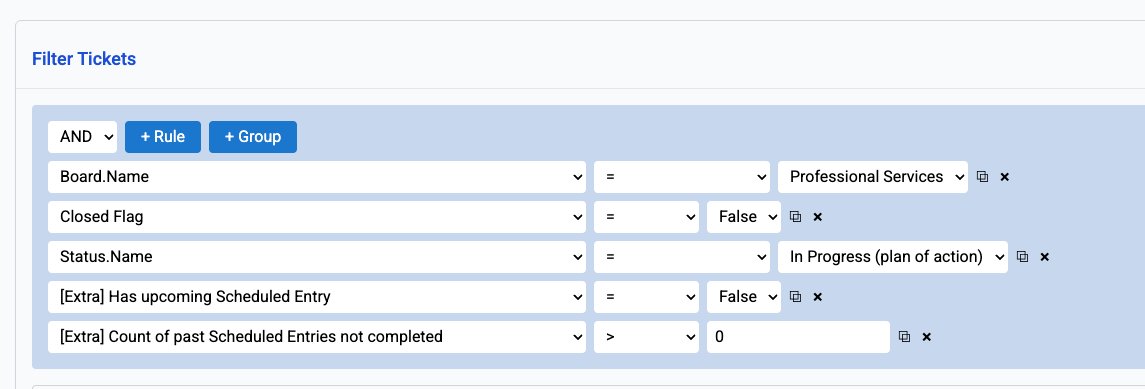
Filter criteria:

- Board.Name = Your target board (e.g., Professional Services)
- Closed Flag = False (only open tickets)
- Status.Name = Your in-progress status (e.g., “In Progress (plan of action)”)
- [Extra] Has upcoming Scheduled Entry = False (no future work scheduled)
- [Extra] Count of past Scheduled Entries not completed > 0 (has missed scheduled work)
Use cases
Missed appointments
When a technician doesn’t complete their scheduled on-site visit, the ticket gets reassigned to someone who can follow up.Workload balancing
If a technician was overloaded and couldn’t complete all scheduled work, the system redistributes tickets to available team members.Coverage for absences
When a technician is unexpectedly absent, their incomplete scheduled work gets reassigned automatically the next morning.Best practices
- Run early in the morning — 7 AM gives dispatchers time to review reassignments before the workday starts
- Use specific board filters — Target only boards where scheduled work matters (e.g., Professional Services, Projects)
- Combine with calendar management — Pair this with the Manage Calendar workflow for comprehensive scheduling oversight
- Monitor Event History — Review which tickets get reassigned to identify patterns (recurring issues with specific technicians or ticket types)