> ## Documentation Index
> Fetch the complete documentation index at: https://docs.neoagent.io/llms.txt
> Use this file to discover all available pages before exploring further.
# Reassign Incomplete Scheduled Work
> Daily oversight to catch and reassign tickets with past scheduled entries not completed
## Overview
Automatically reassign tickets that have past scheduled entries that were never completed. This ensures work doesn't fall through the cracks when technicians miss their scheduled appointments.
This is a Scheduled workflow that runs daily (e.g., at 7 AM) to catch incomplete work from the previous day and reassign tickets to available technicians.
## How it works
* Runs daily at 7 AM (or your preferred time)
* Finds tickets with past scheduled entries that were not completed
* Excludes tickets that already have upcoming scheduled work
* Sends them to a Dispatch workflow for reassignment
## Setup
Name it "Reassign Incomplete Scheduled Work" and set the type to **Scheduled**. Configure it to run daily at 7:00 AM (or your preferred morning time).
Add the following filters to find tickets with incomplete scheduled work:
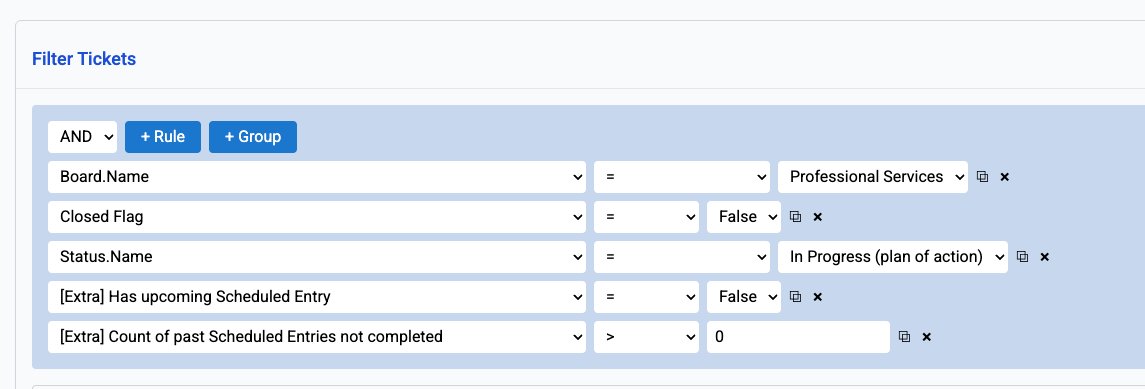 **Filter criteria:**
* **Board.Name** = Your target board (e.g., Professional Services)
* **Closed Flag** = False (only open tickets)
* **Status.Name** = Your in-progress status (e.g., "In Progress (plan of action)")
* **\[Extra] Has upcoming Scheduled Entry** = False (no future work scheduled)
* **\[Extra] Count of past Scheduled Entries not completed** > 0 (has missed scheduled work)
Add a **Trigger Another Workflow** action and select your Dispatch workflow as the target.
**Filter criteria:**
* **Board.Name** = Your target board (e.g., Professional Services)
* **Closed Flag** = False (only open tickets)
* **Status.Name** = Your in-progress status (e.g., "In Progress (plan of action)")
* **\[Extra] Has upcoming Scheduled Entry** = False (no future work scheduled)
* **\[Extra] Count of past Scheduled Entries not completed** > 0 (has missed scheduled work)
Add a **Trigger Another Workflow** action and select your Dispatch workflow as the target.
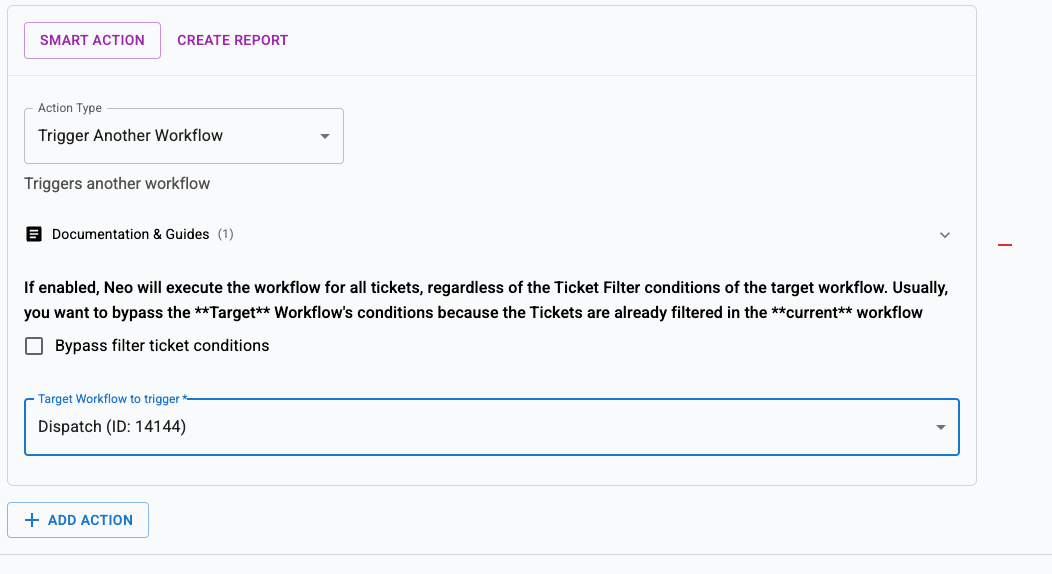 Enable **Bypass filter ticket conditions** if your Dispatch workflow has its own filters that might exclude these tickets. Since you've already filtered in this workflow, bypassing prevents double-filtering.
## Use cases
### Missed appointments
When a technician doesn't complete their scheduled on-site visit, the ticket gets reassigned to someone who can follow up.
### Workload balancing
If a technician was overloaded and couldn't complete all scheduled work, the system redistributes tickets to available team members.
### Coverage for absences
When a technician is unexpectedly absent, their incomplete scheduled work gets reassigned automatically the next morning.
## Best practices
* **Run early in the morning** — 7 AM gives dispatchers time to review reassignments before the workday starts
* **Use specific board filters** — Target only boards where scheduled work matters (e.g., Professional Services, Projects)
* **Combine with calendar management** — Pair this with the [Manage Calendar](/recipes/assign-technician-manage-calendar) workflow for comprehensive scheduling oversight
* **Monitor Event History** — Review which tickets get reassigned to identify patterns (recurring issues with specific technicians or ticket types)
If you want less aggressive reassignment, add a filter for **\[Extra] Count of past Scheduled Entries not completed > 1** to only catch tickets with multiple missed entries.
Enable **Bypass filter ticket conditions** if your Dispatch workflow has its own filters that might exclude these tickets. Since you've already filtered in this workflow, bypassing prevents double-filtering.
## Use cases
### Missed appointments
When a technician doesn't complete their scheduled on-site visit, the ticket gets reassigned to someone who can follow up.
### Workload balancing
If a technician was overloaded and couldn't complete all scheduled work, the system redistributes tickets to available team members.
### Coverage for absences
When a technician is unexpectedly absent, their incomplete scheduled work gets reassigned automatically the next morning.
## Best practices
* **Run early in the morning** — 7 AM gives dispatchers time to review reassignments before the workday starts
* **Use specific board filters** — Target only boards where scheduled work matters (e.g., Professional Services, Projects)
* **Combine with calendar management** — Pair this with the [Manage Calendar](/recipes/assign-technician-manage-calendar) workflow for comprehensive scheduling oversight
* **Monitor Event History** — Review which tickets get reassigned to identify patterns (recurring issues with specific technicians or ticket types)
If you want less aggressive reassignment, add a filter for **\[Extra] Count of past Scheduled Entries not completed > 1** to only catch tickets with multiple missed entries.