> ## Documentation Index
> Fetch the complete documentation index at: https://docs.neoagent.io/llms.txt
> Use this file to discover all available pages before exploring further.
# Microsoft Teams
> The Teams apps Neo offers — the Neo AI Agent app, your branded end-user bot, and a custom internal bot — how to tell them apart, and which one to set up
Neo shows up in Microsoft Teams as **several separate apps** — easy to mix up, partly because more than one appears in a chat simply as "**Neo**." Two questions pin down which you mean: **who messages it** (your technicians or your clients' employees) and **who answers** (Neo's managed assistant or an agent you built).
**"Bot" vs "chat" are different things.** A **bot** is the installable Teams app — the vehicle that carries notifications, cards, and messages into someone's Teams. The **chat** is the agent that answers inside it. The three apps below are bots; what answers inside each is a chat agent (Neo Support, your end-user agent, or your internal agent). Pick both.
## The three apps at a glance
| | Neo AI Agent | Your branded end-user bot | Your custom internal bot |
| ------------------------------ | ---------------------------------------------------------------------------------------------------------------- | ------------------------------------------------------------ | -------------------------------------------------------------------------------- |
| **Who messages it** | Your technicians | Your clients' employees | Your technicians |
| **App name** | **Neo AI Agent** (on Microsoft AppSource) | Yours | Yours |
| **Shows in chat as** | **Neo** | your bot's name | your bot's name |
| **Brand** | Neo | Yours | Yours |
| **Installed in** | Your own tenant | Each client's tenant | Your own tenant |
| **Installed from** | [Microsoft AppSource](https://marketplace.microsoft.com/en-us/product/WA200009699?tab=Overview) | A magic install link (or package) | A self-install link (or package) |
| **Who answers / what it does** | Workflow notifications, approval cards, and [Neo Support](/chat-agents/neo-support-agent) chat — all Neo-managed | Your [chat agent](/chat-agents/overview) answering end users | A [chat agent you build](/integrations/teams/internal-bot) answering technicians |
A technician can run more than one side by side. Quick routing:
* **Your clients' employees** → the [branded end-user bot](/teams-bot) ([deployment guide](/integrations/teams/end-user-bot)). Most teams start here.
* **Your technicians, a Neo-managed assistant** → the **Neo AI Agent** app (this page).
* **Your technicians, an agent you build** → a [custom internal bot](/integrations/teams/internal-bot).
An older end-user bot, **Neo Pulse** (you may see it under a per-client name like "Acme IT Pulse"), predates the branded end-user bot — treat it as legacy; new rollouts use the [branded end-user bot](/teams-bot).
Separately, [Technician Mapping & Availability](/integrations/teams/workforce-availability) maps technicians to their Microsoft accounts (used by "assign to me" in a custom internal bot) and optionally feeds their presence and shifts to Ticket Dispatch — it's an integration, not an app.
## Which "Neo" do I have?
Both the current **Neo AI Agent** and an older, now-retired Neo technician app appear in a 1:1 chat as **"Neo"** — you can't tell them apart from the chat alone, yet notifications and approval cards only reach the **current** app. If a technician's Teams notifications and approvals have **stopped arriving** (or just to be sure), (re)install the current app — installing is idempotent, harmless if they already have it. Identify it by its **listing**, not the chat name: **Neo AI Agent** on [Microsoft AppSource](https://marketplace.microsoft.com/en-us/product/WA200009699?tab=Overview), published by *Neo Agent LTD* — install it [below](#install-the-app).
**The rest of this page covers the Neo AI Agent app.**
## What your technicians get
* **Notifications** from workflows — ticket alerts, escalations, daily digests — as 1:1 Teams messages.
* **Approval cards** for [Technician-in-the-Loop](/core/technician-in-the-loop) sign-off — approve or reject right in Teams.
* **Neo Support** — message the bot anything you'd ask the [Neo Support Agent](/chat-agents/neo-support-agent).
## Install the app
Installing **is** the registration: the moment the app lands in a technician's Teams, Neo captures the delivery route and they become reachable for notifications and approvals — there's no separate sign-up.
### Roll it out across your team (recommended)
A Teams admin does this once for everyone in the [Teams admin center](https://admin.teams.microsoft.com): **install** it, then **pin** it to the sidebar.
**Teams apps → Manage apps** → search **Neo AI Agent** → open it → **Users and groups** → **Installs** → **Install app** → **Install to: Everyone** (or a specific group/team) → **Apply**.
**Teams apps → Setup policies** → open **Global (Org-wide default)** (or a custom policy assigned to your techs) → **Pinned apps** → **+ Add apps** → search **Neo AI Agent** → **Add** → order it → **Save**. Neo then sits in the left app bar so technicians can open Neo Support anytime, not only when a notification arrives. Policy changes can take a few hours to reach clients.
### Install individually
Each technician adds it from the Microsoft AppSource listing — open the Neo AI Agent listing → **Get it now**, then right-click it in the sidebar → **Pin** to keep it handy.
## Notify technicians from workflows
Technicians with the app installed appear in the recipient pickers of the Notify actions:
* [Notify Internal Team](/building-automations/actions/notify/notify-internal-team)
* [Notify Ticket Owner](/building-automations/actions/notify/notify-ticket-owner)
* [Notify Ticket Contact](/building-automations/actions/notify/notify-ticket-contact)
A technician **without** the app can't receive Teams messages: the send fails for that person, the failure is reported in the action's run output, and the workflow continues. There is no automatic fallback to email — configure Email as the notification channel explicitly where you want it.
## Post to a Teams channel
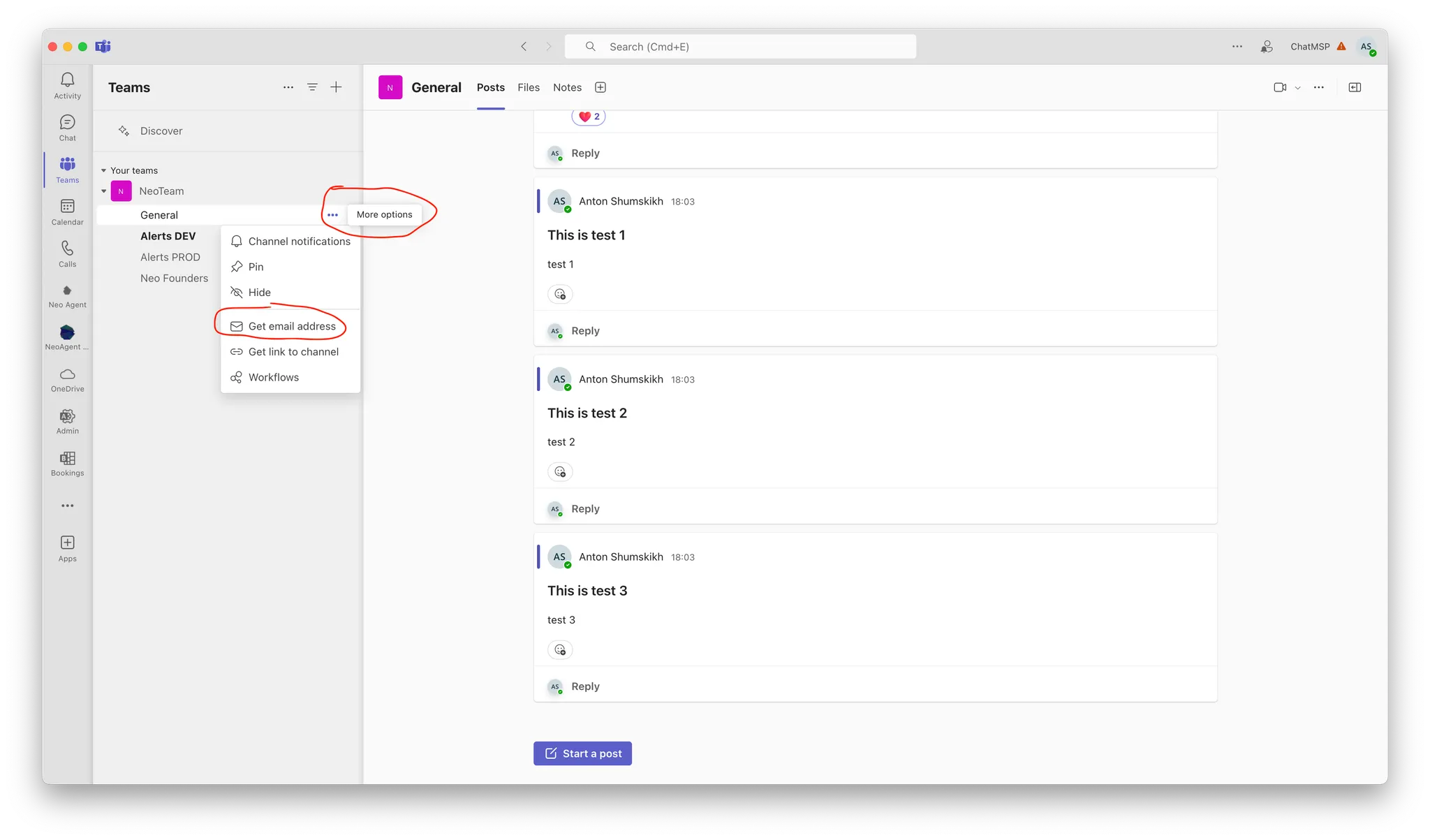
Workflow notifications go to standard Teams channels via the channel's **email address**, not the bot:
Open the channel → click `...` → select `Get email address`.
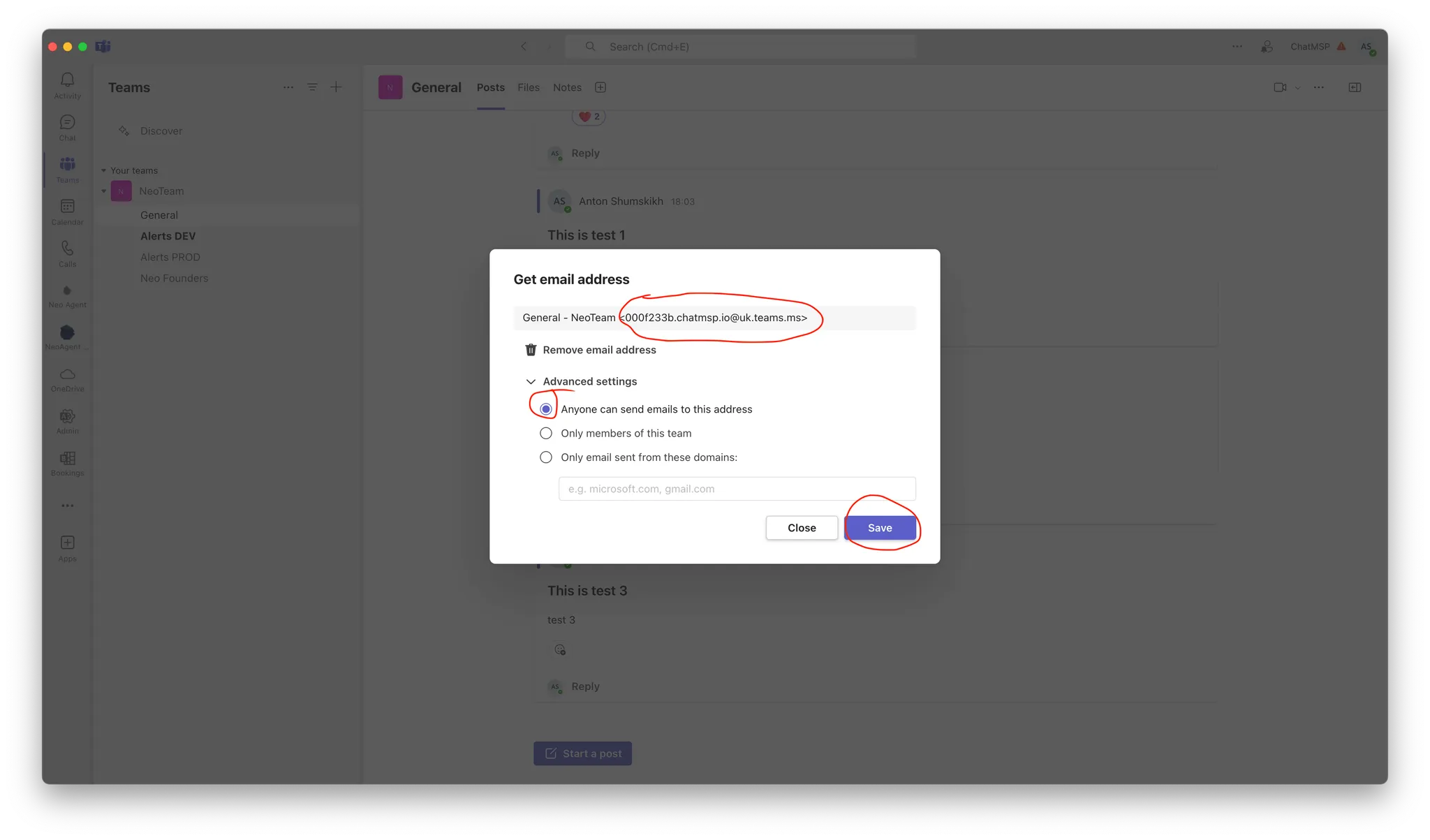
 Open `Advanced settings` and enable `Anyone can send emails to this address`. Copy the email and save.
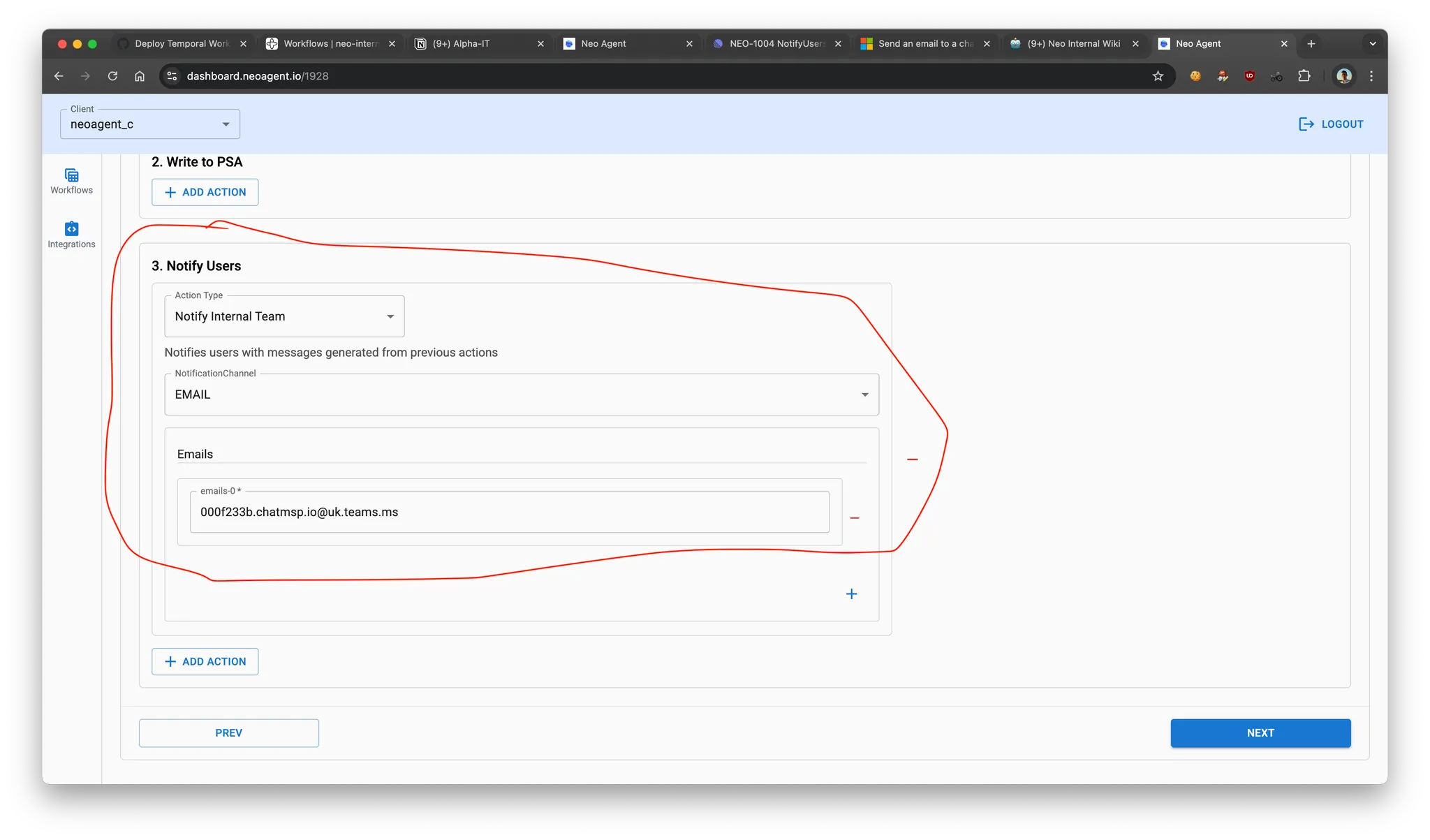
 Paste the channel email into the [Notify Internal Team](/building-automations/actions/notify/notify-internal-team) action as an email recipient.
 ## Troubleshooting
Their Microsoft 365 tenant has the **Neo AI Agent** app blocked. Microsoft then rejects every message and notification to that person with *"(BotDisabledByAdmin) The tenant admin disabled this bot"*, and Teams greys out the compose box. This is set in **your own Teams admin**, not in Neo — and it's per-user, so some technicians can be working while others are blocked.
Fix it in the [Teams admin center](https://admin.teams.microsoft.com): **Teams apps → Manage apps → Neo AI Agent** must be **Allowed**, and the **app permission policy** assigned to the affected technicians must permit it. Then have them re-open the app. Policy changes can take a few hours to apply.
Two causes. Most often the technician is **still only on the retired app** — (re)install the current **Neo AI Agent** (idempotent; see [Which "Neo" do I have?](#which-neo-do-i-have)). If they already have the new app but it's **blocked by your tenant admin** (above), Neo can't deliver to it — clear the app block and have them re-open the app.
## Troubleshooting
Their Microsoft 365 tenant has the **Neo AI Agent** app blocked. Microsoft then rejects every message and notification to that person with *"(BotDisabledByAdmin) The tenant admin disabled this bot"*, and Teams greys out the compose box. This is set in **your own Teams admin**, not in Neo — and it's per-user, so some technicians can be working while others are blocked.
Fix it in the [Teams admin center](https://admin.teams.microsoft.com): **Teams apps → Manage apps → Neo AI Agent** must be **Allowed**, and the **app permission policy** assigned to the affected technicians must permit it. Then have them re-open the app. Policy changes can take a few hours to apply.
Two causes. Most often the technician is **still only on the retired app** — (re)install the current **Neo AI Agent** (idempotent; see [Which "Neo" do I have?](#which-neo-do-i-have)). If they already have the new app but it's **blocked by your tenant admin** (above), Neo can't deliver to it — clear the app block and have them re-open the app.