> ## Documentation Index
> Fetch the complete documentation index at: https://docs.neoagent.io/llms.txt
> Use this file to discover all available pages before exploring further.
# Creating an API Token
> Create a Third-Party Token in Kaseya VSA X for the Neo Agent integration
To enable Neo Agent to interact with your VSA X tenant, create a **Third-Party Token** (a Token ID + Token Secret pair) with the appropriate permissions.
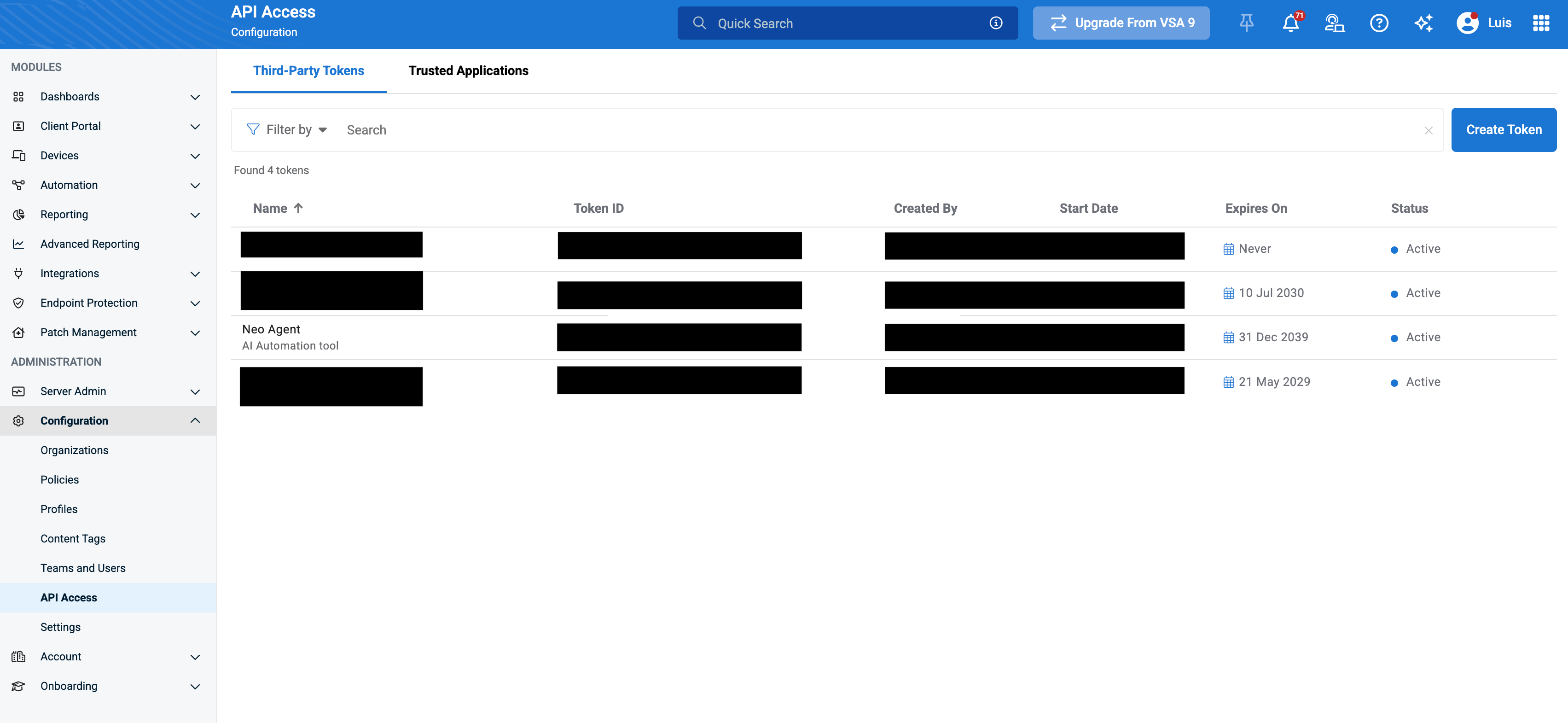
Token management lives under **Configuration → API Access → Third-Party Tokens**. If you don't see **API Access** under Configuration, your account's role lacks the API Access permission — ask a Super Admin to grant it or to create the token for you.
## Creating a Third-Party Token
In your VSA X portal, go to **Configuration → API Access → Third-Party Tokens**, then click **Create Token** in the upper-right corner.
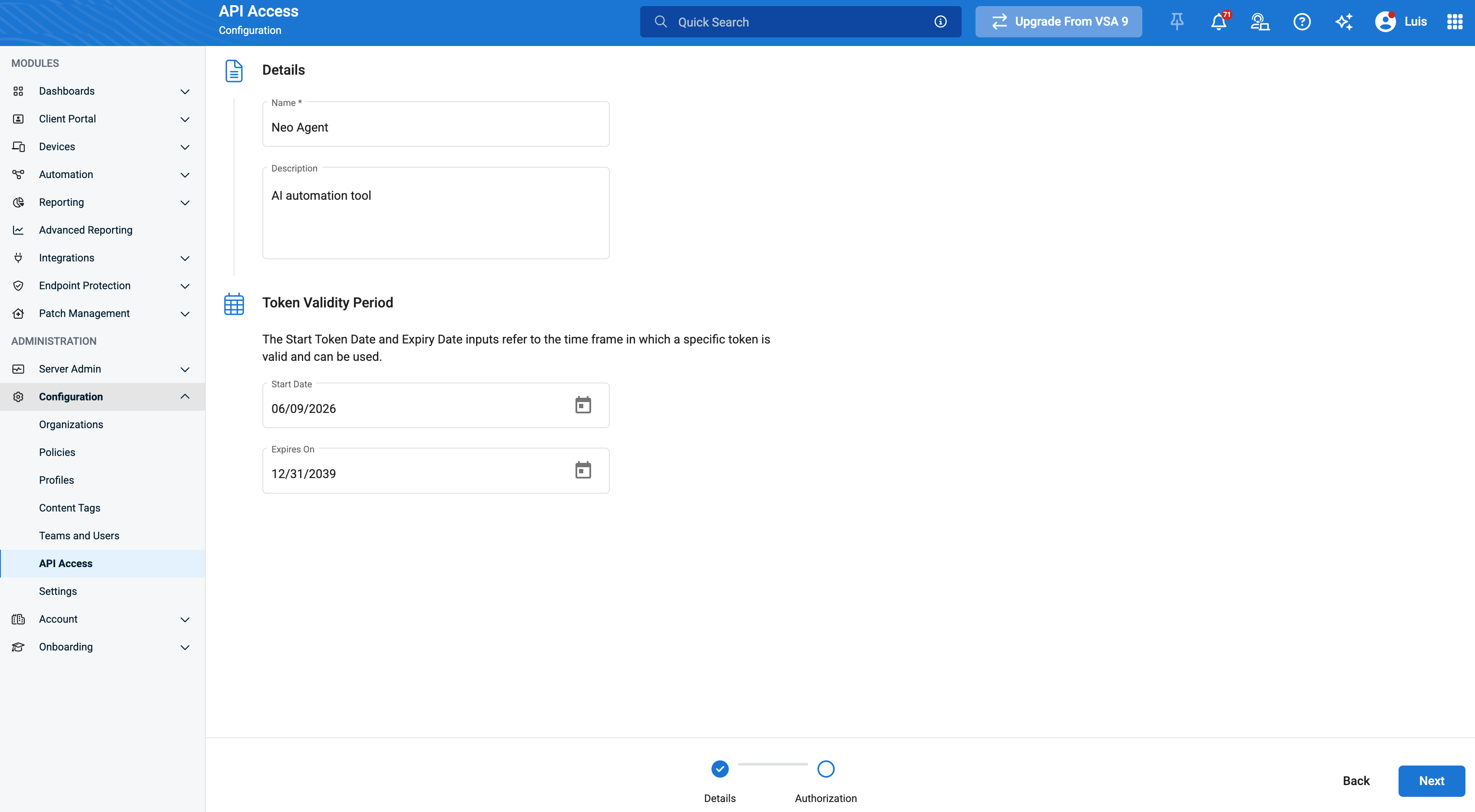
 On the **Details** tab, give the token a recognizable name (e.g. `Neo Agent`) and an optional description. You can optionally set start/expiration dates and restrict the token to specific IP addresses.
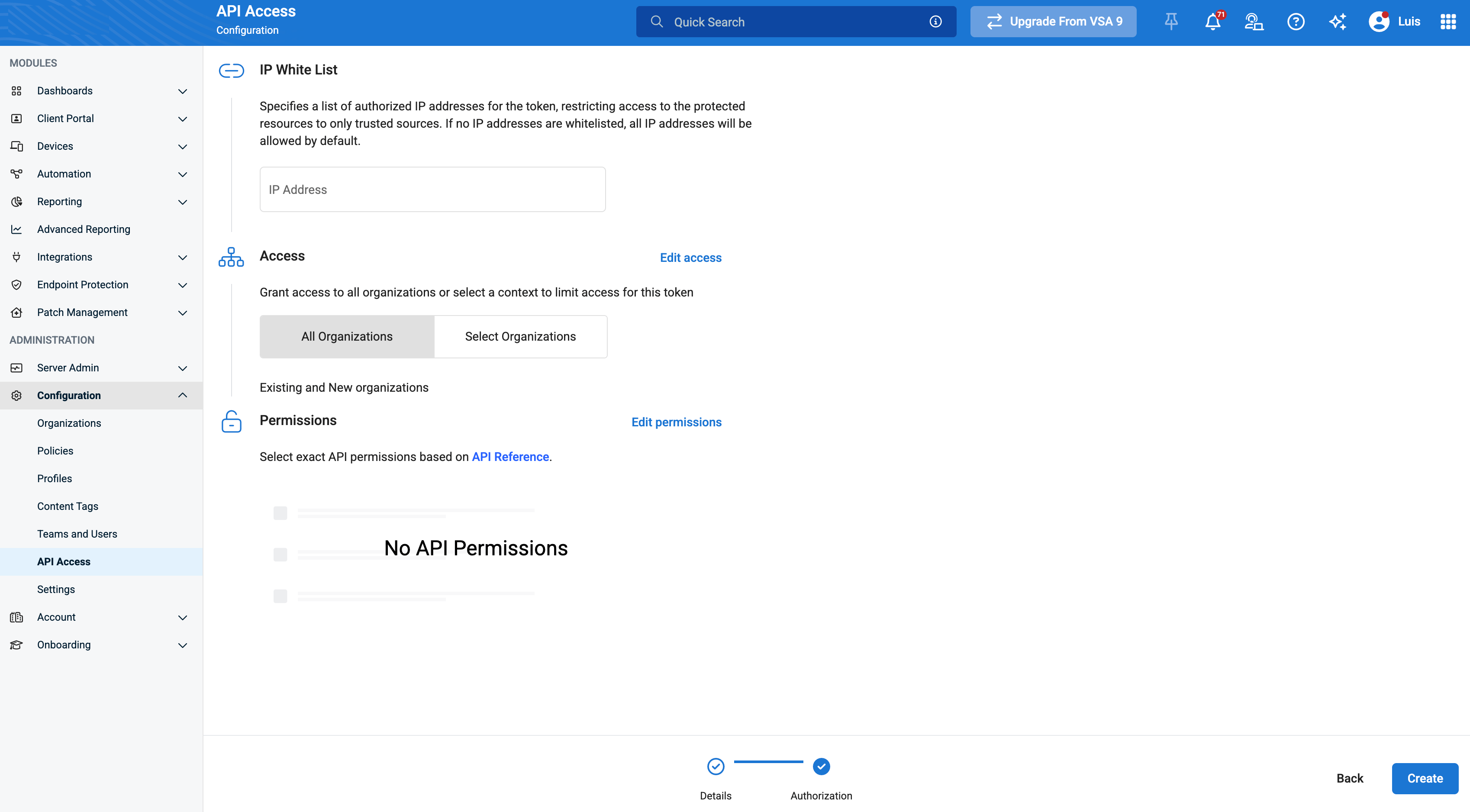
 On the **Authorization** tab, scope the token to the organizations Neo should manage, then grant the API endpoint permissions. Enable the exact set listed under [Permissions to grant](#permissions-to-grant) below — read access across every group, plus the **Automation** run permissions so Neo can execute scripts.
Missing permissions cause Neo to fail with `403 Forbidden` on the affected endpoints. At minimum, grant the **Device**, **Asset**, and **Organization** read permissions so device sync and PSA company mapping work.
Click **Create**. VSA X displays the **Token ID** and **Token Secret** once.
On the **Authorization** tab, scope the token to the organizations Neo should manage, then grant the API endpoint permissions. Enable the exact set listed under [Permissions to grant](#permissions-to-grant) below — read access across every group, plus the **Automation** run permissions so Neo can execute scripts.
Missing permissions cause Neo to fail with `403 Forbidden` on the affected endpoints. At minimum, grant the **Device**, **Asset**, and **Organization** read permissions so device sync and PSA company mapping work.
Click **Create**. VSA X displays the **Token ID** and **Token Secret** once.
 **Important**: Copy both the **Token ID** and **Token Secret** immediately and store them securely. The Token Secret is **not recoverable** after you navigate away — you would have to regenerate it.
Before closing, make sure you've saved:
* The **Token ID**
* The **Token Secret**
* Your tenant URL (e.g. `https://yourtenant.vsax.net`)
## Permissions to grant
Enable the permissions below on the token's **Authorization** tab. The pattern is **read access across every group** plus the **Automation** run permissions so Neo can execute scripts — the create / update / delete write permissions are not needed.
| Group | Enable these permissions |
| --------------------------- | --------------------------------------------------------------------------------------------------------------------------------------------------------------------------------------------------------------------------------------------------------------------------------------------------------------------------------------------------------------------------------------------------------------------------------------------- |
| **Device** | Get a Specific Device · Get All Devices · Get Device Notifications · Get Antivirus Status · Get Device Custom Fields · Get Device Applied Policies |
| **Asset** | Get Asset Information for a Specific Device · Get All Devices and Asset Information |
| **Automation** | Run Task · Get a Specific Task · Get All Tasks · Get Task Execution · Get Task Execution Devices · Get Task Execution Scripts · Get Task Execution Script Output · Run Script · Get a Specific Script · Get All Scripts · Get Script Executions by Device · Get Script Execution Details · Run Workflow · Get a Specific Workflow · Get All Workflows · Get Workflow Executions · Get Workflow Execution Details · Cancel Workflow Executions |
| **Custom Field** | Get a Specific Custom Field · Get All Custom Fields · Get Custom Field Usage |
| **Organization** | Get a Specific Organization · Get All Organizations |
| **Site** | Get a Specific Site · Get All Sites · Get Site Custom Fields |
| **Group** | Get a Specific Group · Get All Groups · Get Group Custom Fields |
| **Environment Information** | Get Environment Information |
Leave the **create / update / delete** permissions — and **Publish a Device** — unchecked. Neo's integration is read-only across your tenant hierarchy and devices; the only writes it needs are the **Automation** run permissions (Run Task / Run Script / Run Workflow) used to execute scripts on devices, including the on-prem AD/Exchange PowerShell flow. If you only want read-only device and asset visibility, you can omit the Automation run permissions too.
A revoked token has a 30-day grace period during which you can regenerate its secret before it's permanently deleted.
## What's Next?
Once you've created your token, you're ready to [connect it to Neo Agent](/integrations/rmm/vsax/connecting-to-neo) using the Token ID and Token Secret.
**Important**: Copy both the **Token ID** and **Token Secret** immediately and store them securely. The Token Secret is **not recoverable** after you navigate away — you would have to regenerate it.
Before closing, make sure you've saved:
* The **Token ID**
* The **Token Secret**
* Your tenant URL (e.g. `https://yourtenant.vsax.net`)
## Permissions to grant
Enable the permissions below on the token's **Authorization** tab. The pattern is **read access across every group** plus the **Automation** run permissions so Neo can execute scripts — the create / update / delete write permissions are not needed.
| Group | Enable these permissions |
| --------------------------- | --------------------------------------------------------------------------------------------------------------------------------------------------------------------------------------------------------------------------------------------------------------------------------------------------------------------------------------------------------------------------------------------------------------------------------------------- |
| **Device** | Get a Specific Device · Get All Devices · Get Device Notifications · Get Antivirus Status · Get Device Custom Fields · Get Device Applied Policies |
| **Asset** | Get Asset Information for a Specific Device · Get All Devices and Asset Information |
| **Automation** | Run Task · Get a Specific Task · Get All Tasks · Get Task Execution · Get Task Execution Devices · Get Task Execution Scripts · Get Task Execution Script Output · Run Script · Get a Specific Script · Get All Scripts · Get Script Executions by Device · Get Script Execution Details · Run Workflow · Get a Specific Workflow · Get All Workflows · Get Workflow Executions · Get Workflow Execution Details · Cancel Workflow Executions |
| **Custom Field** | Get a Specific Custom Field · Get All Custom Fields · Get Custom Field Usage |
| **Organization** | Get a Specific Organization · Get All Organizations |
| **Site** | Get a Specific Site · Get All Sites · Get Site Custom Fields |
| **Group** | Get a Specific Group · Get All Groups · Get Group Custom Fields |
| **Environment Information** | Get Environment Information |
Leave the **create / update / delete** permissions — and **Publish a Device** — unchecked. Neo's integration is read-only across your tenant hierarchy and devices; the only writes it needs are the **Automation** run permissions (Run Task / Run Script / Run Workflow) used to execute scripts on devices, including the on-prem AD/Exchange PowerShell flow. If you only want read-only device and asset visibility, you can omit the Automation run permissions too.
A revoked token has a 30-day grace period during which you can regenerate its secret before it's permanently deleted.
## What's Next?
Once you've created your token, you're ready to [connect it to Neo Agent](/integrations/rmm/vsax/connecting-to-neo) using the Token ID and Token Secret.