> ## Documentation Index
> Fetch the complete documentation index at: https://docs.neoagent.io/llms.txt
> Use this file to discover all available pages before exploring further.
# Generating API Credentials
> Create API access credentials in ConnectWise Asio for Neo Agent integration
To enable Neo Agent to interact with your ConnectWise Asio system, you need to generate API access credentials with the appropriate scopes.
This process involves generating API access credentials (Client ID and Client Secret) in your ConnectWise Asio portal with specific permissions that allow Neo to access your scripts and devices.
## Creating API Access Credentials
Log in to your ConnectWise Asio portal and navigate to the API Access section:
1. Click **Integrations** in the left navigation menu
2. Select **API Access** from the submenu
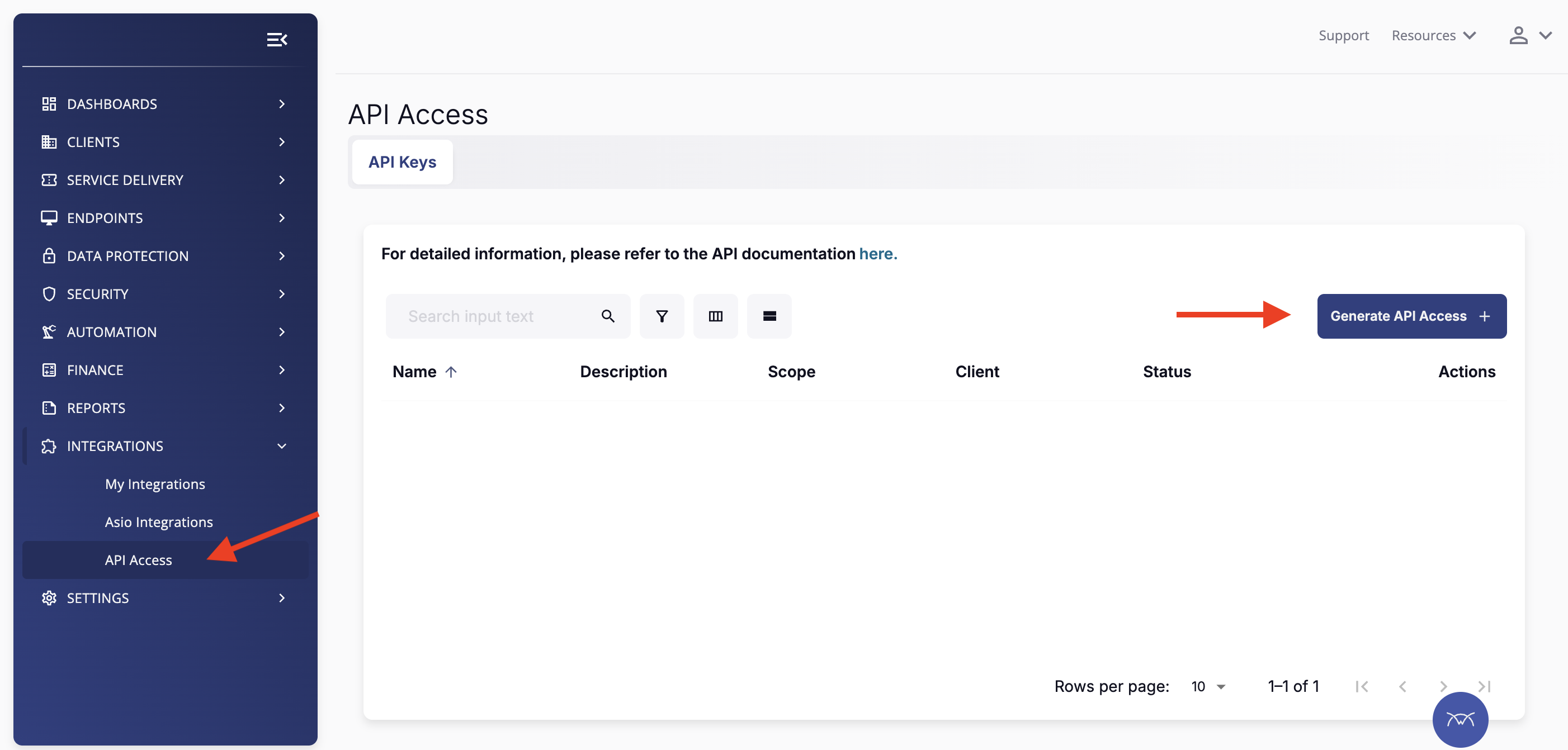 Click the **Generate API Access** button in the top right corner of the API Access page to create new API credentials.
Fill in the API access configuration form:
1. **API Key Name**: Enter a descriptive name (e.g., `neoagent`)
2. **Description**: Add a description for reference (e.g., `Neo Agent Integration`)
3. **Scopes**: Select the required scopes for Neo Agent:
* `Platform - Agent - Read`
* `Platform - Assets - Read`
* `Platform - Automation - Read`
* `Platform - Automation - Create`
* `Platform - Companies - Read`
* `Platform - Contacts - Read`
* `Platform - Devices - Read`
* `Platform - Sites - Read`
* `Platform - Tickets - Read`
4. **Consent**: Check the consent box to acknowledge the API access terms
Click the **Generate API Access** button in the top right corner of the API Access page to create new API credentials.
Fill in the API access configuration form:
1. **API Key Name**: Enter a descriptive name (e.g., `neoagent`)
2. **Description**: Add a description for reference (e.g., `Neo Agent Integration`)
3. **Scopes**: Select the required scopes for Neo Agent:
* `Platform - Agent - Read`
* `Platform - Assets - Read`
* `Platform - Automation - Read`
* `Platform - Automation - Create`
* `Platform - Companies - Read`
* `Platform - Contacts - Read`
* `Platform - Devices - Read`
* `Platform - Sites - Read`
* `Platform - Tickets - Read`
4. **Consent**: Check the consent box to acknowledge the API access terms
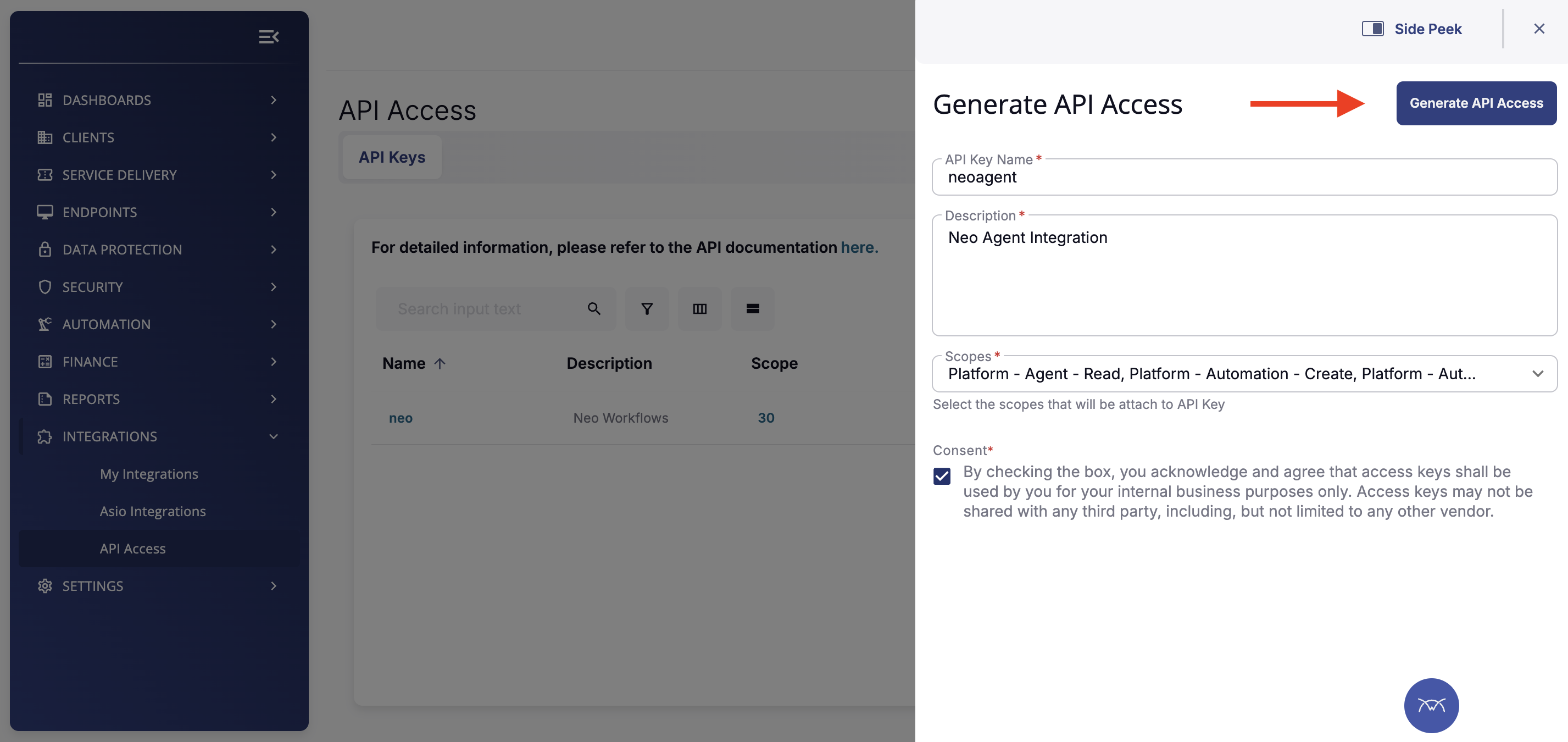 Ensure all required scopes are selected. Missing scopes can cause Neo Agent to fail when attempting to execute scripts or access device information.
Click **Generate API Access** to create your credentials. A panel will appear showing your Client ID and Client Secret.
Ensure all required scopes are selected. Missing scopes can cause Neo Agent to fail when attempting to execute scripts or access device information.
Click **Generate API Access** to create your credentials. A panel will appear showing your Client ID and Client Secret.
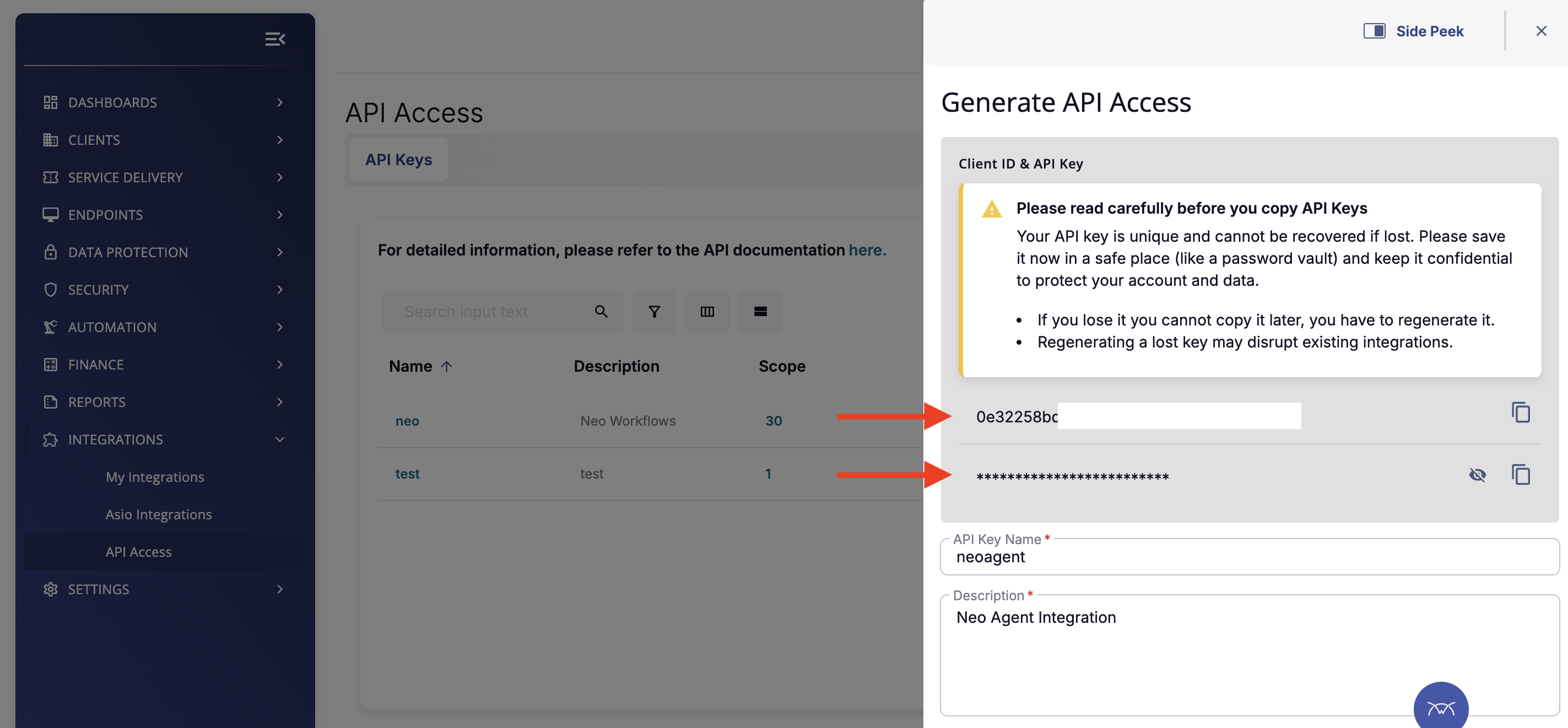 **Important**: Copy both the **Client ID** and **Client Secret** immediately and store them securely. The Client Secret cannot be recovered if lost—you will need to regenerate new credentials.
Before closing this panel, ensure you have saved:
* The **Client ID** (visible in the form)
* The **Client Secret** (hidden by default, click to reveal)
## Required Scopes Reference
The following scopes are required for Neo Agent to function properly:
| Scope | Purpose |
| -------------------------------- | ------------------------------------------------ |
| `Platform - Agent - Read` | Access agent information |
| `Platform - Assets - Read` | Access asset and hardware inventory |
| `Platform - Automation - Read` | List available scripts and automation policies |
| `Platform - Automation - Create` | Execute scripts on devices (coming soon) |
| `Platform - Companies - Read` | Access company/client information |
| `Platform - Contacts - Read` | Access contact information |
| `Platform - Devices - Read` | Access device details and status |
| `Platform - Sites - Read` | Access site configurations |
| `Platform - Tickets - Read` | Access ticket information for device correlation |
If you need Neo to perform additional actions in the future, you may need to regenerate API credentials with additional scopes.
## What's Next?
Once you've successfully generated your API credentials, you're ready to [connect them to Neo Agent](/integrations/rmm/connectwise-rmm/connecting-to-neo) using the Client ID and Client Secret from your ConnectWise Asio portal.
Before proceeding, ensure you have:
* The **Client ID** from your generated API access
* The **Client Secret** from your generated API access
* Your ConnectWise Asio **region** (US, EU, or AU)
**Important**: Copy both the **Client ID** and **Client Secret** immediately and store them securely. The Client Secret cannot be recovered if lost—you will need to regenerate new credentials.
Before closing this panel, ensure you have saved:
* The **Client ID** (visible in the form)
* The **Client Secret** (hidden by default, click to reveal)
## Required Scopes Reference
The following scopes are required for Neo Agent to function properly:
| Scope | Purpose |
| -------------------------------- | ------------------------------------------------ |
| `Platform - Agent - Read` | Access agent information |
| `Platform - Assets - Read` | Access asset and hardware inventory |
| `Platform - Automation - Read` | List available scripts and automation policies |
| `Platform - Automation - Create` | Execute scripts on devices (coming soon) |
| `Platform - Companies - Read` | Access company/client information |
| `Platform - Contacts - Read` | Access contact information |
| `Platform - Devices - Read` | Access device details and status |
| `Platform - Sites - Read` | Access site configurations |
| `Platform - Tickets - Read` | Access ticket information for device correlation |
If you need Neo to perform additional actions in the future, you may need to regenerate API credentials with additional scopes.
## What's Next?
Once you've successfully generated your API credentials, you're ready to [connect them to Neo Agent](/integrations/rmm/connectwise-rmm/connecting-to-neo) using the Client ID and Client Secret from your ConnectWise Asio portal.
Before proceeding, ensure you have:
* The **Client ID** from your generated API access
* The **Client Secret** from your generated API access
* Your ConnectWise Asio **region** (US, EU, or AU)