> ## Documentation Index
> Fetch the complete documentation index at: https://docs.neoagent.io/llms.txt
> Use this file to discover all available pages before exploring further.
# Connecting to Neo Agent
> Configure the connection between your ConnectWise Asio system and Neo Agent using API credentials
Once you've [generated your API credentials](/integrations/rmm/connectwise-rmm/creating-api-key) in ConnectWise Asio, you can configure the connection to Neo Agent through the integrations dashboard.
You'll need the Client ID, Client Secret, and region information from your ConnectWise Asio portal to complete this setup.
## Required Information
Before starting the connection process, gather the following information from your ConnectWise Asio system:
Your ConnectWise Asio region. This determines which API endpoint Neo Agent will use. Available options: **US**, **EU**, or **AU**.
The Client ID from your generated API access credentials in ConnectWise Asio.
The Client Secret from your generated API access credentials in ConnectWise Asio.
## Configuring the Integration
Navigate to the [Neo Agent Dashboard](https://dashboard.neoagent.io/integrations) and log in with your credentials.
From the dashboard:
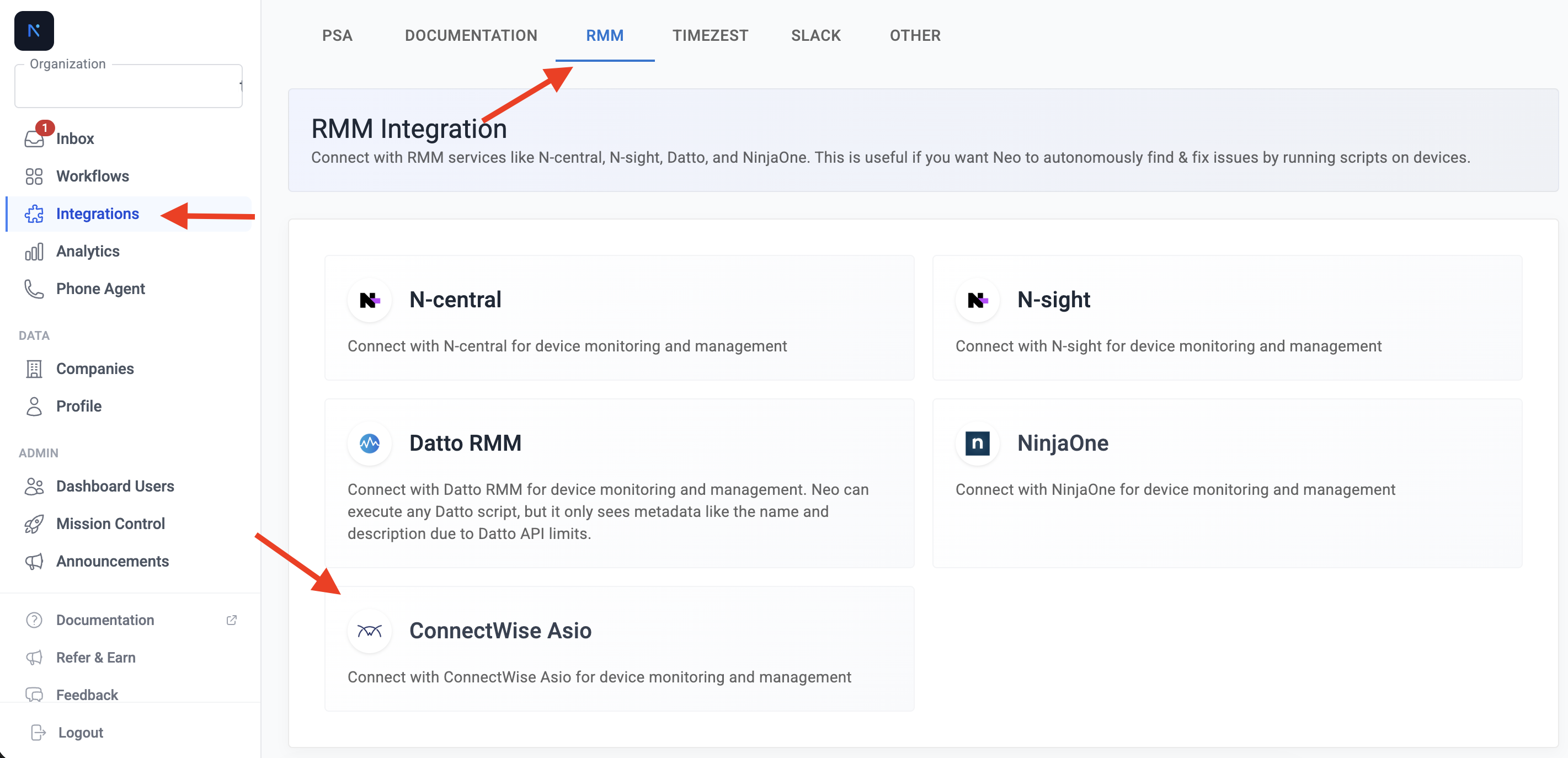
1. Click **Integrations** in the left sidebar
2. Select the **RMM** tab at the top of the page
3. Find and select **ConnectWise Asio** from the list of available RMM integrations
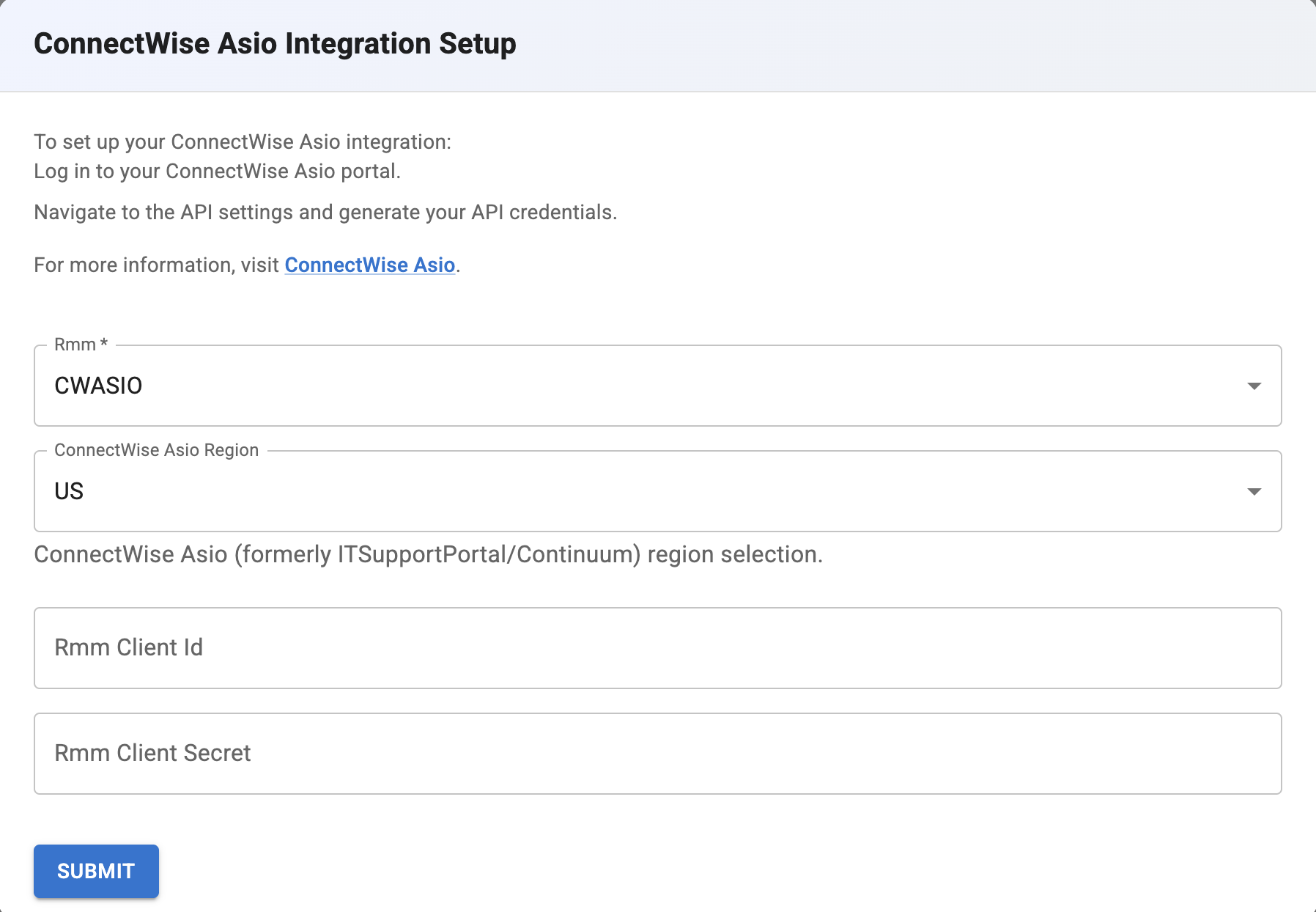
 Complete the ConnectWise Asio Integration Setup form:
1. **RMM**: Ensure **CWASIO** is selected
2. **ConnectWise Asio Region**: Select your region (US, EU, or AU)
3. **RMM Client Id**: Enter your Client ID from ConnectWise Asio
4. **RMM Client Secret**: Enter your Client Secret from ConnectWise Asio
Complete the ConnectWise Asio Integration Setup form:
1. **RMM**: Ensure **CWASIO** is selected
2. **ConnectWise Asio Region**: Select your region (US, EU, or AU)
3. **RMM Client Id**: Enter your Client ID from ConnectWise Asio
4. **RMM Client Secret**: Enter your Client Secret from ConnectWise Asio
 Double-check all credentials for accuracy. Incorrect information will prevent Neo Agent from connecting to your ConnectWise Asio system.
Click **Submit** to save your integration configuration. Neo Agent will validate the credentials and establish a connection to your ConnectWise Asio system.
A successful connection confirms that Neo Agent can access your ConnectWise Asio system with the provided credentials and scopes.
## Determining Your Region
If you're unsure which region your ConnectWise Asio instance uses, check the URL you use to access the portal:
| Portal URL Pattern | Region |
| -------------------------------- | ------ |
| `*.itsupport247.net` (US domain) | US |
| `*.eu.itsupport247.net` | EU |
| `*.au.itsupport247.net` | AU |
ConnectWise Asio (formerly ITSupportPortal/Continuum) uses region-specific API endpoints. Selecting the wrong region will cause authentication failures.
## Troubleshooting Connection Issues
If you encounter issues during the connection process, check the following:
* Verify that the Client ID and Client Secret are correct
* Ensure you copied the full credentials without any extra spaces
* Check that the API access hasn't been revoked in ConnectWise Asio
* Confirm you've selected the correct region
* Review the scopes assigned to your API access in ConnectWise Asio
* Ensure all required scopes listed in the [API credentials guide](/integrations/rmm/connectwise-rmm/creating-api-key) are assigned
* If scopes are missing, generate new API access with the required permissions
* Double-check your portal URL to confirm the correct region
* If you're unsure, try each region option to identify the correct one
* Contact ConnectWise support if you cannot determine your region
If devices or scripts are not showing up after successful connection:
* Verify the API access has the `Platform - Agent - Read` scope
* Ensure the `Platform - Automation - Read` scope is included for script access
* Wait a few minutes for initial synchronization to complete
* Try refreshing the connection in Neo Agent settings
## Configuring Permission Groups
Once the integration is connected, open **Agent Settings → Permission Groups** to choose what the agent is allowed to do in ConnectWise Asio. Each group can be set independently to **Disabled**, **Read-only**, or **Read & Write**:
| Group | Read | Write |
| ------------------------------- | ---------------------------------------------------------------------------------------------------- | ----------------------------------------- |
| **Tickets & Ticketing Lookups** | List and read tickets, notes, statuses, priorities, types, categories, sources, service boards, tags | Create/update tickets and notes |
| **Companies & Sites** | List and read companies and sites | Create/update companies and sites |
| **Contacts** | List and read contacts | Create/update contacts |
| **Device Endpoints** | List and read endpoints (v2 company/site hierarchy) | — |
| **Custom Fields** | List definitions and read values | Write values on companies/sites/endpoints |
| **Policies** | Read policy groups, categories, effective policy, overrides | — |
| **Patching** | Read OS patch catalog and status | — |
| **Alerting** | Read alerts and suspension rules | — |
| **Incidents** | Read Security360 incidents | — |
| **Backup Dashboard** | Read alarms, DR readiness, backup instances | — |
| **Network Devices** | Read network-device inventory | — |
| **Mappings** | Read endpoint/site/integrator mappings | — |
| **Billing** | Read unified product usage | — |
| **Automation** | Read script, shell-script, and task catalog | — |
Write-capable groups default to **Read-only** on existing agents so the expanded v2.5.7 surface is opt-in per tenant — no agent that was previously read-only suddenly starts making changes.
## What's Next?
With your ConnectWise Asio system successfully connected to Neo Agent, you can now:
* **Ticketing workflows**: Neo can triage and create tickets, add notes, and update statuses in ConnectWise Asio
* **Company/site/contact maintenance**: Keep CW Asio CRM data in sync with the agent's workflows
* **Device lookup**: Access endpoint information associated with tickets or end users
* **Script suggestions**: Neo surfaces relevant scripts from your automation catalog
Direct script execution from Neo Agent is not yet exposed by ConnectWise Asio — technicians execute suggested scripts in the CW Asio portal.
Test the integration by asking Neo to find scripts for common issues or by enabling Read & Write on **Tickets** and letting Neo resolve a low-priority ticket end to end.
Double-check all credentials for accuracy. Incorrect information will prevent Neo Agent from connecting to your ConnectWise Asio system.
Click **Submit** to save your integration configuration. Neo Agent will validate the credentials and establish a connection to your ConnectWise Asio system.
A successful connection confirms that Neo Agent can access your ConnectWise Asio system with the provided credentials and scopes.
## Determining Your Region
If you're unsure which region your ConnectWise Asio instance uses, check the URL you use to access the portal:
| Portal URL Pattern | Region |
| -------------------------------- | ------ |
| `*.itsupport247.net` (US domain) | US |
| `*.eu.itsupport247.net` | EU |
| `*.au.itsupport247.net` | AU |
ConnectWise Asio (formerly ITSupportPortal/Continuum) uses region-specific API endpoints. Selecting the wrong region will cause authentication failures.
## Troubleshooting Connection Issues
If you encounter issues during the connection process, check the following:
* Verify that the Client ID and Client Secret are correct
* Ensure you copied the full credentials without any extra spaces
* Check that the API access hasn't been revoked in ConnectWise Asio
* Confirm you've selected the correct region
* Review the scopes assigned to your API access in ConnectWise Asio
* Ensure all required scopes listed in the [API credentials guide](/integrations/rmm/connectwise-rmm/creating-api-key) are assigned
* If scopes are missing, generate new API access with the required permissions
* Double-check your portal URL to confirm the correct region
* If you're unsure, try each region option to identify the correct one
* Contact ConnectWise support if you cannot determine your region
If devices or scripts are not showing up after successful connection:
* Verify the API access has the `Platform - Agent - Read` scope
* Ensure the `Platform - Automation - Read` scope is included for script access
* Wait a few minutes for initial synchronization to complete
* Try refreshing the connection in Neo Agent settings
## Configuring Permission Groups
Once the integration is connected, open **Agent Settings → Permission Groups** to choose what the agent is allowed to do in ConnectWise Asio. Each group can be set independently to **Disabled**, **Read-only**, or **Read & Write**:
| Group | Read | Write |
| ------------------------------- | ---------------------------------------------------------------------------------------------------- | ----------------------------------------- |
| **Tickets & Ticketing Lookups** | List and read tickets, notes, statuses, priorities, types, categories, sources, service boards, tags | Create/update tickets and notes |
| **Companies & Sites** | List and read companies and sites | Create/update companies and sites |
| **Contacts** | List and read contacts | Create/update contacts |
| **Device Endpoints** | List and read endpoints (v2 company/site hierarchy) | — |
| **Custom Fields** | List definitions and read values | Write values on companies/sites/endpoints |
| **Policies** | Read policy groups, categories, effective policy, overrides | — |
| **Patching** | Read OS patch catalog and status | — |
| **Alerting** | Read alerts and suspension rules | — |
| **Incidents** | Read Security360 incidents | — |
| **Backup Dashboard** | Read alarms, DR readiness, backup instances | — |
| **Network Devices** | Read network-device inventory | — |
| **Mappings** | Read endpoint/site/integrator mappings | — |
| **Billing** | Read unified product usage | — |
| **Automation** | Read script, shell-script, and task catalog | — |
Write-capable groups default to **Read-only** on existing agents so the expanded v2.5.7 surface is opt-in per tenant — no agent that was previously read-only suddenly starts making changes.
## What's Next?
With your ConnectWise Asio system successfully connected to Neo Agent, you can now:
* **Ticketing workflows**: Neo can triage and create tickets, add notes, and update statuses in ConnectWise Asio
* **Company/site/contact maintenance**: Keep CW Asio CRM data in sync with the agent's workflows
* **Device lookup**: Access endpoint information associated with tickets or end users
* **Script suggestions**: Neo surfaces relevant scripts from your automation catalog
Direct script execution from Neo Agent is not yet exposed by ConnectWise Asio — technicians execute suggested scripts in the CW Asio portal.
Test the integration by asking Neo to find scripts for common issues or by enabling Read & Write on **Tickets** and letting Neo resolve a low-priority ticket end to end.