> ## Documentation Index
> Fetch the complete documentation index at: https://docs.neoagent.io/llms.txt
> Use this file to discover all available pages before exploring further.
# Creating a Security Group
> Create a Syncro security group for Neo Agent with the permissions it needs, then assign it to the Neo user
Start here. Syncro limits an API token to the permissions of the user who creates it, so the Neo user must hold everything you want the token to have — and that comes from its security group.
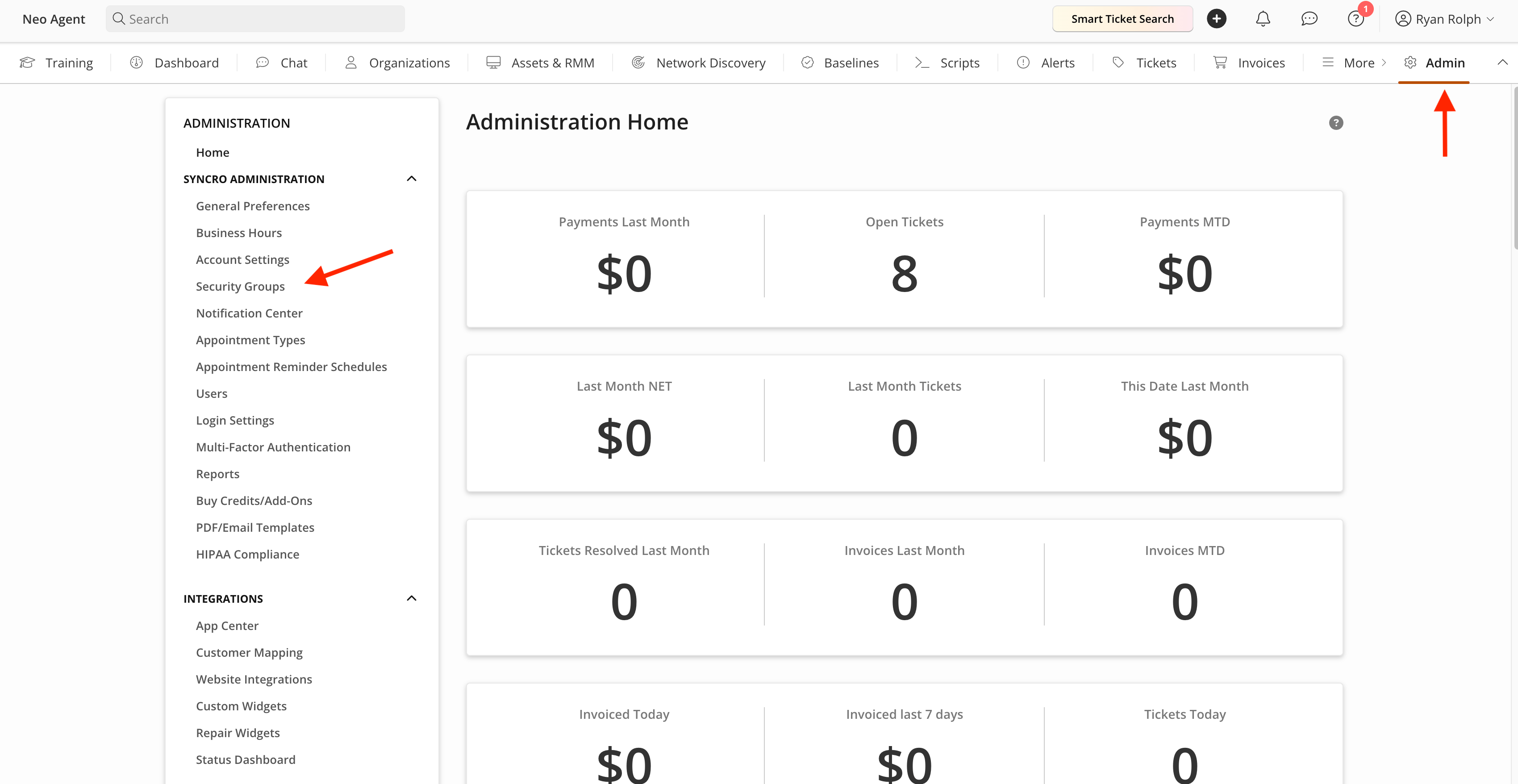
In Syncro, go to **Admin → Syncro Administration → Security Groups**, then create a new group.
 Name it `Neo Agent SG`. Under **Access Type**, leave **All Customers** selected.
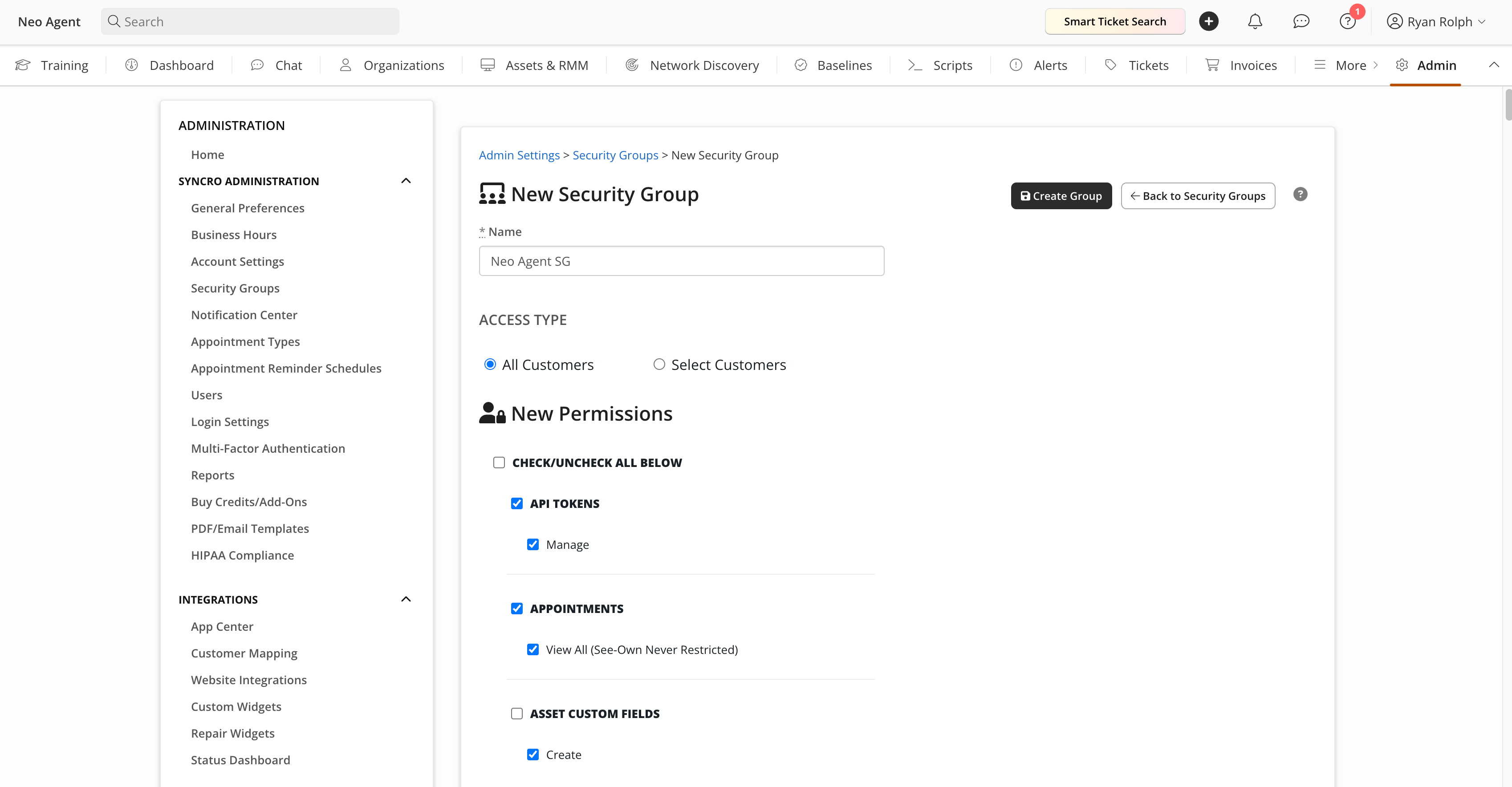 **Do not choose "Select Customers".** It scopes the group to specific customers, so Neo would sync and automate only that subset — with nothing to indicate the rest is missing. Same class of problem as the "mine only" ticket restriction.
Every permission is off by default. Work down the list and tick each one in the tables that follow; anything not listed stays off.
Click **Create Group**. Then create your dedicated Neo user (or edit it) and set its security group to `Neo Agent SG`.
**API Tokens → Manage is required.** Without it the Neo user cannot create its own API token, and you would have to create the token as an admin — which binds it to the admin account and defeats the point of a dedicated user.
## Permissions
### Tickets
The core of the integration.
| Section | Tick |
| --------------------------- | ------------------------------------------------------------------------------------------------------------------------ |
| **Tickets** | Create · Edit · List/Search · Merge · Use Ticket Charges · View Details · View 'Their Ticket' Details (Assigned To Them) |
| **Ticket Comments** | New · Shareable Calendar Links (Manage) |
| **Ticket Custom Fields** | Manage |
| **Ticket Tags** | Create · View |
| **Ticket SLA** | Edit |
| **Ticket Parent-Child** | Edit |
| **Ticket Attachments** | View |
| **Ticket Canned Responses** | Manage |
| **Ticket Blueprints** | Create Ticket From Blueprint · Manage |
| **Ticket Workflows** | Manage |
| **Ticket Worksheets** | Add · Manage |
| **Ticket Automations** | Create · List · Run Now |
| **Recurring Tickets** | Create · Edit · List |
### Time tracking
| Section | Tick |
| ----------------- | ------------------------------------------------------------------------ |
| **Ticket Timers** | Add For Another Technician · Overview · Toggle Time Entry Billable State |
| **Timelogs** | Manage |
### Customers and contacts
| Section | Tick |
| -------------------- | -------------------------------- |
| **Customers** | Edit · List/Search · View Detail |
| **Customer Tags** | Create · View |
| **Customer Mapping** | View |
| **Contact Tags** | Create · View |
| **Contracts** | Edit · List/Search |
**Contacts** has only Export and Import options — leave both off. Neo reads contacts through the customer permissions above, so there is no separate contact-view permission to find.
### Assets and RMM
| Section | Tick |
| ------------------------- | --------------------------------------------------------------------------------------------------------------------------------------------------------------------------------------------------------------- |
| **Assets** | Allow Backgrounding Tools · Assets Pending Approval · Bulk Script Execute · Edit · Install Windows Patches Manually · List/Search · Reboot · View Archived Assets · View Details · View Thumbnail · Wake On Lan |
| **Asset Custom Fields** | Create · Edit · View |
| **RMM Alerts** | Clear/Manage · Create · List |
| **Automated Remediation** | Create · Edit · List |
| **Policies** | List |
| **Network Discovery** | Run Profile · View Profile |
**Assets → Create**, **Delete**, **Archive**, **Allow Remote Access** and **Edit Policy (\$)** stay off — Neo works on assets Syncro already knows about.
### Scripts
| Section | Tick |
| ---------------------------- | -------------------------------------- |
| **Scripts** | Edit · Execute · Favorite · List · New |
| **Script Categories** | Edit · List · New |
| **Script Categories Access** | All Categories |
### Billing and inventory
Needed only if you want Neo to reason about billing. Safe to leave off otherwise.
| Section | Tick |
| ------------------- | --------------------------------------------------------- |
| **Products** | Create · Edit · Edit Quantities · List/Search · View Cost |
| **Estimates** | Create · Edit · List/Search · View Details |
| **Invoices** | List/Search · View Details |
| **Purchase Orders** | List/Search · View Details |
| **Parts Orders** | List/Search · View |
| **Line Item** | View Cost |
Invoices are read-only here — no Create, Edit, Delete or Refund. Neo can reference invoices without being able to change what a customer is billed.
### Other
| Section | Tick |
| ----------------- | ----------------------------------- |
| **API Tokens** | Manage |
| **Appointments** | View All (See-Own Never Restricted) |
| **Documentation** | Allow Usage · Create · Edit |
| **Reports** | View |
## Next Steps
Sign in as the Neo user and generate the API token.
**Do not choose "Select Customers".** It scopes the group to specific customers, so Neo would sync and automate only that subset — with nothing to indicate the rest is missing. Same class of problem as the "mine only" ticket restriction.
Every permission is off by default. Work down the list and tick each one in the tables that follow; anything not listed stays off.
Click **Create Group**. Then create your dedicated Neo user (or edit it) and set its security group to `Neo Agent SG`.
**API Tokens → Manage is required.** Without it the Neo user cannot create its own API token, and you would have to create the token as an admin — which binds it to the admin account and defeats the point of a dedicated user.
## Permissions
### Tickets
The core of the integration.
| Section | Tick |
| --------------------------- | ------------------------------------------------------------------------------------------------------------------------ |
| **Tickets** | Create · Edit · List/Search · Merge · Use Ticket Charges · View Details · View 'Their Ticket' Details (Assigned To Them) |
| **Ticket Comments** | New · Shareable Calendar Links (Manage) |
| **Ticket Custom Fields** | Manage |
| **Ticket Tags** | Create · View |
| **Ticket SLA** | Edit |
| **Ticket Parent-Child** | Edit |
| **Ticket Attachments** | View |
| **Ticket Canned Responses** | Manage |
| **Ticket Blueprints** | Create Ticket From Blueprint · Manage |
| **Ticket Workflows** | Manage |
| **Ticket Worksheets** | Add · Manage |
| **Ticket Automations** | Create · List · Run Now |
| **Recurring Tickets** | Create · Edit · List |
### Time tracking
| Section | Tick |
| ----------------- | ------------------------------------------------------------------------ |
| **Ticket Timers** | Add For Another Technician · Overview · Toggle Time Entry Billable State |
| **Timelogs** | Manage |
### Customers and contacts
| Section | Tick |
| -------------------- | -------------------------------- |
| **Customers** | Edit · List/Search · View Detail |
| **Customer Tags** | Create · View |
| **Customer Mapping** | View |
| **Contact Tags** | Create · View |
| **Contracts** | Edit · List/Search |
**Contacts** has only Export and Import options — leave both off. Neo reads contacts through the customer permissions above, so there is no separate contact-view permission to find.
### Assets and RMM
| Section | Tick |
| ------------------------- | --------------------------------------------------------------------------------------------------------------------------------------------------------------------------------------------------------------- |
| **Assets** | Allow Backgrounding Tools · Assets Pending Approval · Bulk Script Execute · Edit · Install Windows Patches Manually · List/Search · Reboot · View Archived Assets · View Details · View Thumbnail · Wake On Lan |
| **Asset Custom Fields** | Create · Edit · View |
| **RMM Alerts** | Clear/Manage · Create · List |
| **Automated Remediation** | Create · Edit · List |
| **Policies** | List |
| **Network Discovery** | Run Profile · View Profile |
**Assets → Create**, **Delete**, **Archive**, **Allow Remote Access** and **Edit Policy (\$)** stay off — Neo works on assets Syncro already knows about.
### Scripts
| Section | Tick |
| ---------------------------- | -------------------------------------- |
| **Scripts** | Edit · Execute · Favorite · List · New |
| **Script Categories** | Edit · List · New |
| **Script Categories Access** | All Categories |
### Billing and inventory
Needed only if you want Neo to reason about billing. Safe to leave off otherwise.
| Section | Tick |
| ------------------- | --------------------------------------------------------- |
| **Products** | Create · Edit · Edit Quantities · List/Search · View Cost |
| **Estimates** | Create · Edit · List/Search · View Details |
| **Invoices** | List/Search · View Details |
| **Purchase Orders** | List/Search · View Details |
| **Parts Orders** | List/Search · View |
| **Line Item** | View Cost |
Invoices are read-only here — no Create, Edit, Delete or Refund. Neo can reference invoices without being able to change what a customer is billed.
### Other
| Section | Tick |
| ----------------- | ----------------------------------- |
| **API Tokens** | Manage |
| **Appointments** | View All (See-Own Never Restricted) |
| **Documentation** | Allow Usage · Create · Edit |
| **Reports** | View |
## Next Steps
Sign in as the Neo user and generate the API token.