> ## Documentation Index
> Fetch the complete documentation index at: https://docs.neoagent.io/llms.txt
> Use this file to discover all available pages before exploring further.
# Hudu
> Connect Hudu for documentation sync and direct API access from Neo agents
Neo Agent integrates with Hudu to automatically synchronize your documentation and give agents direct API access to your Hudu instance. Once connected, Neo indexes your articles, assets, and procedures for search, and agents can read and manage Hudu resources based on the permissions you configure.
Hudu provides robust API access, so Neo can keep your documentation up to date without manual exports — and agents can interact with Hudu directly during ticket resolution.
1. Log in to your Hudu instance.
2. Go to **Admin** → **API**.
3. Click **Add New API Key**.
4. Give the key a descriptive name (e.g., "Neo Agent").
5. Copy the API key and store it securely.
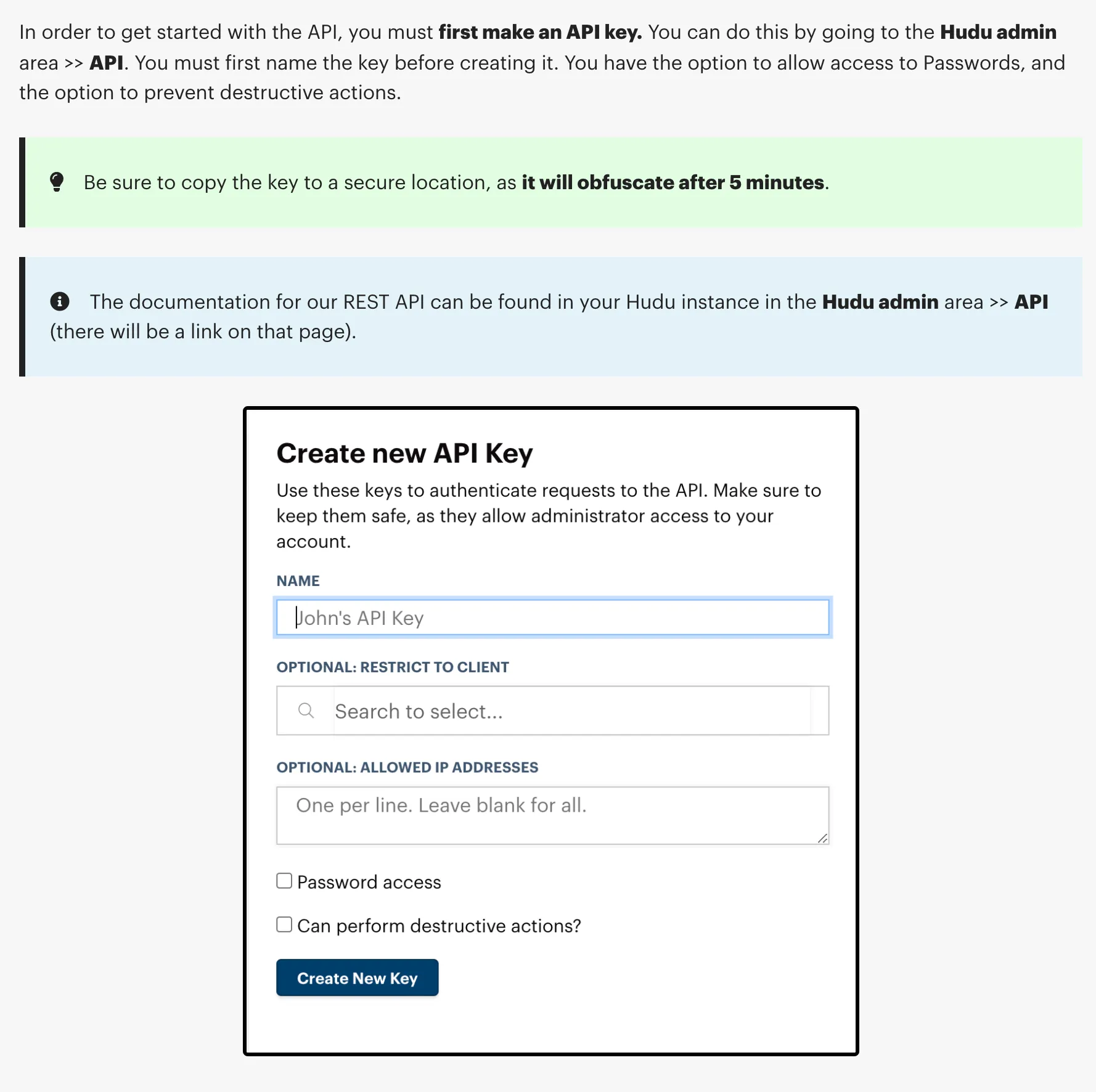 For agents with write permissions, the API key must have full access. For read-only documentation sync, a read-only key is sufficient.
1. In the Neo Dashboard, open **Integrations**.
2. Select the **Documentation** tab and add **Hudu**.
3. Enter your Hudu URL and API key.
Examples for your Hudu URL:
* `https://your-company.huducloud.com` (cloud-hosted)
* `https://hudu.your-domain.com` (self-hosted)
After saving the integration:
* Neo connects to Hudu using your API key and URL
* Performs an initial sync of all accessible articles, assets, and procedures
* Parses content and metadata, then indexes it in Neo's search engine
* Re-syncs periodically to pick up additions, edits, and removals
No manual uploads required. Your Hudu docs stay current automatically.
## What gets synced
Neo syncs the following from Hudu for documentation search:
| Content Type | Status |
| ------------------------------------------ | ------------------------- |
| **Articles** (Knowledge Base) | Synced |
| **Assets** (structured data) | Synced |
| **Procedures** (step-by-step process docs) | Synced |
| **Companies** | Synced (for organization) |
Passwords are **never** imported, accessed, or stored by Neo's documentation sync. Agent access to passwords is controlled separately via permission groups and always requires technician approval for write operations.
## Agent API access
When you enable the **Hudu API** tool on an agent, it can interact with your Hudu instance directly during ticket resolution — looking up documentation, creating articles, managing assets, and more.
### Permission groups
Agent access to Hudu is controlled through **8 permission groups**, each configurable as Disabled, Read Only, or Read/Write:
| Permission Group | What it controls |
| ------------------ | ------------------------------------------------------------------------- |
| **Companies** | Companies, relations, activity logs, matchers, integration cards |
| **Articles** | Knowledge base articles, procedures, uploads, public photos |
| **Assets** | Asset records — structured data entries created from asset layout schemas |
| **Asset Layouts** | Asset layout definitions — the schemas that define asset structure |
| **Passwords** | Asset passwords and password folders |
| **Folders** | Documentation folders for organizing articles |
| **Infrastructure** | Networks, VLANs, VLAN zones, IP addresses (IPAM), rack storages |
| **Websites** | Monitored website entries — uptime and SSL tracking |
### Access profiles
For quick setup, choose a preset access profile:
All 8 groups set to read-only. The agent can look up any Hudu data but cannot make changes.
Read/write for Articles, Assets, Folders, and Websites. Read-only for everything else. Ideal for agents that create and update documentation autonomously.
All groups read/write with delete enabled. Passwords still require technician approval for write operations. Company deletion is always blocked.
### Safety controls
* **Passwords always require approval** — write operations on passwords trigger technician-in-the-loop approval regardless of permission settings.
* **Company deletion is blocked** — agents cannot delete companies, even with full access.
* **Delete must be explicitly enabled** — each permission group has a separate "Allow Delete" toggle.
## Troubleshooting
If a sync cannot connect to your Hudu instance, Neo posts an action-required notification to your dashboard inbox (and emails your admins if the problem persists across consecutive syncs):
* **Hudu unreachable** — Neo could not open a connection to your Hudu URL at all (timeout, connection refused, or DNS failure). Check that your instance is online and reachable from the internet. Self-hosted instances behind a firewall need Neo's IP addresses whitelisted — see [IP whitelisting](/integrations/ip-whitelisting).
* **Access denied** — your instance responded but rejected the API key (401/403). Re-check the Hudu URL and API key in the integration settings, and any WAF rules in front of your instance.
A sync that fails this way is retried automatically on the next scheduled run — a brief outage on your side self-heals without any action in Neo.
## Security
* Documentation sync only reads articles, assets, and procedures — no write access required for sync
* Passwords are **never** synced or stored by Neo
* Agent write access is opt-in per permission group
* All data is encrypted in transit and at rest
* API keys are stored in Azure Key Vault, never in plaintext
For agents with write permissions, the API key must have full access. For read-only documentation sync, a read-only key is sufficient.
1. In the Neo Dashboard, open **Integrations**.
2. Select the **Documentation** tab and add **Hudu**.
3. Enter your Hudu URL and API key.
Examples for your Hudu URL:
* `https://your-company.huducloud.com` (cloud-hosted)
* `https://hudu.your-domain.com` (self-hosted)
After saving the integration:
* Neo connects to Hudu using your API key and URL
* Performs an initial sync of all accessible articles, assets, and procedures
* Parses content and metadata, then indexes it in Neo's search engine
* Re-syncs periodically to pick up additions, edits, and removals
No manual uploads required. Your Hudu docs stay current automatically.
## What gets synced
Neo syncs the following from Hudu for documentation search:
| Content Type | Status |
| ------------------------------------------ | ------------------------- |
| **Articles** (Knowledge Base) | Synced |
| **Assets** (structured data) | Synced |
| **Procedures** (step-by-step process docs) | Synced |
| **Companies** | Synced (for organization) |
Passwords are **never** imported, accessed, or stored by Neo's documentation sync. Agent access to passwords is controlled separately via permission groups and always requires technician approval for write operations.
## Agent API access
When you enable the **Hudu API** tool on an agent, it can interact with your Hudu instance directly during ticket resolution — looking up documentation, creating articles, managing assets, and more.
### Permission groups
Agent access to Hudu is controlled through **8 permission groups**, each configurable as Disabled, Read Only, or Read/Write:
| Permission Group | What it controls |
| ------------------ | ------------------------------------------------------------------------- |
| **Companies** | Companies, relations, activity logs, matchers, integration cards |
| **Articles** | Knowledge base articles, procedures, uploads, public photos |
| **Assets** | Asset records — structured data entries created from asset layout schemas |
| **Asset Layouts** | Asset layout definitions — the schemas that define asset structure |
| **Passwords** | Asset passwords and password folders |
| **Folders** | Documentation folders for organizing articles |
| **Infrastructure** | Networks, VLANs, VLAN zones, IP addresses (IPAM), rack storages |
| **Websites** | Monitored website entries — uptime and SSL tracking |
### Access profiles
For quick setup, choose a preset access profile:
All 8 groups set to read-only. The agent can look up any Hudu data but cannot make changes.
Read/write for Articles, Assets, Folders, and Websites. Read-only for everything else. Ideal for agents that create and update documentation autonomously.
All groups read/write with delete enabled. Passwords still require technician approval for write operations. Company deletion is always blocked.
### Safety controls
* **Passwords always require approval** — write operations on passwords trigger technician-in-the-loop approval regardless of permission settings.
* **Company deletion is blocked** — agents cannot delete companies, even with full access.
* **Delete must be explicitly enabled** — each permission group has a separate "Allow Delete" toggle.
## Troubleshooting
If a sync cannot connect to your Hudu instance, Neo posts an action-required notification to your dashboard inbox (and emails your admins if the problem persists across consecutive syncs):
* **Hudu unreachable** — Neo could not open a connection to your Hudu URL at all (timeout, connection refused, or DNS failure). Check that your instance is online and reachable from the internet. Self-hosted instances behind a firewall need Neo's IP addresses whitelisted — see [IP whitelisting](/integrations/ip-whitelisting).
* **Access denied** — your instance responded but rejected the API key (401/403). Re-check the Hudu URL and API key in the integration settings, and any WAF rules in front of your instance.
A sync that fails this way is retried automatically on the next scheduled run — a brief outage on your side self-heals without any action in Neo.
## Security
* Documentation sync only reads articles, assets, and procedures — no write access required for sync
* Passwords are **never** synced or stored by Neo
* Agent write access is opt-in per permission group
* All data is encrypted in transit and at rest
* API keys are stored in Azure Key Vault, never in plaintext