> ## Documentation Index
> Fetch the complete documentation index at: https://docs.neoagent.io/llms.txt
> Use this file to discover all available pages before exploring further.
# Granting Access to External Users
> Safely provide Neo Agent access to contractors and third-party support engineers through Microsoft Entra ID
Sometimes, you may want to give access to **Neo Agent** to an external user, such as a contractor or third-party support engineer. This guide explains how to add them as a **Guest User** in your Microsoft Entra ID (formerly Azure AD) tenant and limit their access so they can only use the Neo Agent web app.
Invite the external user with a **personal email** (Gmail, Outlook, etc.). Inviting someone with a **work email from another Microsoft 365 organization** isn't supported yet — Microsoft signs them into their own organization, so they can't reach your Neo Agent dashboard. Native cross-organization access is planned.
## Add External User as a Guest in Azure AD
Go to the **Microsoft Entra admin center**: [https://entra.microsoft.com](https://entra.microsoft.com)
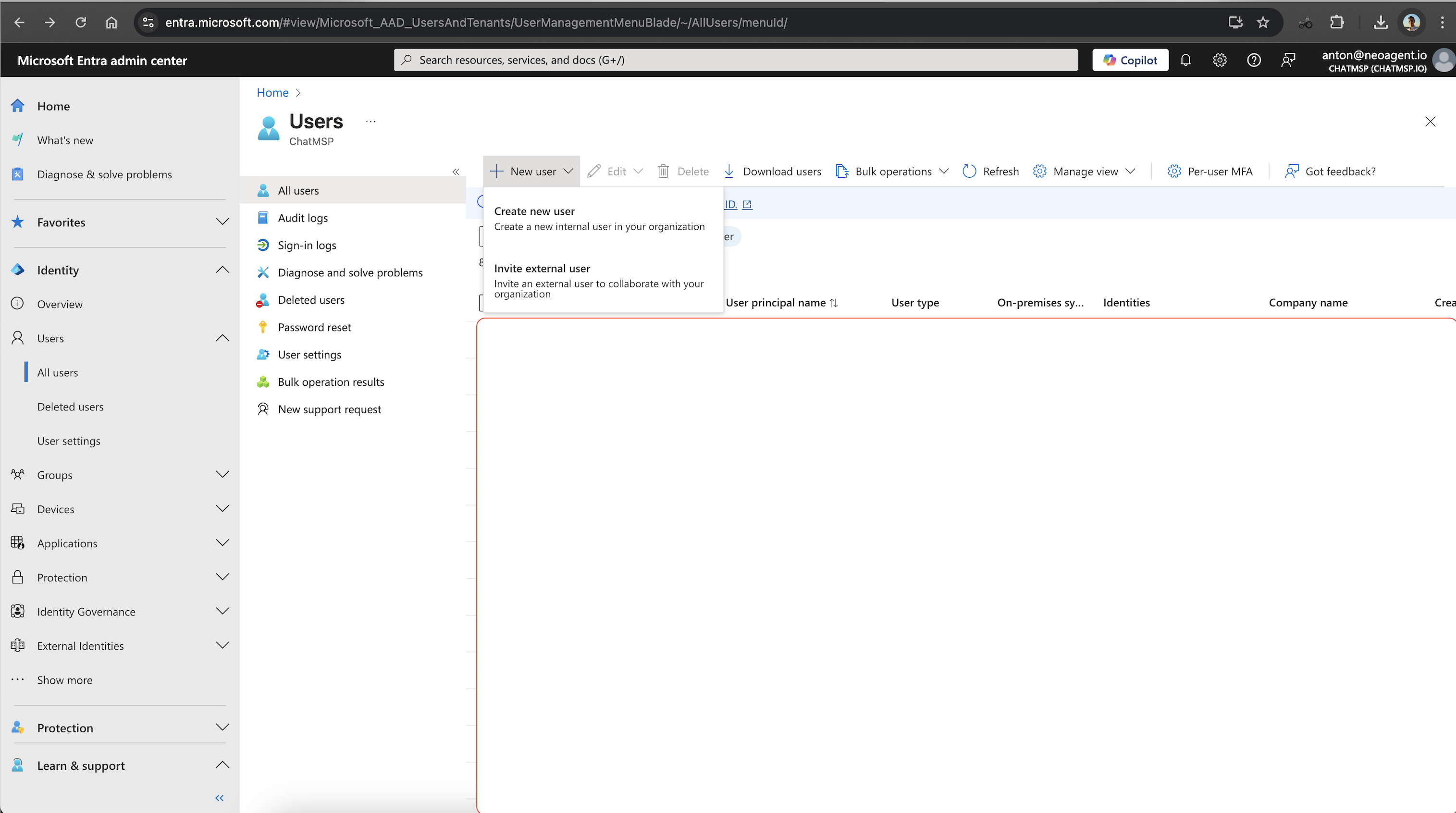
In the left-hand menu, navigate to: **Identity > Users > All users**
Click on the arrow next to the **New user** button and select **Invite external user**
Complete the invitation form:
* **Display Name**: Full name of the user
* **Email**: External **personal** email address (e.g., Gmail or Outlook)
* You may optionally personalize the invitation message
Click **Invite** to send the invitation
 ## Assign Guest User to the Neo Agent App
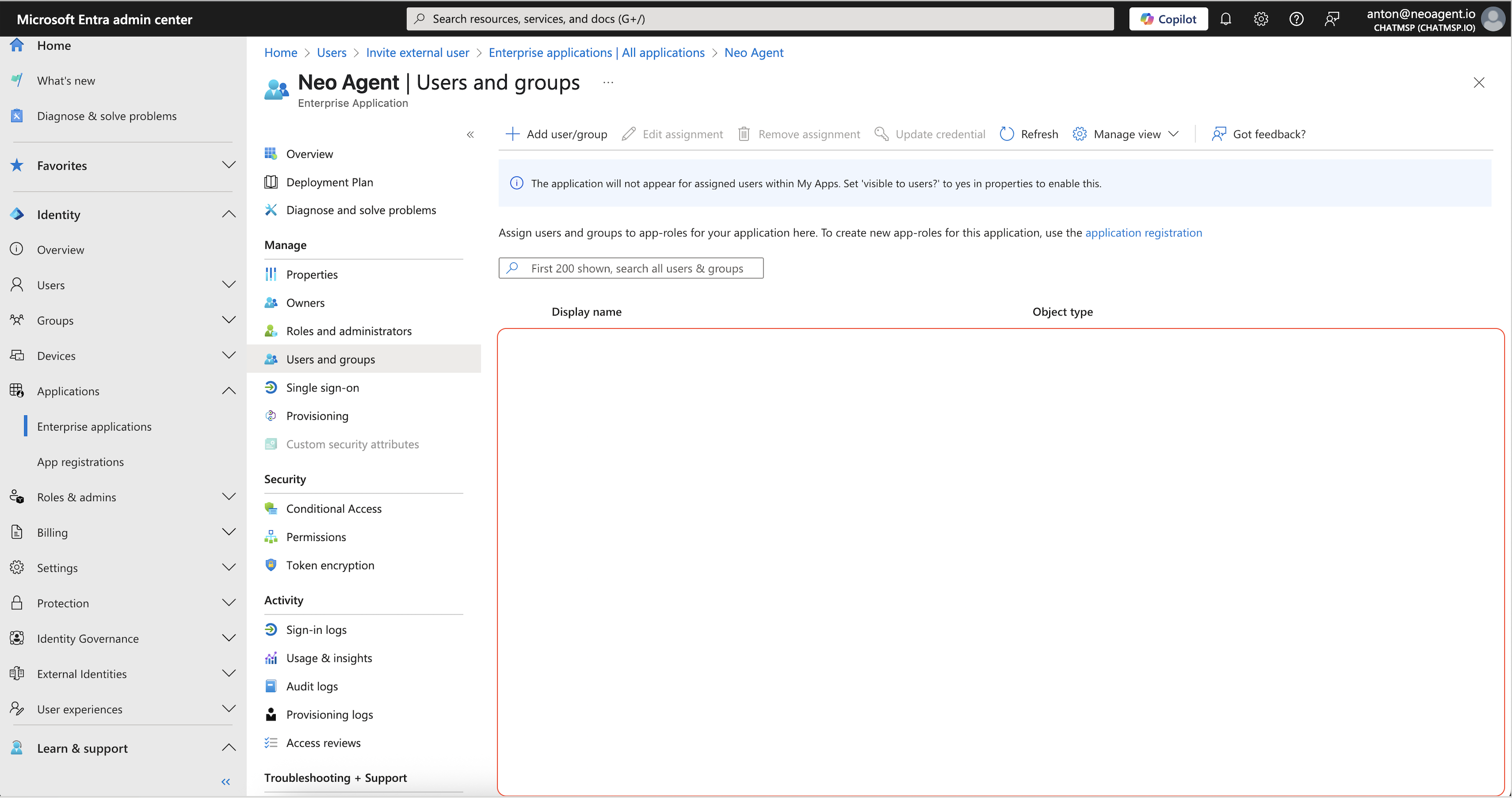
In the Entra Admin Center, go to: **Applications > Enterprise applications**
Search for **Neo Agent**, and click into the app
* Application ID: `3da03a86-b850-4c07-96e5-7590022efe11`
Go to: **Users and groups > Add user/group**
Select the newly added guest user
If you've defined **App Roles** in your Neo Agent App Registration (e.g., Viewer, Admin), assign the appropriate role here
Click **Assign** to complete the process
## Assign Guest User to the Neo Agent App
In the Entra Admin Center, go to: **Applications > Enterprise applications**
Search for **Neo Agent**, and click into the app
* Application ID: `3da03a86-b850-4c07-96e5-7590022efe11`
Go to: **Users and groups > Add user/group**
Select the newly added guest user
If you've defined **App Roles** in your Neo Agent App Registration (e.g., Viewer, Admin), assign the appropriate role here
Click **Assign** to complete the process
 ## Restrict Access to Everything Else (Optional but Recommended)
When you invite a guest user (external user) into your Microsoft Entra ID tenant, they have **zero access** by default to your resources.
To ensure the guest user **only** accesses Neo Agent:
* Do **not** assign them to any other Azure groups or roles
* Avoid assigning any **Azure roles** like Contributor or Reader
Follow the principle of least privilege. Only grant the minimum access necessary for the external user to perform their required tasks in Neo Agent.
## Let the Guest User Log In
The guest user will receive an invite email from Microsoft. Once accepted, they can:
1. Sign in to the Neo Agent web app via your standard login URL: [https://dashboard.neoagent.io](https://dashboard.neoagent.io)
2. Use **Microsoft OAuth** just like your internal users
### Troubleshooting Access Issues
If they encounter an **"Access Denied"** error:
* Verify they accepted the invite
* Check that they are assigned to the Neo Agent enterprise app
* Review Conditional Access policies that may block them
Test the external user's access immediately after setup to ensure everything works as expected before they need to use it for actual work.
## Frequently Asked Questions
Yes. Microsoft Entra supports any email via its B2B system. If the user doesn't have a Microsoft account, they'll be prompted to create one during the invitation acceptance process.
Not yet. Use a personal email (Gmail, Outlook, etc.) for the guest instead. Native cross-organization access is planned.
Yes. You can:
* Remove them from the **Neo Agent application** assignment
* Delete the user entirely from your directory if needed
* Disable their account temporarily if you need to suspend access
No. Guest users only have access to resources you explicitly assign to them. By default, they cannot see or access any other services, applications, or data in your tenant.
You can create Azure AD groups specifically for external Neo Agent users and assign the entire group to the Neo Agent application. This makes management easier when you have multiple contractors or partners.
External users will be subject to the same RBAC permissions within Neo Agent as internal users. You can assign them appropriate roles (Admin, User, Viewer) based on their needs and responsibilities.
## Security Best Practices
* **Regular Review**: Periodically review all external user accounts and remove those no longer needed
* **Time-Limited Access**: Consider setting expiration dates for external user accounts when possible
* **Monitor Activity**: Use Azure AD audit logs to monitor external user activity
* **Conditional Access**: Apply appropriate Conditional Access policies to external users based on your security requirements
* **Documentation**: Maintain records of why each external user was granted access and when their access should be reviewed
External user access is managed entirely through Microsoft Entra ID. Neo Agent inherits the authentication and authorization decisions made by your identity provider, ensuring consistent security policies across all your applications.
## Restrict Access to Everything Else (Optional but Recommended)
When you invite a guest user (external user) into your Microsoft Entra ID tenant, they have **zero access** by default to your resources.
To ensure the guest user **only** accesses Neo Agent:
* Do **not** assign them to any other Azure groups or roles
* Avoid assigning any **Azure roles** like Contributor or Reader
Follow the principle of least privilege. Only grant the minimum access necessary for the external user to perform their required tasks in Neo Agent.
## Let the Guest User Log In
The guest user will receive an invite email from Microsoft. Once accepted, they can:
1. Sign in to the Neo Agent web app via your standard login URL: [https://dashboard.neoagent.io](https://dashboard.neoagent.io)
2. Use **Microsoft OAuth** just like your internal users
### Troubleshooting Access Issues
If they encounter an **"Access Denied"** error:
* Verify they accepted the invite
* Check that they are assigned to the Neo Agent enterprise app
* Review Conditional Access policies that may block them
Test the external user's access immediately after setup to ensure everything works as expected before they need to use it for actual work.
## Frequently Asked Questions
Yes. Microsoft Entra supports any email via its B2B system. If the user doesn't have a Microsoft account, they'll be prompted to create one during the invitation acceptance process.
Not yet. Use a personal email (Gmail, Outlook, etc.) for the guest instead. Native cross-organization access is planned.
Yes. You can:
* Remove them from the **Neo Agent application** assignment
* Delete the user entirely from your directory if needed
* Disable their account temporarily if you need to suspend access
No. Guest users only have access to resources you explicitly assign to them. By default, they cannot see or access any other services, applications, or data in your tenant.
You can create Azure AD groups specifically for external Neo Agent users and assign the entire group to the Neo Agent application. This makes management easier when you have multiple contractors or partners.
External users will be subject to the same RBAC permissions within Neo Agent as internal users. You can assign them appropriate roles (Admin, User, Viewer) based on their needs and responsibilities.
## Security Best Practices
* **Regular Review**: Periodically review all external user accounts and remove those no longer needed
* **Time-Limited Access**: Consider setting expiration dates for external user accounts when possible
* **Monitor Activity**: Use Azure AD audit logs to monitor external user activity
* **Conditional Access**: Apply appropriate Conditional Access policies to external users based on your security requirements
* **Documentation**: Maintain records of why each external user was granted access and when their access should be reviewed
External user access is managed entirely through Microsoft Entra ID. Neo Agent inherits the authentication and authorization decisions made by your identity provider, ensuring consistent security policies across all your applications.