> ## Documentation Index
> Fetch the complete documentation index at: https://docs.neoagent.io/llms.txt
> Use this file to discover all available pages before exploring further.
# Scheduled workflows
> Run workflows on a cadence (every N minutes, hourly, daily) to scan and act on items — SLA sweeps, stale-ticket cleanup, end-of-day reviews, weekly audits.
## What it is
Scheduled workflows run at defined intervals (for example, every 5 minutes, hourly, daily). At each run, they evaluate items using your filters and then execute actions for matching items.
For agents that don't process tickets — like proactive M365 audits or recurring compliance checks — see [Scheduled Agents](/core/scheduled-agents).
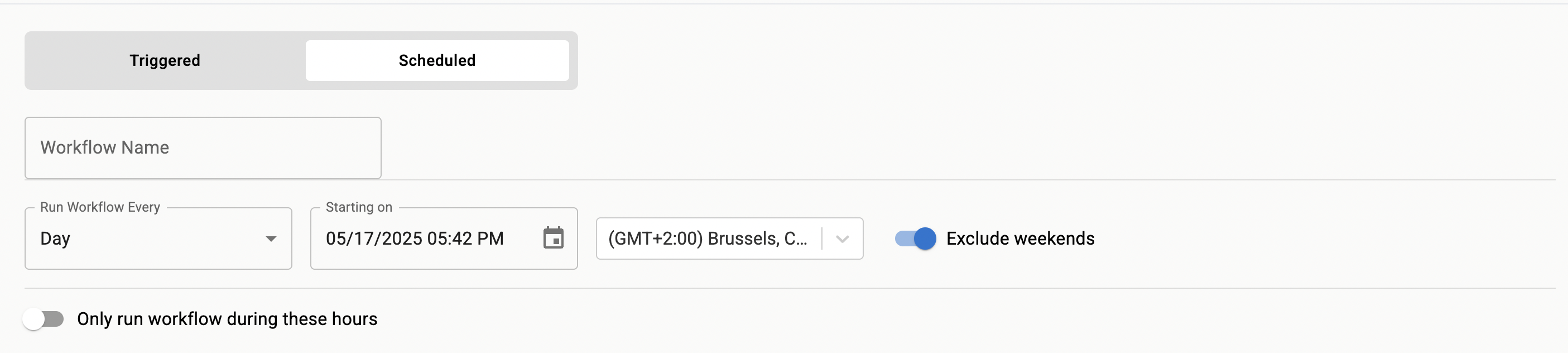 ## Scheduling patterns
* Hourly housekeeping for queues with high volume
* Morning reviews to triage stale tickets
* End-of-day cleanup to close resolved items awaiting confirmation
* Weekly audits to enforce policy compliance
## Cadence tips
Pick the slowest cadence that still meets your objectives. Faster cadences can increase API load and duplicate work if actions are not idempotent.
Use updated-time windows in filters to avoid reprocessing the same items every run.
## Verification
Target a specific queue or label to limit impact while testing.
Manually wait for the next run and review Event History for the schedule.
Compare the number of matches with your expectations. Adjust filters until counts align.
## Troubleshooting
Loosen filters or widen the time window. Verify source integration permissions and data visibility.
Make actions idempotent and add markers (labels, status comments) to detect prior runs.
Adjust frequency and window size together. For example, hourly runs with a 70-minute updated window provide overlap without gaps.
## Scheduling patterns
* Hourly housekeeping for queues with high volume
* Morning reviews to triage stale tickets
* End-of-day cleanup to close resolved items awaiting confirmation
* Weekly audits to enforce policy compliance
## Cadence tips
Pick the slowest cadence that still meets your objectives. Faster cadences can increase API load and duplicate work if actions are not idempotent.
Use updated-time windows in filters to avoid reprocessing the same items every run.
## Verification
Target a specific queue or label to limit impact while testing.
Manually wait for the next run and review Event History for the schedule.
Compare the number of matches with your expectations. Adjust filters until counts align.
## Troubleshooting
Loosen filters or widen the time window. Verify source integration permissions and data visibility.
Make actions idempotent and add markers (labels, status comments) to detect prior runs.
Adjust frequency and window size together. For example, hourly runs with a 70-minute updated window provide overlap without gaps.