> ## Documentation Index
> Fetch the complete documentation index at: https://docs.neoagent.io/llms.txt
> Use this file to discover all available pages before exploring further.
# Intent Forms
> Turn an intent's intake into a form the employee fills in — dropdowns, dates and yes/no answers collected in one go instead of a back-and-forth
Some intake is a list of specific answers rather than a conversation — a device from a list, a start date, a yes/no. Add a **form** to an [intent](/chat-agents/intents) and the employee gets all the questions at once instead of a back-and-forth: one card with a dropdown, a date picker and a toggle beats four rounds of questions, and the answers come back in the shape you asked for.
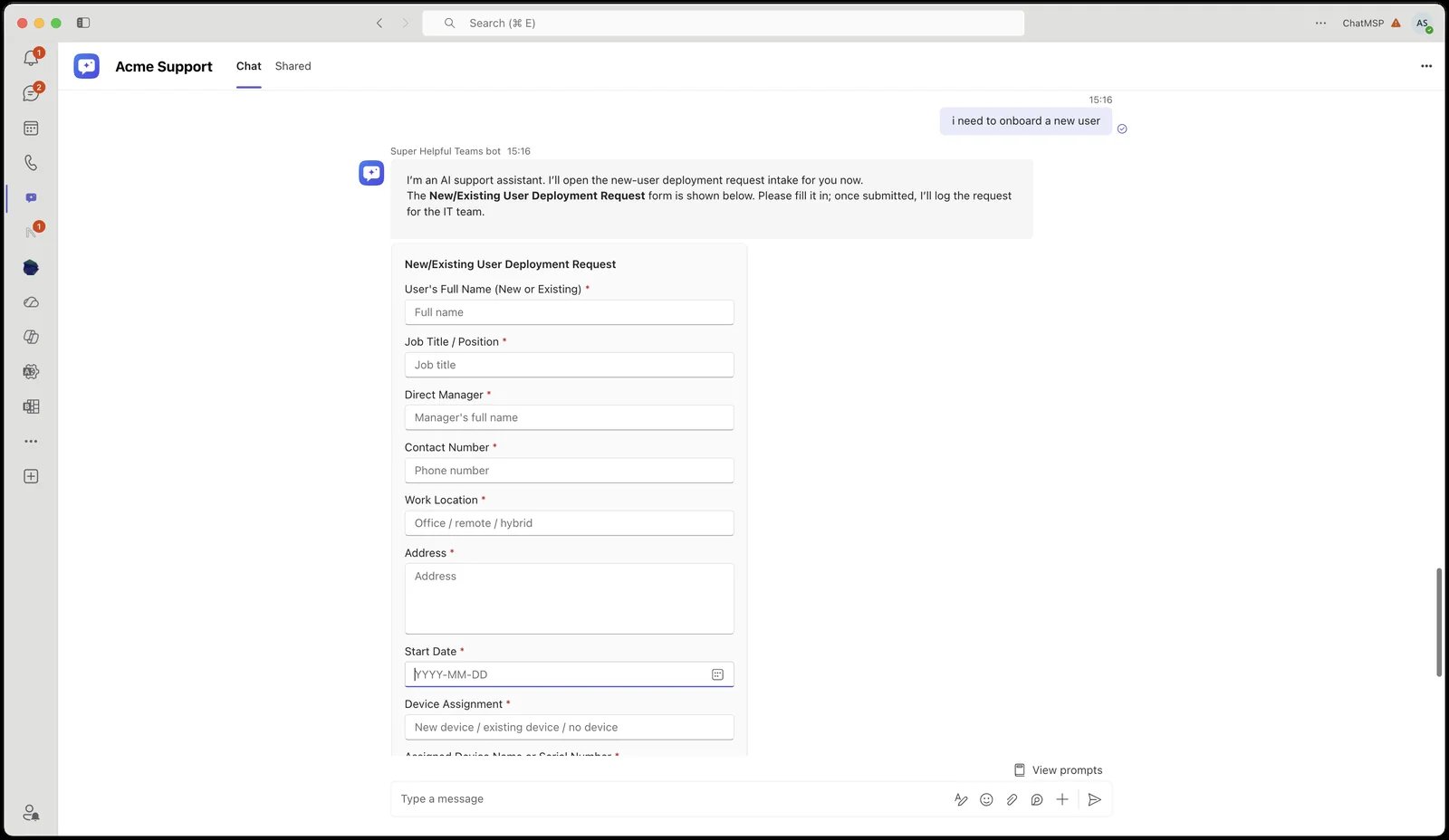 ## What the employee sees
The bot recognises the request from the intents offered to their company, then posts the form and waits. It doesn't ask those questions itself and doesn't repeat them back — the form is the intake.
* **Required questions are enforced in the card.** A missing answer is flagged where the employee is typing, before anything is sent.
* **Each form is submitted once.** Scrolling back and re-tapping an old card doesn't inject stale answers into a live conversation — the bot shows what was already sent instead.
* **After Submit the card becomes a read-only summary** of the answers that went through. Because the answers reach the agent as a submission rather than a typed message, that summary is the employee's record of what they sent.
* **In a group chat, the form belongs to whoever asked.** Everyone can see the card, but only the person whose request produced it can submit it.
Then the agent carries on exactly as it would after a conversation: it files the ticket to its configured Create Ticket destination with every answer in the body.
Forms also render in the dashboard chat, so you can fill one in yourself to check the wording before rolling it out to a client.
## Building a form
Forms are built on the intent itself, under **Form**, below **Questions to ask**.
## What the employee sees
The bot recognises the request from the intents offered to their company, then posts the form and waits. It doesn't ask those questions itself and doesn't repeat them back — the form is the intake.
* **Required questions are enforced in the card.** A missing answer is flagged where the employee is typing, before anything is sent.
* **Each form is submitted once.** Scrolling back and re-tapping an old card doesn't inject stale answers into a live conversation — the bot shows what was already sent instead.
* **After Submit the card becomes a read-only summary** of the answers that went through. Because the answers reach the agent as a submission rather than a typed message, that summary is the employee's record of what they sent.
* **In a group chat, the form belongs to whoever asked.** Everyone can see the card, but only the person whose request produced it can submit it.
Then the agent carries on exactly as it would after a conversation: it files the ticket to its configured Create Ticket destination with every answer in the body.
Forms also render in the dashboard chat, so you can fill one in yourself to check the wording before rolling it out to a client.
## Building a form
Forms are built on the intent itself, under **Form**, below **Questions to ask**.
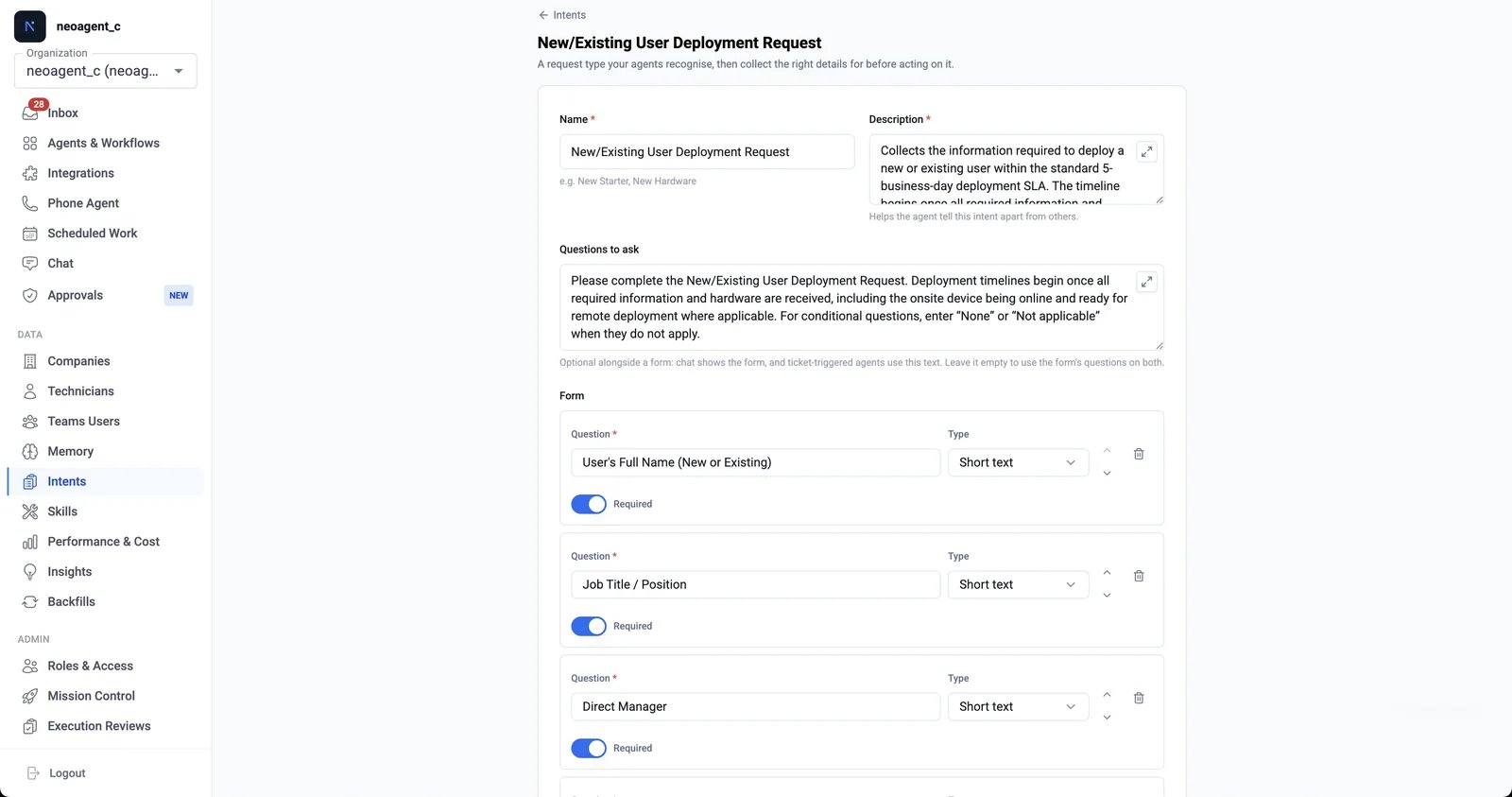 Go to [**Intents**](https://dashboard.neoagent.io/intents) under **Data** in the left navigation and open the intent (or create one).
Under **Form**, select **Add question**. Each question has the text the employee sees, a **Type**, and a **Required** toggle. Reorder with the arrows — the form asks them in the order you list them.
**Dropdown** and **Multi-select** questions take an **Options** list; the other types don't.
The form is live on the next message — you don't need to restart a conversation that's already open.
### Question types
| Type | What the employee gets |
| ---------------- | ------------------------------------------------ |
| **Short text** | A single-line answer — a name, a phone number. |
| **Long text** | A multi-line answer — an address, a description. |
| **Dropdown** | One choice from your options list. |
| **Multi-select** | Any number of choices from your options list. |
| **Number** | A numeric answer. |
| **Date** | A date picker. |
| **Time** | A time picker. |
| **Yes / No** | A toggle. |
**Dropdown** and **Multi-select** need at least one option; the other types don't take options at all.
### Limits
An intent's form can hold up to **15 questions**, with up to **40 options** on any one question and **150 options** across the whole form. The option limits aren't taste — every option travels twice in a Teams card, and a longer list would exceed what a card can carry. The editor shows your counts as you build and blocks a save that goes over.
## Forms and "Questions to ask" together
The two can coexist, and which one is used depends on where the request arrives:
| | Form only | Both filled in | Questions only |
| -------------------- | ---------------------------------------- | ---------------------- | ------------------------------------ |
| **End-user chat** | The form | The form | The questions, asked in conversation |
| **Triggered agents** | The form's questions, as a numbered list | Your written questions | The questions, in the agent's reply |
A ticket has nowhere to draw a form, so on a [triggered agent](/core/triggers-and-schedules/triggered-workflows) the same questions become a numbered list in the agent's client-facing reply, options spelled out. Nothing is lost; it just arrives as an email.
That's the reason to fill in both: write prose specifically for the email round-trip while chat users get the form. Leave **Questions to ask** empty and the form's questions stand in on both surfaces.
Use form questions for answers you need in a fixed shape (which office, which laptop model, what date) and **Questions to ask** for anything conditional or judgement-based (*"if they need RDS access, ask which existing user to mirror"*). A form can't branch — a question can.
## Related
What an intent is, how it's matched, and how to scope one to agents and companies.
The trust boundary and the bot-ticket-agent split behind every end-user conversation.
How ticket events trigger an agent — and how a customer reply re-triggers it to continue intake.
Where intents fit next to instructions, skills, and memory — and how the four compose.
Go to [**Intents**](https://dashboard.neoagent.io/intents) under **Data** in the left navigation and open the intent (or create one).
Under **Form**, select **Add question**. Each question has the text the employee sees, a **Type**, and a **Required** toggle. Reorder with the arrows — the form asks them in the order you list them.
**Dropdown** and **Multi-select** questions take an **Options** list; the other types don't.
The form is live on the next message — you don't need to restart a conversation that's already open.
### Question types
| Type | What the employee gets |
| ---------------- | ------------------------------------------------ |
| **Short text** | A single-line answer — a name, a phone number. |
| **Long text** | A multi-line answer — an address, a description. |
| **Dropdown** | One choice from your options list. |
| **Multi-select** | Any number of choices from your options list. |
| **Number** | A numeric answer. |
| **Date** | A date picker. |
| **Time** | A time picker. |
| **Yes / No** | A toggle. |
**Dropdown** and **Multi-select** need at least one option; the other types don't take options at all.
### Limits
An intent's form can hold up to **15 questions**, with up to **40 options** on any one question and **150 options** across the whole form. The option limits aren't taste — every option travels twice in a Teams card, and a longer list would exceed what a card can carry. The editor shows your counts as you build and blocks a save that goes over.
## Forms and "Questions to ask" together
The two can coexist, and which one is used depends on where the request arrives:
| | Form only | Both filled in | Questions only |
| -------------------- | ---------------------------------------- | ---------------------- | ------------------------------------ |
| **End-user chat** | The form | The form | The questions, asked in conversation |
| **Triggered agents** | The form's questions, as a numbered list | Your written questions | The questions, in the agent's reply |
A ticket has nowhere to draw a form, so on a [triggered agent](/core/triggers-and-schedules/triggered-workflows) the same questions become a numbered list in the agent's client-facing reply, options spelled out. Nothing is lost; it just arrives as an email.
That's the reason to fill in both: write prose specifically for the email round-trip while chat users get the form. Leave **Questions to ask** empty and the form's questions stand in on both surfaces.
Use form questions for answers you need in a fixed shape (which office, which laptop model, what date) and **Questions to ask** for anything conditional or judgement-based (*"if they need RDS access, ask which existing user to mirror"*). A form can't branch — a question can.
## Related
What an intent is, how it's matched, and how to scope one to agents and companies.
The trust boundary and the bot-ticket-agent split behind every end-user conversation.
How ticket events trigger an agent — and how a customer reply re-triggers it to continue intake.
Where intents fit next to instructions, skills, and memory — and how the four compose.