> ## Documentation Index
> Fetch the complete documentation index at: https://docs.neoagent.io/llms.txt
> Use this file to discover all available pages before exploring further.
# Overview
> How workflow actions fit together — Smart Actions (AI analysis & triage), Write-to-PSA (field updates, notes, assignments), and Notify (Email/Slack/Teams/SMS). Composing them safely from simple to complex.
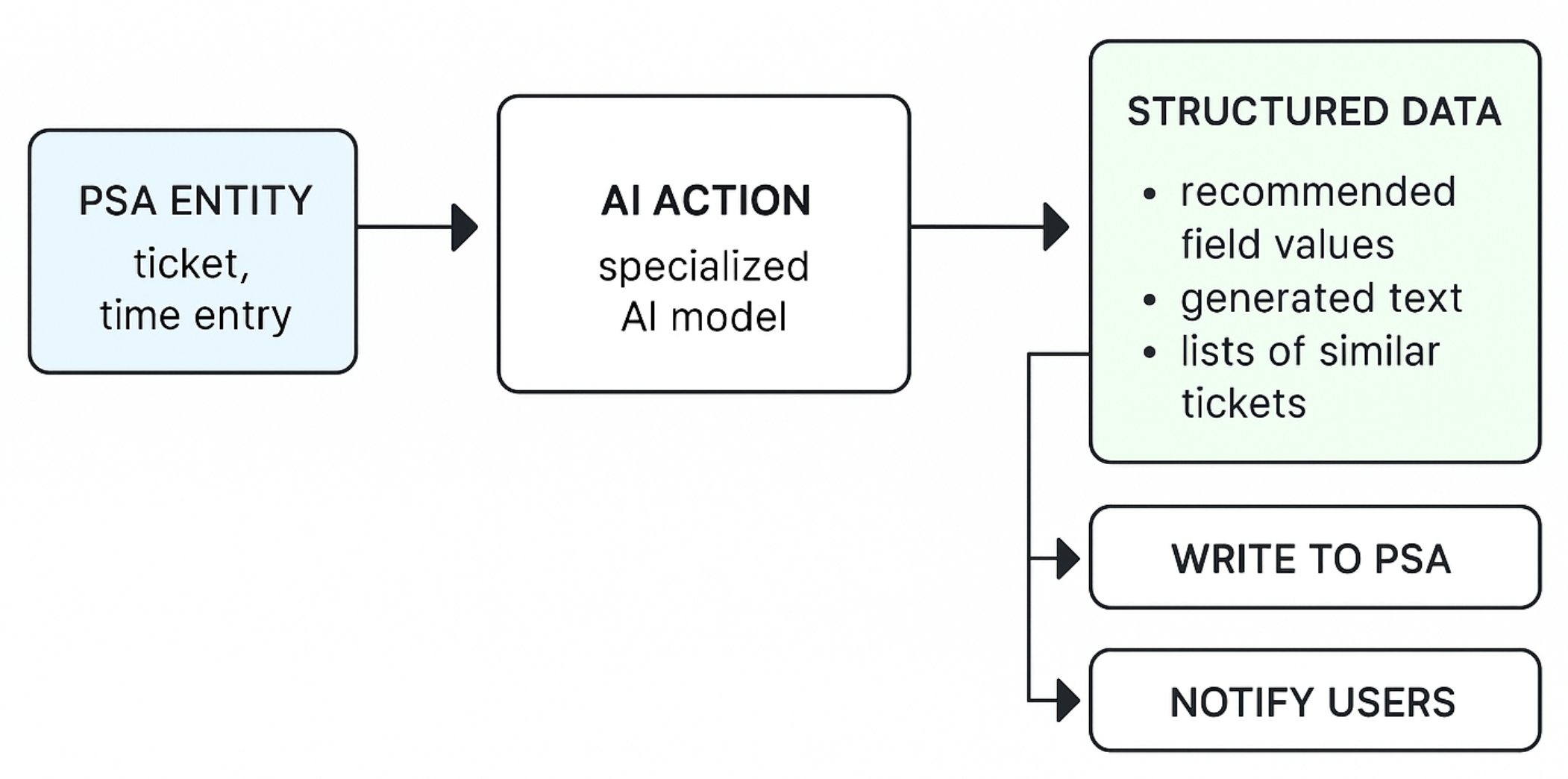
Actions are the fundamental building blocks of automations in Neo Agent. They represent specific operations or tasks that are executed as part of a workflow. Each action is designed to perform a distinct function, from analyzing data with AI to updating your PSA or notifying users.
By combining different actions, you can create powerful and customized automations to streamline your IT service management processes.
## What actions are
Actions are the steps your workflows execute. They analyze data, update your PSA, notify people, and coordinate follow‑ups. Each action is purpose‑built for MSP workflows and designed to be reliable, auditable, and fast.
 ## Core capabilities
* **Understand and Categorize:** Automatically triage tickets by setting fields like type, sub-type, priority based on content
* **Analyze and Summarize:** Generate concise summaries of complex tickets and analyze technician performance
* **Detect Patterns:** Identify recurring issues, analyze customer sentiment, and check for specific patterns
* **Recommend and Suggest:** Propose the best technician, suggest RMM scripts, or find relevant configurations
* **Field Updates:** Safely modify ticket fields, priorities, statuses, and custom fields
* **Note Management:** Add detailed notes, time entries, and documentation
* **Ticket Operations:** Create new tickets, merge duplicates, and manage ticket relationships
* **Resource Assignment:** Assign technicians and update ownership information
* **Internal Notifications:** Keep teams informed via Microsoft Teams, Slack, or email
* **Customer Updates:** Send progress updates and resolution confirmations to end users
* **Escalation Alerts:** Notify managers and senior technicians of critical issues
* **Feedback Collection:** Request input and gather insights from team members
## Getting started
Learn about AI-powered actions that can analyze tickets, suggest resolutions, and automate complex reasoning tasks.
Understand how to safely update your PSA system with automated field changes, notes, and ticket operations.
Configure automated notifications to keep your team and customers informed about important updates.
Each action is robust, auditable, and designed specifically for the needs of MSPs. Start with simple workflows and gradually add complexity as you become more familiar with the capabilities.
## Core capabilities
* **Understand and Categorize:** Automatically triage tickets by setting fields like type, sub-type, priority based on content
* **Analyze and Summarize:** Generate concise summaries of complex tickets and analyze technician performance
* **Detect Patterns:** Identify recurring issues, analyze customer sentiment, and check for specific patterns
* **Recommend and Suggest:** Propose the best technician, suggest RMM scripts, or find relevant configurations
* **Field Updates:** Safely modify ticket fields, priorities, statuses, and custom fields
* **Note Management:** Add detailed notes, time entries, and documentation
* **Ticket Operations:** Create new tickets, merge duplicates, and manage ticket relationships
* **Resource Assignment:** Assign technicians and update ownership information
* **Internal Notifications:** Keep teams informed via Microsoft Teams, Slack, or email
* **Customer Updates:** Send progress updates and resolution confirmations to end users
* **Escalation Alerts:** Notify managers and senior technicians of critical issues
* **Feedback Collection:** Request input and gather insights from team members
## Getting started
Learn about AI-powered actions that can analyze tickets, suggest resolutions, and automate complex reasoning tasks.
Understand how to safely update your PSA system with automated field changes, notes, and ticket operations.
Configure automated notifications to keep your team and customers informed about important updates.
Each action is robust, auditable, and designed specifically for the needs of MSPs. Start with simple workflows and gradually add complexity as you become more familiar with the capabilities.