> ## Documentation Index
> Fetch the complete documentation index at: https://docs.neoagent.io/llms.txt
> Use this file to discover all available pages before exploring further.
# Custom Skills
> Capture a proven procedure once so your agents run it the same reliable way every time
Built-in skills cover general MSP best practices. **Custom skills** capture *your* repeatable procedures — the specific multi-step jobs your agents do again and again, like a weekly service-desk report or a monthly license reconciliation.
Once one of those jobs works the way you want, you turn it into a skill. From then on, every run follows the exact same steps and produces the same dependable output — instead of the agent figuring the job out from scratch each time.
**Rolling out now.** Custom skills are being released gradually. If you don't see a **Skills** tab in your dashboard yet, it's on its way — reach out to your account manager to have it switched on for your team. You can already ask the [Neo Support Agent](/chat-agents/neo-support-agent) to build a skill for you today.
## Why custom skills make outputs reliable
When an agent takes on a complex, multi-step task, it normally works out the approach *each time it runs* — which data to pull, how to crunch it, how to format the result. That flexibility is exactly what you want for one-off problems.
But for a job you run every week, you want the opposite: the **same proven steps, every time, no surprises**. A custom skill gives the agent a fixed recipe to follow instead of reinventing it. The result:
* **Consistent** — the Monday report looks the same every Monday, in the same shape and format.
* **Reliable** — the tricky parts (a fiddly query, a specific calculation) were worked out and tested once, then reused. The agent doesn't re-derive them and occasionally get them wrong.
* **Faster** — the agent follows the recipe rather than reasoning the whole job out from first principles.
A good rule of thumb: if you find yourself running the same kind of job over and over and wishing it came out *identical* each time, that job is a great candidate for a skill.
## What's inside a skill
A skill is a small bundle of files. There are two kinds:
| File | What it is | Can you edit it? |
| ----------- | ----------------------------------------------------------------------------------------------- | -------------------------- |
| `SKILL.md` | The procedure written in plain English — the steps the agent follows, and when to use the skill | **Yes** — edit it any time |
| `scripts/…` | The code the skill runs (for example, to pull and crunch data) | **No** — read-only |
Not every skill has scripts. A skill can be just a `SKILL.md` — a written procedure the agent reads and follows. Skills that do real data work usually include one or more scripts that the agent runs in its secure [code sandbox](/agents/tools/built-in/overview).
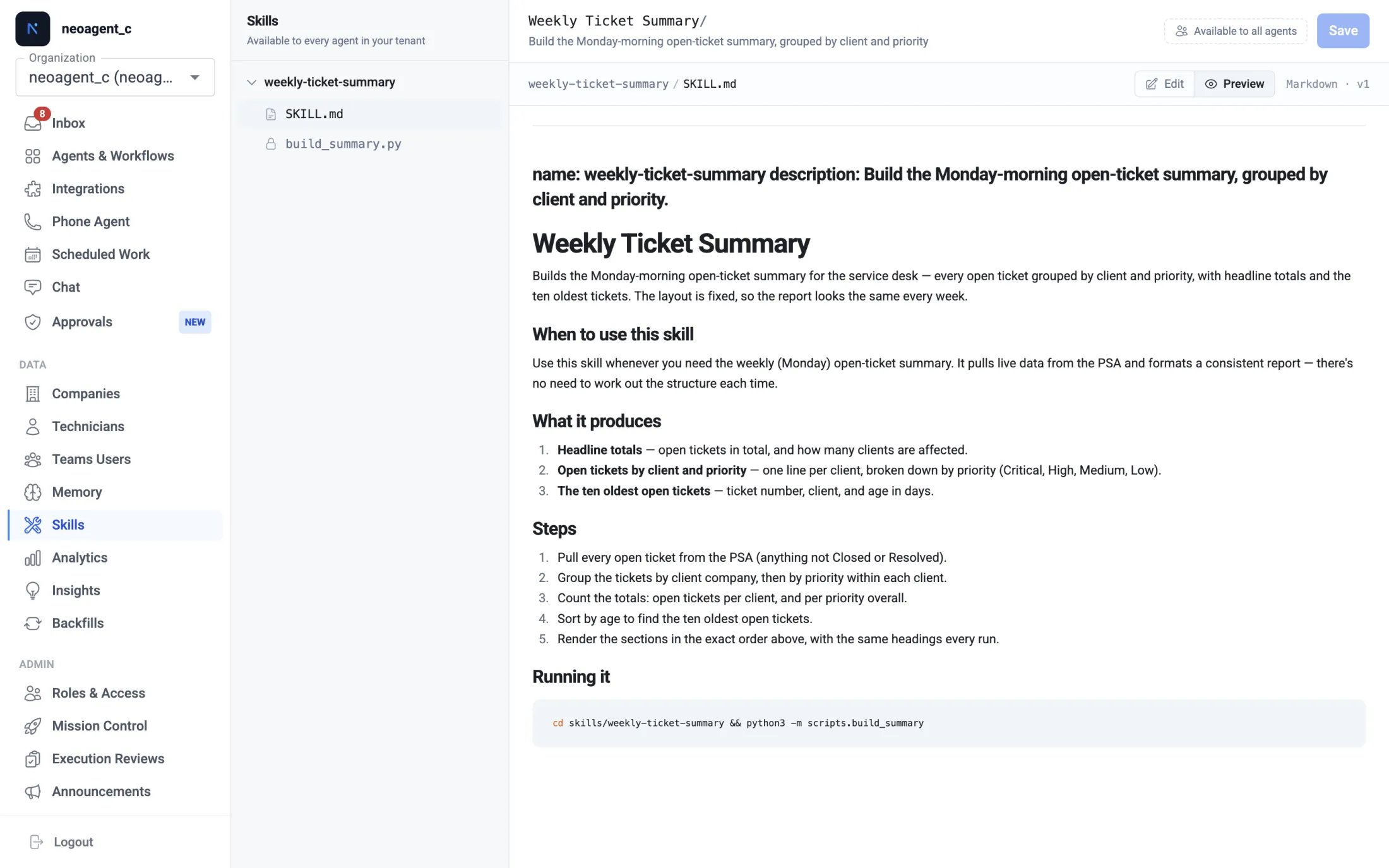 The plain-English procedure (`SKILL.md`) is yours to fine-tune whenever you like. The scripts are locked to keep a tested skill working exactly as verified — to change a script, just [ask Neo Support](/agents/skills/creating-skills). This split is deliberate: you stay in control of the *instructions* while the *code* stays safe.
## How your agents use a skill
* **Available everywhere.** Every skill you create is automatically available to **every agent in your tenant** — there's no per-agent setup or toggle.
* **Loaded when relevant.** When an agent takes on a task that matches a skill, it loads that skill, reads the procedure, and runs any scripts — instead of working the task out from scratch.
* **Guaranteed for a scheduled job.** For a [scheduled agent](/core/scheduled-agents) whose entire job is one procedure (say, a weekly report), name the skill in the agent's instructions — for example, *"Load and run the `weekly-ticket-summary` skill"* — so it's used on every run.
## A typical example
Say every Monday a scheduled agent builds an open-ticket summary for your team — grouped by client and priority, with totals and a short list of the oldest tickets. It works, but you notice small differences week to week: the grouping order shifts, the wording changes, occasionally a count looks off.
Turn that job into a skill, and it stops drifting. The procedure and the code are fixed, so the report comes out in the same shape — same sections, same calculations, same format — every single Monday. New technicians reading the report always see the layout they're used to, and you can trust the numbers because the same tested logic runs each time.
## Skills vs. instructions & memory
A skill, custom instructions, and [memory](/core/memory) all shape how an agent behaves, but they do different jobs:
| | Best for |
| -------------------------- | --------------------------------------------------------------------------------------------------------------------------- |
| **Custom skill** | A specific, repeatable *procedure* you want done the same way every time (a report, a reconciliation, a multi-step routine) |
| **Custom instructions** | Ongoing rules and preferences that apply across an agent's work (tone, sign-off, which clients to prioritize) |
| **[Memory](/core/memory)** | Facts about your company and clients the agent should remember and reuse |
Ask Neo Support to build a skill, then view and fine-tune it in the Skills tab
The plain-English procedure (`SKILL.md`) is yours to fine-tune whenever you like. The scripts are locked to keep a tested skill working exactly as verified — to change a script, just [ask Neo Support](/agents/skills/creating-skills). This split is deliberate: you stay in control of the *instructions* while the *code* stays safe.
## How your agents use a skill
* **Available everywhere.** Every skill you create is automatically available to **every agent in your tenant** — there's no per-agent setup or toggle.
* **Loaded when relevant.** When an agent takes on a task that matches a skill, it loads that skill, reads the procedure, and runs any scripts — instead of working the task out from scratch.
* **Guaranteed for a scheduled job.** For a [scheduled agent](/core/scheduled-agents) whose entire job is one procedure (say, a weekly report), name the skill in the agent's instructions — for example, *"Load and run the `weekly-ticket-summary` skill"* — so it's used on every run.
## A typical example
Say every Monday a scheduled agent builds an open-ticket summary for your team — grouped by client and priority, with totals and a short list of the oldest tickets. It works, but you notice small differences week to week: the grouping order shifts, the wording changes, occasionally a count looks off.
Turn that job into a skill, and it stops drifting. The procedure and the code are fixed, so the report comes out in the same shape — same sections, same calculations, same format — every single Monday. New technicians reading the report always see the layout they're used to, and you can trust the numbers because the same tested logic runs each time.
## Skills vs. instructions & memory
A skill, custom instructions, and [memory](/core/memory) all shape how an agent behaves, but they do different jobs:
| | Best for |
| -------------------------- | --------------------------------------------------------------------------------------------------------------------------- |
| **Custom skill** | A specific, repeatable *procedure* you want done the same way every time (a report, a reconciliation, a multi-step routine) |
| **Custom instructions** | Ongoing rules and preferences that apply across an agent's work (tone, sign-off, which clients to prioritize) |
| **[Memory](/core/memory)** | Facts about your company and clients the agent should remember and reuse |
Ask Neo Support to build a skill, then view and fine-tune it in the Skills tab